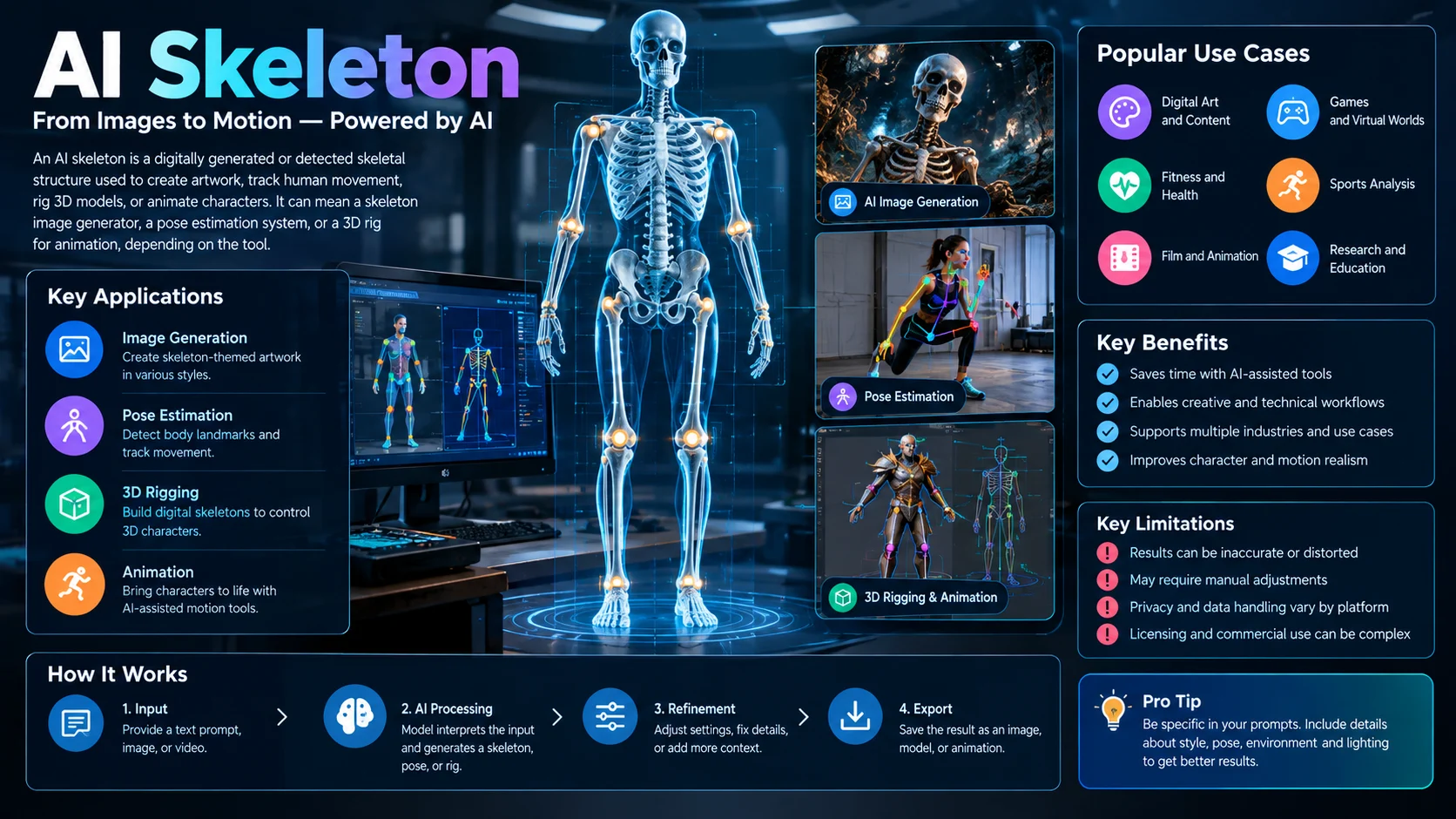
An AI skeleton is a digitally generated or detected skeletal structure used to create character artwork, track human movement, rig 3D models, or animate digital characters. Depending on the tool, it can mean a skeleton-themed image generator, an AI-powered body-pose tracking system, or software that builds an animation-ready skeleton for a character.
The term AI skeleton has several meanings, and choosing the right tool depends on what you want to create. Some people want spooky skeleton artwork for social media, while others need a digital skeleton that tracks body movement or controls a 3D character.
These applications use different technologies. Understanding the distinction can save time, prevent unnecessary subscriptions, and help you choose a tool that produces the output you actually need.
AI Skeleton at a Glance
- AI skeleton generator: Creates images or videos featuring skeletons, including realistic, cartoon, and fantasy designs.
- AI pose estimation: Detects body landmarks, such as shoulders, elbows, hips, and knees, in images or video.
- AI rigging: Helps build a digital bone structure that controls a 2D or 3D character.
- AI animation: Uses a rig or motion-generation system to make digital characters move.
- Popular applications: Digital art, games, animation, fitness analysis, sports, and movement research.
- Key limitation: AI-generated visuals, detected joints, and animated skeletons can contain errors and may require manual correction.
What Is an AI Skeleton?
An AI skeleton is a broad term for a skeleton-related visual or technical output produced with artificial intelligence. The exact meaning depends on the application.
For artists, it may refer to a generated image of a human skeleton, a cartoon skeleton, or a fantasy creature. For developers, it may describe a set of connected body landmarks or a digital bone structure used to control a character.
Three categories account for most practical uses.
1. AI Skeleton Image Generators
An AI skeleton image generator turns a written description or, in some tools, a reference image into artwork featuring a skeleton.
You might request a realistic anatomical skeleton, a glowing neon skeleton, a cartoon mascot, or a cinematic skeleton warrior. The generator interprets the prompt and produces a visual result.
For example, Kapwing offers an AI skeleton generator designed for creating skeleton characters and incorporating them into images and videos. Its published product page describes text prompts, reference images, character reuse, and video editing features.
2. AI Skeleton Tracking and Pose Estimation
In computer vision, a skeleton often represents a simplified map of a person’s body.
A pose estimation model identifies keypoints such as shoulders, elbows, wrists, hips, knees, and ankles. Software connects these points to create a stick-figure representation of the person’s posture.
When the model processes successive video frames, the system can track how those points move. This technique supports applications such as exercise analysis, gesture recognition, sports analytics, and movement visualization.
3. AI Skeleton Rigging for Digital Characters
In animation, a skeleton is a digital structure made of connected bones or joints. Animators use it to control how a character moves.
AI-assisted rigging can help create that structure from a character model or image. Depending on the software, it may also help separate image layers, assign movement controls, or generate animations.
For example, Bake3D describes an image-to-3D workflow with rigging and animation, while other tools focus on adding 2D skeletal rigs to existing artwork.
These three categories overlap in the broader world of AI creativity, but they solve different problems. A skeleton image generator does not automatically provide accurate human motion tracking, and a pose estimation model does not necessarily create finished character artwork.
How an AI Skeleton Generator Works
A typical AI skeleton image generator follows a simple process: it interprets a prompt, creates an image, and allows you to refine the result.
Step 1: Describe the Skeleton
Tell the generator what you want to see. Include the skeleton’s appearance, pose, environment, lighting, and artistic style.
A prompt such as “a skeleton standing in a dark forest” establishes the subject. Adding details about moonlight, fog, camera angle, and texture gives the model more guidance.
Step 2: Generate the Image
The image model converts your instructions into a visual result. Some platforms also accept reference images or sketches, which can help guide the design.
The first result may not match every detail. AI generators can produce incorrect bone structures, distorted hands, inconsistent accessories, or unwanted background elements.
Step 3: Refine the Result
Review the image and identify the most important correction. You might need a clearer pose, a different camera angle, stronger contrast, or more realistic anatomical details.
Make targeted adjustments instead of rewriting the entire prompt after every attempt.
Step 4: Export or Animate
Depending on the platform, you may be able to download the image, place it in a video project, or animate the character.
For example, Kapwing documents a workflow for generating skeleton characters and incorporating them into image and video projects. Its available export options and usage conditions depend on the service and account plan.
How to Create Better AI Skeleton Images
Prompt quality influences the result, but it cannot guarantee anatomical accuracy. A useful prompt describes the subject and the visual evidence needed to achieve the desired effect.
Choose the Right Style
Start by selecting one clear visual direction.
- Photorealistic: Detailed bone textures, natural shadows, and realistic lighting.
- Cartoon: Simplified shapes, expressive poses, and clean outlines.
- Horror: Dark environments, dramatic shadows, and unsettling compositions.
- Fantasy: Magical effects, unusual armor, and imaginative settings.
- Neon or cyberpunk: Glowing bones, futuristic cityscapes, and colored lights.
- Educational: Clear anatomical structures, neutral backgrounds, and minimal decoration.
A single dominant style usually provides a clearer starting point than several competing visual directions.
Use Specific Composition Details
A strong prompt describes five elements:
- Subject: Human skeleton, cartoon skeleton, skeletal creature, or anatomical model.
- Pose: Standing, running, sitting, dancing, or holding an object.
- Environment: Studio, forest, city street, museum, or fictional world.
- Lighting: Soft studio lighting, moonlight, dramatic backlighting, or daylight.
- Framing: Close-up, full-body view, portrait, or wide landscape.
For example, a full-body skeleton against a plain background is useful when you need a clear character reference. A wide cinematic scene works better for storytelling or social media artwork.
Copy-Ready AI Skeleton Prompt
Use this prompt as a starting point in a text-to-image generator:
Create a highly detailed, photorealistic human skeleton standing in a dramatic ancient stone hall. Show the complete skeleton from head to toe, with anatomically plausible bone proportions, clearly defined ribs, a realistic pelvis, and detailed hand bones. Use cinematic side lighting, subtle atmospheric fog, natural bone textures, deep environmental shadows, and a professional editorial composition. Keep the skeleton centered, with a clean silhouette and a visually coherent background. Wide 16:9 landscape format, no text, no watermark.
For a different result, change the setting and style while retaining the details that matter most.
Example Prompts for Different Needs
Cartoon mascot:
Design a friendly cartoon skeleton character with expressive eyes, clean outlines, simple proportions, and a playful pose. Use a bright, uncluttered background and a polished animated-film aesthetic.
Horror thumbnail:
Create a photorealistic skeleton emerging from a misty forest at midnight. Use dramatic moonlight, detailed bone textures, deep shadows, a strong central silhouette, and a cinematic horror atmosphere. Leave clear negative space for a title.
For an anatomy reference:
Create a full-body educational illustration of a human skeleton in a neutral standing pose. Show the skull, spine, rib cage, pelvis, arms, hands, legs, and feet clearly against a plain light background. Use a clean scientific illustration style without decorative effects.
The anatomy prompt should not be treated as a medically validated reference. Verify important structures against trusted anatomical sources before using the output for education or clinical purposes.
AI Skeleton Tracking: How Pose Estimation Works
AI skeleton tracking is a different technology from skeleton image generation. It analyzes images or video to estimate where a person’s body joints are located.
A typical system produces coordinates for visible landmarks and connects them into a skeletal diagram. The diagram can then be tracked over time to represent movement.
What Are Body Keypoints?
Keypoints are the estimated positions of body landmarks. Depending on the model, these may include:
- Nose or head landmarks.
- Shoulders and elbows.
- Wrists and hands.
- Hips.
- Knees and ankles.
Some models estimate a smaller set of landmarks, while others provide more detailed body, face, or hand information.
The output is usually a collection of coordinates and confidence values. Software can connect these points to display a skeleton or calculate movement-related measurements.
What Happens When the Person Moves?
A tracking system processes successive video frames and estimates how the landmarks change. Additional software may smooth sudden jumps, associate detections with the same person, and calculate joint angles or movement patterns.
This distinction matters because pose estimation identifies body positions, while tracking and activity analysis interpret how those positions change. Counting exercise repetitions or evaluating technique requires additional logic beyond simply drawing a skeleton.
Common Pose Estimation Tools
| Tool | Typical use | Key consideration |
|---|---|---|
| MediaPipe Pose | Body landmark detection in applications, including mobile and browser workflows | Check the current API, supported platforms, and model capabilities |
| MoveNet | Human pose estimation for fitness and interactive applications | Evaluate landmark coverage, device performance, and accuracy for your task |
| OpenPose | Research and computer vision workflows involving body, face, and hand keypoints | Check its current implementation requirements and licensing |
| RTMPose | Pose estimation in real-time and production computer vision pipelines | Model size, hardware, and deployment requirements affect performance |
These tools serve technical pose estimation tasks, not necessarily decorative skeleton artwork. Their outputs and capabilities differ, so compare them using the same test images or videos.
AI Skeleton Rigging and 3D Animation
For game developers and animators, an AI skeleton often means the bone structure that controls a digital character.
A 3D character may look complete but remain difficult to animate until a suitable rig exists. A rig connects the character’s geometry to a hierarchy of joints, allowing movements to deform the model.
What Is Automatic Rigging?
Automatic rigging uses software to create or assist with a character’s skeletal structure. Depending on the tool, the process may include joint placement, bone hierarchy creation, and skin weighting.
Skin weights determine how strongly each bone influences nearby parts of a model. Poor weights can cause a character’s shoulders, elbows, knees, or hips to deform unnaturally.
AI-assisted tools can reduce manual work, but generated rigs still need inspection. Unusual body shapes, long tails, extra limbs, and mechanical characters can require additional adjustments.
From an Image to an Animated Character
Some services combine image-to-3D generation, rigging, and animation in one workflow.
For example, Bake3D describes a process that starts with an image, reconstructs a textured 3D model, creates a rig, and generates motion. Its website advertises a free demo and paid processing starting at $5, although users should check the current terms before purchasing.
A practical workflow looks like this:
- Upload a clear image or create a character concept.
- Generate or reconstruct the 3D model.
- Inspect the geometry for missing or distorted parts.
- Create the skeletal rig and review the joint placement.
- Test basic movements, such as walking or turning.
- Correct deformation problems and export the asset if supported.
The quality of the original image matters. A clear silhouette and visible limbs give the system more information than a heavily obscured character.
What AI Rigging Cannot Guarantee
A generated skeleton may contain misplaced joints or an unsuitable bone hierarchy. A character may also deform badly during complex movements even when it looks correct in a static pose.
For professional game development, inspect the exported asset inside your target software. Confirm that its scale, skeleton hierarchy, textures, animation clips, and file format meet your project’s requirements.
Best AI Skeleton Tools by Use Case
There is no single tool that fits every meaning of the keyword. The following options illustrate different workflows.
| Tool | Best suited to | Main capability | Pricing considerations |
|---|---|---|---|
| Kapwing AI Skeleton Generator | Content creators and marketers | Skeleton images, character reuse, and video workflows | Free access is available to start; AI features use credits |
| Pincel Skeleton AI Generator | Digital artists and casual users | Prompt-based skeleton artwork using image generation tools | Check the current model options and usage terms |
| Bake3D | 3D artists and developers | Image-to-3D generation, rigging, and animation | Free demo; paid processing advertised from $5 |
| MediaPipe | Developers building pose-aware applications | Body landmark detection | Check current API and deployment requirements |
| Hugging Face Hub | Developers and researchers | Discovery of machine learning models, including pose and image-generation models | Costs depend on the model, hardware, and hosting arrangement |
This is a use-case comparison, not a benchmark ranking. Product features, prices, model availability, and licensing may change.
How to Choose Between Them
Choose a generator like Kapwing or Pincel if your goal is a skeleton image or creative visual content. Choose a rigging service like Bake3D if you need a character that can move inside a 3D project.
If you need to track a real person’s movement, investigate MediaPipe, MoveNet, or other pose estimation models. If you want to develop a custom pipeline, a model repository may provide more flexibility but requires more technical work.
Is an AI Skeleton Generator Free?
Some AI skeleton tools provide free entry-level access, but the limits differ by product.
A free tier may restrict the number of generations, resolution, export formats, processing speed, or access to specific models. Some services use credits, while others charge for processing or subscriptions.
Before paying, check:
- Generation limits: How many images, videos, or rigging jobs can you run?
- Export quality: Can you download the resolution or file format you need?
- Credit rules: Do credits expire, and how many does each operation consume?
- Character reuse: Is saving and reusing a character included in the free tier?
- Commercial rights: Does the license permit your intended use?
- Cancellation and refunds: What happens to unused credits or failed jobs?
For developers, also consider hardware costs and deployment expenses. A model that runs locally may avoid per-generation cloud fees, but it can require a capable computer and ongoing maintenance.
The cheapest advertised option is not always the least expensive for a complete project. Compare the total cost of producing and exporting a usable result.
Limitations, Accuracy, and Privacy
AI skeleton tools can accelerate creative and technical workflows, but their output needs appropriate review.
Image and Video Quality
Image generators may distort hands, teeth, joints, and anatomical proportions. Video models can introduce flicker or change details between frames.
For commercial artwork, inspect the final image at full size. For video, review the entire clip rather than relying on a single attractive frame.
Pose Estimation Accuracy
Body tracking may struggle when limbs overlap, lighting is poor, the person moves quickly, or part of the body leaves the frame. A 2D skeleton also does not automatically provide reliable measurements of real-world depth.
Do not assume that a pose model can diagnose an injury or provide clinically validated movement assessments. Medical and safety-critical applications need appropriate validation.
Privacy of Uploaded Images and Video
Pose tracking and online generation may involve processing identifiable photos or footage. Check whether a service uploads media to its servers, how long it retains files, and whether it uses submitted content for model improvement.
For footage of other people, obtain appropriate permission before recording or uploading it. If privacy is important, investigate local processing options and verify where computation actually occurs.
Licensing and Commercial Use
A generated image, a 3D model, and an animation can have different licensing considerations. Review both the platform’s terms and the license of any underlying model or asset.
An export option does not automatically grant every commercial right. This is particularly important when using third-party characters, copyrighted references, or assets intended for resale.
Frequently Asked Questions
1. What is an AI skeleton generator?
An AI skeleton generator is a tool that creates skeleton-themed images or videos from text prompts and, in some cases, reference images. Other AI skeleton tools detect human body landmarks or create digital rigs for animation.
2. Can I generate AI skeleton images for free?
Yes, some platforms offer free access or limited generations. The available credits, export quality, supported models, and commercial-use terms depend on the specific tool.
3. What is the difference between AI skeleton tracking and AI rigging?
AI skeleton tracking estimates body landmarks in images or video to represent movement. AI rigging creates a digital bone structure that controls a character’s movements in animation software.
4. Can AI turn a picture into a 3D skeleton or animated character?
Some tools can convert an image into a 3D model and then create a rig or animation. Results depend on the input image, the tool’s capabilities, and the amount of manual correction required.
5. Are AI skeleton generators suitable for commercial projects?
They can be suitable, but you should check the platform’s licensing terms, the underlying model’s license, and any rights associated with reference images or third-party assets. Commercial permission should not be assumed from the ability to download an output.
Conclusion
AI skeleton describes several related but distinct technologies. It can mean a generator for skeleton artwork, a computer vision system that tracks human movement, or an AI-assisted tool that rigs and animates digital characters.
For casual creators, an image generator offers a straightforward starting point. Animators should evaluate rig quality and export compatibility, while developers should compare pose estimation accuracy, deployment requirements, and licensing.
The most useful tool is the one that produces the right output for your project. Test it with a realistic example, inspect the results, and confirm the cost and usage rights before committing.