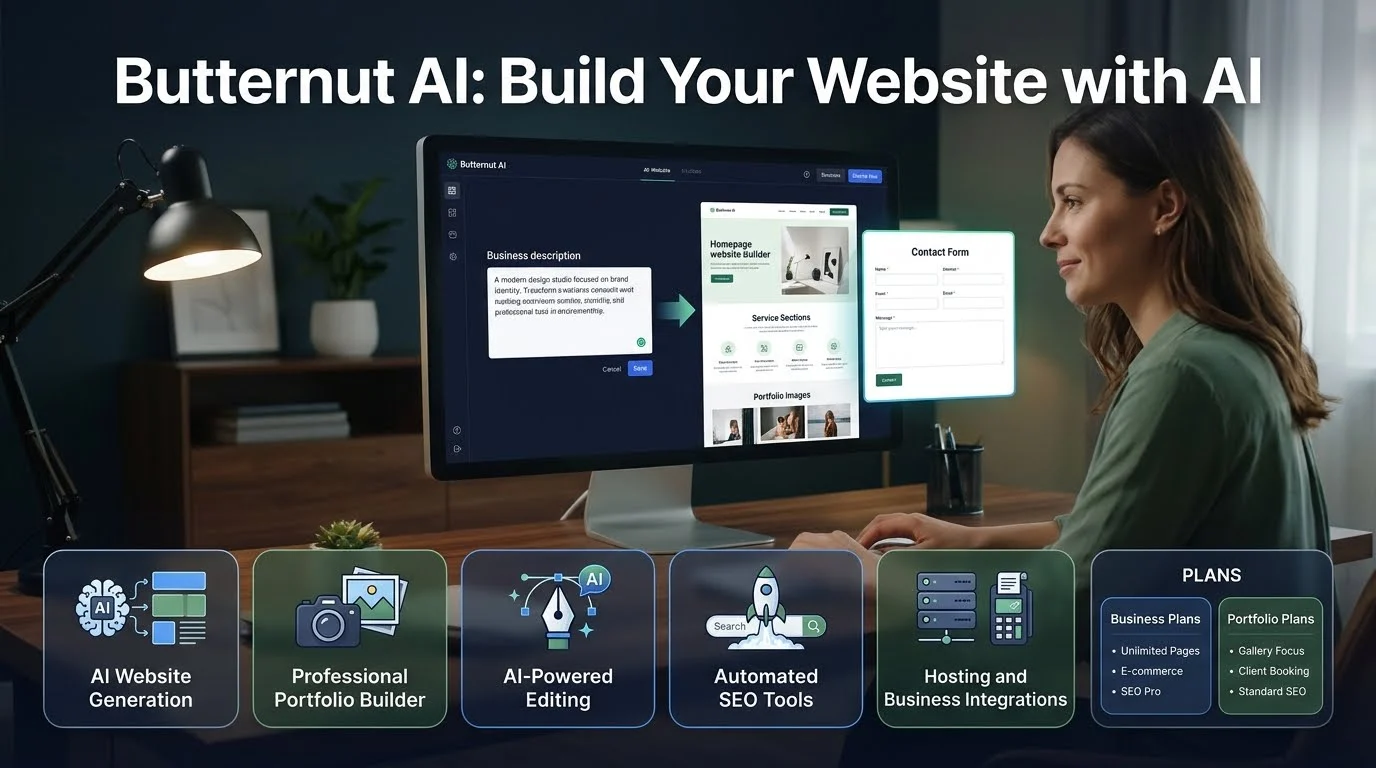
Quick Answer: Butternut AI is an AI website builder that creates business websites and professional portfolios from simple descriptions or resume information. It combines AI-generated layouts and content with visual editing, hosting, SEO tools, and business features such as payment integrations and chatbots.
Butternut AI is an online AI website builder designed to simplify website creation. Instead of building pages manually, users describe their requirements and let the platform generate an initial website.Its portfolio builder follows a slightly different process. Users can upload a resume or enter professional information. The platform then creates a portfolio that presents their experience, skills, and projects.
The platform targets people who want an online presence without spending hours designing a website. Its potential users include freelancers, consultants, founders, small businesses, designers, and job seekers. Butternut AI also offers tools beyond initial website generation. These include hosting, SSL, SEO settings, AI blog writing, visual editing, payment integrations, and business automation features. Availability varies by product and subscription.
How does Butternut AI work?
Butternut AI uses information supplied by the user to generate an initial website. You can then review the design, change its content, and prepare it for publication.
Describe your business
Start by entering your business name and a description of what you offer.
For example, a fitness studio might describe its classes, location, target audience, and membership options.
A more detailed description gives the generator useful context. Instead of writing only “fitness studio,” explain whether you offer personal training, yoga, group classes, or strength training.
Choose a visual style
Butternut AI provides different design directions for business websites.
These include styles such as:
- Modern
- Minimal
- Corporate
- Dark
- Light
- Bold
- Pastel
- Retro
- Playful
- Illustration
Choose a style that matches your brand and audience. A professional consulting firm may need a different visual approach from a creative design studio. Butternut AI
Generate the website
After entering the required information, start the generation process.
Butternut AI creates an initial website structure with relevant content and visual elements. The company advertises generation in approximately 20 seconds.
Treat this as a claim about initial generation, not a guarantee of a complete, publication-ready website. You still need to review the design, correct information, and test important features. Butternut AI
Edit the generated website
Once the first version appears, customize it to match your requirements.
Butternut AI provides a visual editor and describes an AI agent that can make changes through natural-language instructions.
For example, you might ask it to:
- Add a testimonials section.
- Rewrite the homepage headline.
- Create a page for your services.
- Change the website’s color scheme.
- Add a contact form.
- Insert a new section describing your products.
Its official tutorials also cover page settings, custom scripts, navigation, metadata, blogs, and website sections.
Publish your website
When the design and content are ready, choose the appropriate publishing plan.
Business plans include hosting and SSL. The portfolio product offers a Butternut subdomain on its Starter plan, while its Pro plan supports a custom domain.
Check the exact publishing conditions before subscribing, particularly if you need a custom domain or want to remove platform branding.
Key features of Butternut AI
Butternut AI combines website generation with tools for editing, publishing, and managing an online presence.
AI website generation
Website generation is the platform’s central feature.
You describe your business, choose a design direction, and let the AI create an initial website. This can reduce the time needed to plan basic pages and prepare an initial layout.
It is useful for:
- Small business websites
- Service-based businesses
- Landing pages
- Consultant websites
- Startup websites
- Personal brand websites
However, generated content should never be treated as automatically accurate. Review every service description, price, address, business claim, and call to action.
AI portfolio builder
Butternut AI offers a separate portfolio builder for professionals.
You can upload a resume or enter a short description of your background. The platform uses this information to generate a portfolio website.
This may help:
- Freelancers present their services.
- Designers display creative projects.
- Developers showcase technical work.
- Job seekers present their experience.
- Consultants build professional credibility.
The generated portfolio should reflect your actual achievements. Check job titles, project descriptions, qualifications, and dates before publishing. Butternut AI+1
AI-powered visual editing
A generated website is rarely perfect on the first attempt.
Butternut AI provides visual editing and AI-assisted customization. Users can adjust text, colors, sections, and other website elements.
Its tutorials show how to edit text, manage pages, change themes, add sections, and update SEO metadata.
This approach can be convenient for beginners who prefer describing a change rather than working directly with code.
However, users who need detailed control over every layout element should test the editor before committing to a paid plan.
Built-in hosting and SSL
The business plans include website hosting and SSL.
The Starter plan lists 10 GB of hosting, while Pro lists 200 GB. The portfolio plans have separate storage allowances.
SSL enables HTTPS connections between visitors and your website. It is an important baseline feature, but it does not independently guarantee complete website security.
Automated SEO tools
Butternut AI promotes built-in SEO features for generated websites.
Its published materials describe tools such as:
- Meta title and description editing
- Sitemap and robots.txt-related functionality
- SEO-friendly website structure
- Google Analytics integration
- AI-generated blog content
- Mobile-responsive layouts
Some integrations and advanced options depend on the plan. Confirm the available features before subscribing.
These features can help establish a basic SEO foundation. However, automated settings cannot guarantee search rankings.
You still need relevant content, keyword research, strong internal links, accurate information, and a useful experience for visitors.
AI blog generation
The business pricing page lists AI blog generation as part of the platform’s content features. Its FAQ also describes AI-generated blogs and different allowances between Starter and Pro. Butternut AI
This may help small businesses prepare initial articles about their services or industry.
However, publishing large quantities of unedited AI content is not a reliable SEO strategy. Review facts, add original expertise, and make sure every article provides genuine value.
AI chatbot and WhatsApp integration
The business Pro plan lists a custom AI chatbot trained on business data. It also includes WhatsApp integration for receiving leads.
These tools may help service businesses answer common questions and collect customer enquiries.
For example, a consulting firm could use a chatbot to explain its services and direct potential clients toward a contact form.
Before relying on it, test the chatbot with realistic customer questions. Check how it handles incorrect assumptions, pricing enquiries, and questions that require a human response.
The public information reviewed does not establish the chatbot’s underlying model, training method, or detailed data-retention practices.
Payments and business integrations
The business Starter plan lists integrations and features for selling products, courses, and services.
It also mentions payment acceptance through providers such as PayPal and Stripe. Google Analytics and custom code embedding are included in the listed features. Butternut AI
These options may suit small businesses that need a straightforward website with basic selling and lead-generation functionality.
However, businesses with complex inventory, advanced checkout requirements, or large online stores should test the platform carefully before choosing it over a dedicated e-commerce system.
Butternut AI pricing | Business and portfolio plans
Butternut AI has two different product categories: business website plans and portfolio website plans.
Their prices and included features are not interchangeable. Choose the category that matches your actual project.
Business website pricing
Official pricing page checked November 16, 2026. Prices shown below are the displayed monthly prices. Verify billing frequency and checkout totals before payment.
| Plan | Displayed price | Main features |
|---|---|---|
| Starter | $20/month | One custom domain, 10 GB hosting, 100 AI credits/month, SEO, unlimited pages, payment integrations |
| Pro | $69/month | Two custom domains, 200 GB hosting, 300 AI credits/month, AI chatbot, WhatsApp integration, priority support |
The pricing page advertises a 25% saving for annual billing. It also lists a free custom domain for the first year with both business plans. Butternut AI+1
Starter may suit freelancers, founders, and small businesses that need a standard website.
Pro may suit consultants, agencies, and growing businesses that need additional lead-generation features.
Portfolio website pricing
The portfolio builder has separate early-access pricing.
| Plan | Displayed price | Main features |
|---|---|---|
| Starter | $5/month | Butternut subdomain, AI portfolio generation, 10 GB hosting, SSL, visual editing |
| Pro | $12/month | Custom domain, no Butternut branding, 100 GB hosting, blogs, forms, custom code |
The portfolio pricing page describes these as limited-time early-access prices. They may change, so verify the current offer before subscribing.
Can you use Butternut AI for free?
Yes, Butternut AI advertises free website generation and editing before upgrading.
Its business pricing FAQ says users can generate and edit draft websites without paying. The portfolio product also describes free creation and editing, with paid plans offering additional publishing and branding options.
However, free website creation is not necessarily the same as unrestricted free hosting.
Before relying on the free option, confirm:
- Whether the website can be publicly published.
- Whether a custom domain is supported.
- Whether Butternut branding remains visible.
- How much hosting is available.
- Which editing features require payment.
Understand the AI credit and command limits
This is an area where Butternut AI’s public information needs clarification.
The business pricing page lists:
- 100 AI credits per month for Starter.
- 300 AI credits per month for Pro.
However, its pricing FAQ separately describes 200 AI-agent commands per month for Starter and unlimited commands for Pro. It also describes different AI blog allowances. Butternut AI
The page does not clearly explain how credits relate to commands or how much each action consumes.
Before subscribing, ask the company:
- What actions use AI credits?
- Are AI-agent commands separate from credits?
- How many credits does a typical website edit consume?
- Do unused credits roll over?
- Are blog generations included in the monthly allowance?
This matters if you expect to make frequent changes or create content regularly.
Is Butternut AI good for SEO?
Butternut AI offers useful SEO-related features, but it is important to distinguish technical setup from actual search performance.
A website can have automatically generated metadata and a sitemap without ranking well on Google.
To improve your website’s SEO, review these areas after generation:
| SEO element | What you should check |
|---|---|
| Page titles | Include relevant topics and describe each page accurately |
| Meta descriptions | Write clear summaries that encourage relevant clicks |
| Headings | Use one clear H1 and organize sections with H2 and H3 headings |
| Content | Add original information and useful answers |
| Internal links | Connect related services, pages, and articles |
| Images | Use descriptive filenames and meaningful alt text |
| Mobile experience | Test navigation, forms, and text on different screens |
| Analytics | Connect analytics tools and monitor visitor behavior |
Butternut AI’s tutorials include instructions for updating meta titles and descriptions. Its FAQ also addresses SEO settings, sitemap generation, robots.txt, and search-console integration. Confirm the exact availability of each feature on your selected plan.
Editorial assessment: Butternut AI can help prepare a website’s basic SEO setup. It cannot replace a proper content strategy, keyword research, technical audits, or ongoing optimization.
Butternut AI advantages and limitations
The platform offers convenience, but that does not mean it fits every website project.
| Advantages | Limitations |
|---|---|
| Generates websites from descriptions | Generated content needs human review |
| Supports business and portfolio websites | Separate products have different plans |
| Offers visual and AI-assisted editing | AI usage allowances need clarification |
| Includes hosting and SSL | Hosting is tied to the platform |
| Provides basic SEO tools | SEO settings do not guarantee rankings |
| Offers payment and lead-generation features | Complex e-commerce needs should be tested |
| Has dedicated portfolio pricing | Website export is unavailable |
Website export and platform lock-in
The inability to export a website is one of the most important limitations to understand.
Butternut AI’s official FAQ explicitly states that website export is unavailable. Users should not assume they can download the complete website and move it to another hosting provider.
Imagine building a business website with multiple service pages, blog posts, and customer forms. If you later move to WordPress or another website builder, you may need to recreate much of that work.
Your custom domain and your website files are separate things. Being able to connect or transfer a domain does not mean the website itself is portable.
For a temporary landing page or simple portfolio, this may be acceptable. For a business that expects to expand over several years, it deserves serious consideration.
Privacy, security, and website ownership
Before uploading resumes, customer information, or business documents, review the platform’s privacy policy and terms.
Privacy policy
The privacy policy currently available on Butternut AI’s website says the company may collect information such as names, email addresses, and phone numbers.
It also describes the use of cookies and third-party analytics services. The policy says information may be shared with service providers and other parties in specified circumstances. Butternut AI
One important limitation is the policy’s date. The published document says it was last updated on March 5, 2023.
That does not prove the platform’s current practices are unsafe. It does mean users should request or locate current documentation before uploading sensitive information.
Website content and ownership
Butternut AI’s Terms of Use say users are responsible for content and materials they upload or generate. The terms also state that the company does not claim ownership of user-generated content, but may use and analyze it to improve its services.
Read the complete agreement before using the platform for client projects or confidential business material.
The published terms and privacy policy do not establish a verified SOC 2 certification or Zero Data Retention commitment. Do not assume either exists.
Butternut AI alternatives: Wix and Durable
Butternut AI competes with other platforms that generate websites from prompts and provide hosting or business tools.
Two relevant alternatives are Wix and Durable.
| Platform | Target user | Key strength | Pricing transparency | Main consideration |
|---|---|---|---|---|
| Butternut AI | Small businesses and professionals | Prompt-based business and portfolio websites | Separate business and portfolio plans published | Website export unavailable |
| Wix | Businesses, creators, and online stores | AI creation with extensive templates and business features | Free and paid plans published | More options may require additional setup |
| Durable | Small businesses and service providers | AI website generation with CRM and business tools | Free and paid plans published | Less extensive customization than some broader platforms |
Butternut AI vs. Wix
Wix offers AI website creation, templates, hosting, and business tools.
Its current AI builder lets users generate a website from a description and then refine it through AI assistance or manual editing. Wix also offers e-commerce, marketing, SEO tools, and extensive templates.
Wix may be more suitable if you want a broader website-building environment with extensive design options.
Butternut AI may appeal to users who prefer a direct prompt-to-website workflow or want a dedicated portfolio builder.
Butternut AI vs. Durable
Durable focuses on helping small businesses establish an online presence and manage customer activity.
Its current plans include AI website creation, hosting, SEO, CRM, and business tools. Paid plans add features such as bookings, advanced SEO, and larger AI credit allowances.
Durable may suit businesses that want website creation combined with customer management and automation.
Butternut AI offers separate portfolio pricing and a straightforward website-generation workflow. Compare the editing experience, publishing restrictions, and long-term portability before choosing.
Who should use Butternut AI?
Butternut AI is most relevant to people who want to establish an online presence without building every page manually.
- Small business owners: Create websites for services, local businesses, and professional practices.
- Freelancers: Present services, work samples, and contact information.
- Job seekers: Turn resume information into a professional portfolio.
- Designers: Showcase creative projects and professional skills.
- Consultants: Publish service pages and collect enquiries.
- Startup founders: Create an initial website for a new business.
It may be less suitable for developers who need full source-code control, businesses with complex e-commerce requirements, or teams that require complete website portability.
Tips for getting better results with Butternut AI
AI generation provides a starting point. The quality of the final website depends on the information you supply and the improvements you make afterward.
Write a specific business description
Avoid entering only a business name and industry.
Explain what you offer, who your customers are, where you operate, and what makes your services different.
Select a design that fits your audience
A corporate consultancy needs a different design from a photography portfolio.
Choose a visual style that supports your brand rather than simply selecting the most attractive option.
Check every generated page
Review the homepage, About page, services, contact details, and calls to action.
Correct inaccurate statements and remove unnecessary sections.
Test the mobile experience
A responsive layout is useful, but you should still test the actual website.
Check navigation, buttons, images, forms, and text on different screen sizes.
Review SEO settings before publishing
Check page titles, descriptions, headings, image alt text, and internal links.
Do not assume automated settings are complete.
Keep copies of your website content
Because website export is unavailable, save copies of important text, images, brand assets, and page information.
This will make a future redesign or migration easier.
Frequently asked questions about Butternut AI
1. What is Butternut AI used for?
Butternut AI is used to create business websites, landing pages, and professional portfolios. Users provide a business description or resume information, and the platform generates an editable website.
2. Does Butternut AI offer a free plan?
Yes. Butternut AI allows users to generate and edit draft websites before upgrading. Its portfolio product also describes free creation options, but publishing features and custom-domain availability depend on the selected plan.
3. How much does Butternut AI cost?
The business website plans currently list Starter at $20 per month and Pro at $69 per month. Separate portfolio plans list Starter at $5 per month and Pro at $12 per month. Prices and billing conditions may change.
4. Can I export my website from Butternut AI?
No. Butternut AI’s official FAQ says website export is unavailable. Users who may want to move their website to another hosting provider should consider this limitation before subscribing.
5. Is Butternut AI good for SEO?
Butternut AI includes automated SEO features such as metadata and sitemap-related tools. However, search performance still depends on content quality, keyword relevance, website structure, competition, and ongoing optimization.
Conclusion
Butternut AI is an AI website builder that creates business websites and professional portfolios from written descriptions or resume information. Its visual editing, hosting, SEO features, and business integrations make it useful for people who want to establish an online presence without starting from scratch.
However, the platform has limitations worth considering. Business and portfolio plans have different prices, AI usage descriptions need clarification, and website export is unavailable.It may suit freelancers, professionals, and small businesses that prioritize convenience. Before subscribing, test the editor, compare the correct pricing category, review the privacy terms, and consider whether platform lock-in fits your long-term plans.