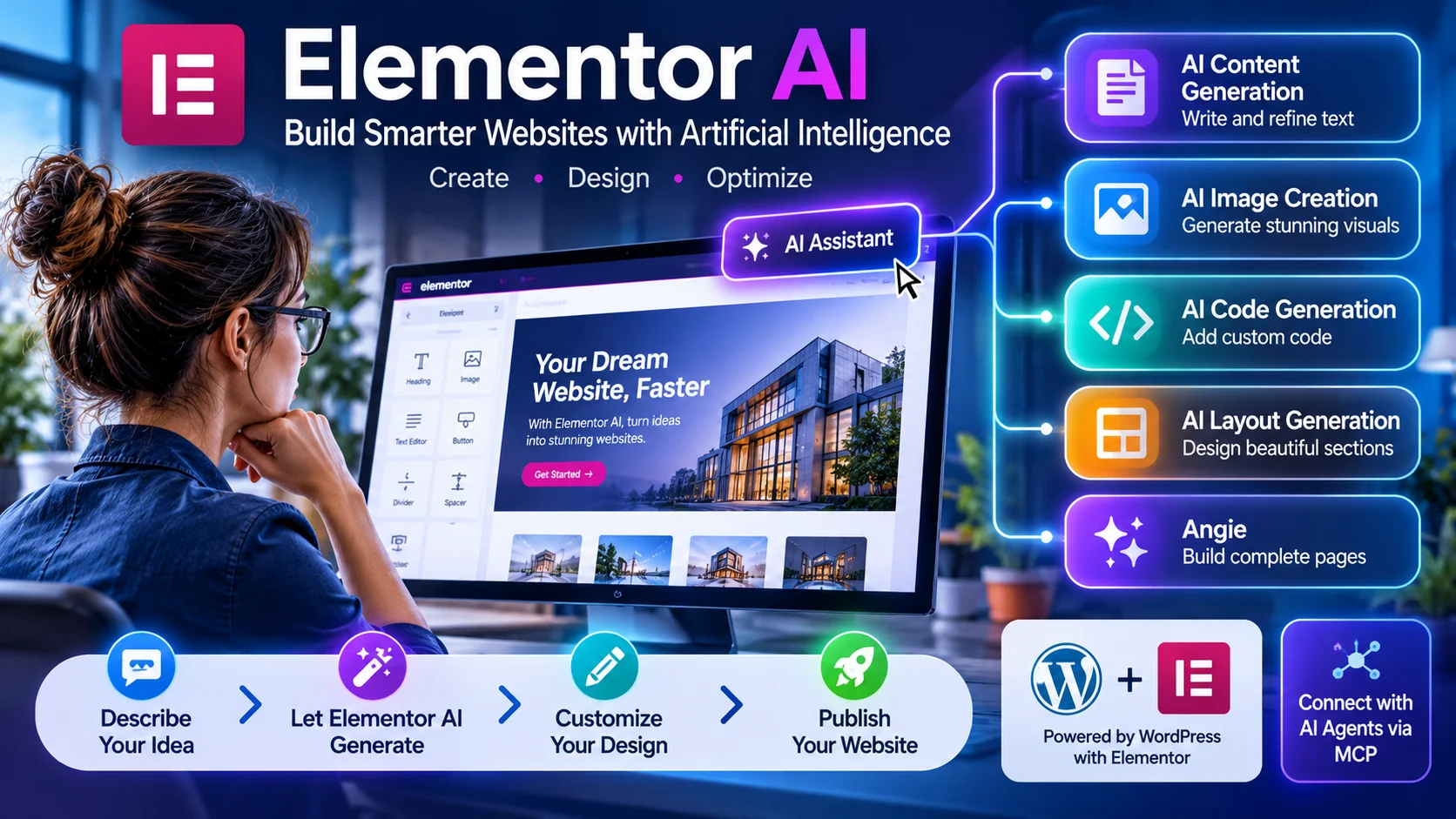
Quick Answer: Elementor AI is an artificial intelligence ecosystem integrated into the Elementor WordPress website builder. It helps users generate website pages, write content, create images, develop custom code, and automate parts of the design workflow.
Elementor AI is a collection of artificial intelligence tools that help users build and manage WordPress websites.It brings generative AI into the Elementor editing environment. Users can create website content, generate images, customize layouts, and produce code using natural-language instructions.
Traditionally, designers needed separate applications for these activities. They might use ChatGPT for copywriting, an image generator for graphics, and a code editor for custom styling.Elementor AI brings many of these tasks into one website-building workflow.
However, its capabilities now extend beyond the original AI writing assistant. The broader ecosystem includes website planning, AI-generated pages, Angie, and integrations with external AI assistants through the Model Context Protocol (MCP).This distinction is important when evaluating Elementor AI. It is no longer just a tool for generating website text.
Elementor AI vs. Elementor One vs. Angie
These names describe different parts of Elementor’s AI ecosystem.
| Product | What it does |
|---|---|
| Elementor AI | Generates text, images, code, and design elements |
| Elementor One | Combines Elementor Pro with AI credits and additional website services |
| AI Site Planner | Creates website briefs, sitemaps, and wireframes |
| Angie | Uses AI agents to build and modify WordPress content and functionality |
| Elementor MCP | Connects compatible external AI assistants to Elementor websites |
Elementor One is a subscription bundle, not a separate AI model. Angie is an agent-based building tool, while MCP provides a connection between Elementor and compatible AI applications.
Understanding these differences prevents confusion when comparing plans and features.
How Does Elementor AI Work?
Elementor AI uses natural-language instructions to help users complete website development tasks.
A user describes the desired result, and the relevant AI tool generates an initial output.
The user can then review, modify, and apply that output through the WordPress editing environment.
The general workflow looks like this:
- Open a WordPress website using Elementor.
- Select the page, widget, or design element.
- Choose an available AI function.
- Enter a prompt describing the required result.
- Review the generated content, design, or code.
- Edit and publish the approved changes.
More advanced workflows use Angie or Elementor MCP to generate larger sections of a website.
The key advantage is that generated results can become editable website elements rather than remaining isolated AI-generated images or text documents.
Main Features of Elementor AI
AI Text Generation and Content Writing
Elementor AI helps users create and improve website copy directly inside the editor.
It can assist with:
- Homepage headlines.
- About Us descriptions.
- Service page content.
- Product descriptions.
- Blog introductions.
- Calls to action.
- Frequently asked questions.
- Marketing messages.
It can also rewrite existing text, shorten paragraphs, adjust tone, and improve clarity.
Practical example:
A freelancer creating a website for a digital marketing agency can enter:
“Write a professional homepage headline for a digital marketing agency serving small businesses. Use a confident tone and focus on measurable growth.”
The AI generates a draft that can be edited before publication.
This feature is useful for overcoming blank-page problems. However, it does not replace audience research, brand strategy, or factual editing.
AI Image Generation and Editing
Elementor AI can generate visual assets from written descriptions.
Users can describe the subject, composition, colors, and artistic style they want.
Common applications include:
- Homepage hero images.
- Blog featured images.
- Background visuals.
- Product illustrations.
- Promotional graphics.
- Custom website imagery.
AI-assisted image editing can also help modify existing visuals.
For example, a designer can request a different background or ask for additional visual elements.
The main advantage is workflow convenience. Generated images can be incorporated into the website without moving through several unrelated applications.
Nevertheless, users should inspect every image for visual mistakes, incorrect text, and brand consistency.
Commercial users should also review the applicable AI terms and intellectual property requirements before using generated assets.
AI Code Generation
Elementor AI can generate custom code from natural-language instructions.
Its code assistance is particularly useful for CSS and HTML customization.
For example, a user might request:
“Create a modern button with rounded corners, a subtle shadow, and a smooth hover animation.”
The AI can produce code that provides a starting point for implementation.
Typical applications include:
- Custom CSS styling.
- HTML elements.
- Button animations.
- Hover effects.
- Responsive adjustments.
- Interface customization.
This reduces the amount of manual coding required for relatively simple design tasks.
However, generated code is not automatically production-ready. Developers should check compatibility, responsiveness, accessibility, and potential conflicts with existing styles.
AI Layout and Container Generation
Website layouts determine how information is organized on a page.
Elementor AI can generate containers and structured layouts based on written instructions.
A container can hold headings, images, buttons, text, and other website elements.
For example, a designer can request:
“Create a two-column services section with an image on the left and three service cards on the right.”
The AI can produce an editable layout that the designer can refine.
This is especially helpful when creating repeated website sections or experimenting with different page structures.
AI Site Planner
Elementor Site Planner addresses an important part of website development: planning.
Before designing a website, creators need to understand its purpose, audience, pages, and navigation structure.
Site Planner uses an AI-guided conversation to collect project information.
It can then generate:
- A website brief.
- A sitemap.
- Page structures.
- Wireframes.
- Initial AI-generated content.
For example, a business owner planning a photography website can describe the business and its target customers.
Site Planner can suggest pages such as Home, Portfolio, Services, About, and Contact.
Its wireframes provide a starting structure rather than a finished, fully optimized website.
Free access Elementor currently documents Site Planner as free to use. Users can explore its planning workflow without purchasing an Elementor One subscription. Elementor+1
Angie | Elementor’s AI Website-Building Agent
Angie represents a more advanced stage of Elementor’s AI development.
Instead of generating only individual text blocks or design suggestions, Angie can work on structured WordPress website tasks.
Elementor’s current product documentation describes capabilities such as:
- Generating complete website pages.
- Creating custom widgets.
- Building forms.
- Creating design systems.
- Generating custom post types and fields.
- Developing CSS and JavaScript snippets.
- Modifying existing website layouts.
- Creating visual tools such as calculators and quizzes.
Its outputs are designed to work with WordPress and Elementor elements.
This means users can inspect and edit generated results rather than depending entirely on a static AI design.
An important technical limitation: Elementor’s Angie documentation states that certain workflows require containers. Angie does not work with legacy sections or V4 elements in the documented workflow. Users should verify compatibility before attempting to modify an older website. Elementor+1
Elementor MCP | Connect External AI Assistants
One of the more important developments is Elementor MCP.
MCP stands for Model Context Protocol. It is a standard that allows compatible AI applications to interact with external tools and information.
Elementor MCP connects supported AI assistants with a WordPress website.
Elementor documents compatibility with tools such as:
- Claude
- Codex
- Cursor
With this connection, users can describe website changes through an external AI application.
For example, a designer could request a new landing page or ask an AI coding assistant to modify a website layout.
The resulting content can then be reviewed in Elementor’s visual editor.
Elementor states that connecting MCP does not require an additional Elementor MCP fee. However, charges from the external AI application may still apply. Available generation capabilities also depend on the user’s Elementor plan.
How to Build a Website Using Elementor AI
Elementor AI can help beginners create a website without manually designing every section.
However, good results require a clear project plan and some customization.
Here is a practical workflow for creating a business website.
Set Up WordPress and Elementor
Start with a WordPress installation and a compatible hosting service.
Install Elementor from the WordPress plugin directory and activate it.
The free Elementor plugin provides basic website editing. Some advanced design and AI capabilities require an eligible paid plan.
Plan Your Website
Use Site Planner to describe your business and website requirements.
Provide information about:
- Business type.
- Target audience.
- Website purpose.
- Required pages.
- Design preferences.
- Main services or products.
Review the generated sitemap before moving into design.
Generate Your First Page
Open Elementor’s AI building tools and describe the page you want.
A useful prompt includes the business context, layout, visual style, and required sections.
Example website generation prompt
Create a modern website for a professional digital marketing agency.
Target audience: Small businesses and startups.
Design style: Minimal, premium, and professional.
Color palette: Navy blue, white, and turquoise.
Include a homepage hero section, services, testimonials, company introduction, pricing information, and contact form.
Use clear headings, concise content, responsive layouts, and strong calls to action.
Customize the Generated Design
Review the AI-generated page and adjust its appearance.
Focus on:
- Typography and brand colors.
- Images and backgrounds.
- Section spacing.
- Navigation menus.
- Buttons and links.
- Mobile responsiveness.
Optimize and Publish
Before publishing, test the website carefully.
Check:
- Mobile and desktop layouts.
- Contact forms.
- Navigation links.
- Page loading speed.
- Image dimensions.
- SEO titles and meta descriptions.
- Accessibility.
- Indexing settings.
A generated website is a starting point, not a guarantee of a successful online presence.
Elementor AI Pricing | Plans, Credits, and Costs
Pricing is one of the most confusing parts of the Elementor AI ecosystem.
The main reason is that Elementor offers different products with different entitlements.
Elementor AI generation, Elementor Pro, and Elementor One should not be treated as identical subscriptions.
How Much Does Elementor AI Cost?
Elementor’s current website describes free AI access with daily-renewing credits. Elementor One provides a larger shared monthly credit allocation.
The published Elementor One plans include:
| Plan | Monthly credits | Website allowance |
|---|---|---|
| Elementor One | 25,000 | 1 website |
| Elementor One Agency | 350,000 | Unlimited websites |
These figures refer to the currently published plan allocations, not a guarantee that all credits can be spent exclusively on AI generation.
For exact subscription prices, check the official Elementor pricing page. Prices, promotions, billing periods, and regional offers can change.
How Does the Elementor One Credit System Work?
Elementor One uses a shared monthly credit pool.
Credits can be allocated across supported services rather than being reserved exclusively for AI.
The published credit schedule includes:
| Activity | Credit consumption |
|---|---|
| AI text generation | 1–40 per action |
| AI code generation | 1–40 per action |
| AI image generation | 1–40 per action |
| AI container generation | 1–40 per action |
| Image optimization | 10 per image |
| Accessibility fixes | 20 per fix |
| Email delivery | 10 per email |
| Cookie consent | 1 per consent |
| Cookie consent scan | 1 per scan |
| Accessibility scan | 0 |
The exact AI cost varies by task and prompt.
This means a user cannot reliably calculate the number of images or pages they can generate from the monthly credit allocation without testing actual usage. Choose Your Plan+1
Do Elementor AI Credits Expire?
Yes, unused Elementor One credits do not roll over.
Elementor replenishes the monthly allocation when the next billing cycle begins.
If users exhaust their credits, they can wait for the next monthly allocation or upgrade to a higher-tier plan.
This is important for agencies managing multiple projects. Heavy usage across AI generation, image optimization, and other services can reduce the remaining monthly balance.
Is Elementor AI Free?
Elementor currently advertises a free AI option with daily-renewing credits.
Its Site Planner is also documented as free.
However, free access does not mean unlimited generation or access to every advanced feature.
For example, Elementor One provides a much larger shared credit pool, while some advanced website-building workflows require Pro capabilities.
The free option is suitable for testing. Frequent users should calculate their expected monthly consumption before upgrading. Elementor+2
Hidden Costs to Consider
A website builder subscription does not cover every expense associated with running a professional website.
Potential additional costs include:
- WordPress hosting.
- Domain registration.
- Premium themes and plugins.
- Elementor Pro or One upgrades.
- External AI subscriptions used with MCP.
- Premium fonts and stock images.
- Website maintenance and backups.
A useful buying tip: Calculate the combined cost of hosting, Elementor, AI credits, and external tools. Do not compare subscriptions using the advertised price alone.
Privacy, Security, and Data Ownership
AI website builders process user prompts, uploaded content, and generated outputs.
This creates important questions about privacy and intellectual property.
Elementor’s AI Terms identify third-party technology providers as part of its AI services. The document names providers such as OpenAI, Stability AI, Microsoft Azure, and Anthropic.
The same terms state that submitted inputs may be shared with technology partners. They also describe potential use of inputs by those partners for training and service improvement, subject to applicable policies. Elementor
What Information Should You Avoid Submitting?
Website owners should avoid including unnecessary confidential information in AI prompts.
Examples include:
- Customer passwords.
- Private customer records.
- API keys and access tokens.
- Confidential client documents.
- Sensitive personal information.
- Unpublished business strategies.
Elementor’s AI Terms specifically prohibit submitting certain categories of sensitive personal data.
Who Owns AI-Generated Content?
This is another important consideration for commercial websites.
Elementor’s AI Terms explain that generated outputs may not be unique. Similar or identical outputs may be generated for other users.
The terms also place responsibility on users to ensure that their inputs and outputs comply with applicable laws and do not infringe third-party intellectual property rights. Elementor
Therefore, do not assume that an AI-generated logo, image, or marketing design is automatically exclusive to your business.
Review generated assets before using them commercially.
Does Elementor Guarantee Zero Data Retention?
The available documentation does not establish a universal Zero Data Retention guarantee for every AI provider and workflow.
A privacy policy, security measure, or contractual commitment should not automatically be interpreted as ZDR.
Businesses with strict data requirements should review the current AI terms, third-party provider policies, and applicable data processing agreements.
Benefits of Elementor AI
Elementor AI offers practical advantages for people who regularly create WordPress websites.
1. Faster Website Development
Designers can generate initial content, layouts, and code without starting every task manually.
This can shorten the early production process.
2. An Integrated Creative Workflow
Users can work with text, images, and code inside the website-building environment.
Angie and MCP extend this approach to larger development tasks.
3. Accessible to Beginners
Natural-language prompts make certain technical tasks easier to approach.
Users can request design changes without writing every CSS instruction themselves.
However, understanding basic website design still improves the final result.
4. More Efficient Agency Workflows
Agencies can reuse design systems and build similar website sections across different projects.
The Elementor One Agency plan also offers shared credits across its eligible unlimited-site allowance.
This can be useful for teams managing multiple client websites.
5. Greater Design Flexibility
AI-generated layouts provide starting points for experimentation.
Designers can compare different structures, test visual ideas, and refine them manually.
Limitations of Elementor AI
Despite its capabilities, Elementor AI has limitations that potential buyers should understand.
1. Generated Results Need Human Review
AI can generate inaccurate information, unsuitable designs, and code that does not work as expected.
Every important output needs testing and editing.
2. Credit Consumption Is Not Completely Predictable
AI actions consume between 1 and 40 credits under Elementor’s published schedule.
The actual amount depends on the task.
Shared credits also support services outside AI generation. Users must monitor their overall balance.
3. Angie Has Compatibility Restrictions
Angie’s documented limitations matter when working with older websites.
Its supported workflow requires containers rather than legacy sections. The documentation also identifies restrictions involving V4 elements.
An older Elementor website may therefore need structural changes before certain agent workflows become practical. Elementor
4. Third-Party AI Dependency
Elementor relies on external AI infrastructure for its AI features.
Its general terms explain that providers may change, modify, limit, or discontinue their services.
Such changes can affect feature availability and generated output. Elementor
5. WordPress Ecosystem Dependency
Elementor AI is designed around WordPress.
Users who prefer a fully hosted website platform may find another solution easier to manage.
Switching away from Elementor may also require rebuilding layouts and replacing builder-specific elements.
6. AI Does Not Guarantee SEO Performance
A website can look impressive but still perform poorly in organic search.
Search visibility depends on content quality, search intent, technical SEO, website performance, and competition.
AI-generated text alone does not create topical authority or guarantee rankings.
Elementor AI Alternatives and Competitors
Elementor AI competes with several AI-powered website builders and WordPress design tools.
However, not every alternative serves the same purpose. Some focus on WordPress customization, while others provide complete hosted website-building platforms.
Comparison of Popular Elementor AI Alternatives
| Platform | Target user | Main strength | Pricing model | Main limitation |
|---|---|---|---|---|
| Divi AI | WordPress designers | AI content, images, layouts, and code | Subscription | Designed around Divi |
| 10Web | Businesses and agencies | AI website generation and hosting | Subscription | Platform-dependent workflow |
| Hostinger AI Website Builder | Beginners and small businesses | Guided website creation | Hosting subscription | Less WordPress flexibility |
| Brizy | Freelancers and designers | Visual page creation | Free and paid plans | Different builder ecosystem |
| Spectra | WordPress users | Native block editing | Free and paid plans | Different design workflow |
1. Divi AI
Divi AI is designed for users working with the Divi WordPress website builder.
It provides AI-assisted text, image, code, and layout generation.
One interesting difference is its subscription model. Elegant Themes documents unlimited text, image, code, and layout generation under its fair-use policy, while its Divi AI Agent uses a separate monthly usage balance.
This makes it an interesting alternative for designers who regularly generate website content. Elegant Themes Help Center
2. 10Web AI Website Builder
10Web combines AI-assisted website creation with WordPress hosting.
It is designed for users who want a more automated website-building process.
Its appeal is the combination of generation and hosting rather than simply adding AI tools to an existing WordPress editor.
3. Hostinger AI Website Builder
Hostinger offers a guided AI website-building experience.
Users can describe their business and generate an initial website design.
It may suit beginners who want a straightforward hosted solution without managing a separate WordPress installation.
4. Brizy AI
Brizy focuses on visual website creation and landing-page design.
Its AI-assisted capabilities make it relevant to freelancers and businesses that prioritize visual editing.
5. Spectra
Spectra extends the native WordPress block editor with additional design components.
It is worth considering for users who prefer Gutenberg rather than a separate visual page builder.
Which Elementor AI Alternative Should You Choose?
The best option depends on your existing workflow.
- Elementor AI: Suitable for existing Elementor users who want integrated AI assistance.
- Divi AI: Relevant for designers already working with Divi.
- 10Web: Worth considering for AI-generated WordPress websites and hosting.
- Hostinger: Suitable for beginners seeking a guided hosted solution.
- Brizy: Relevant for visual website and landing-page creation.
- Spectra: Suitable for Gutenberg-focused WordPress users.
Compare the editing experience, subscription structure, ownership requirements, and long-term flexibility before switching platforms.
Who Should Use Elementor AI?
Elementor AI is particularly useful for people who regularly build or maintain WordPress websites.
Freelance web designers: They can generate initial layouts, create content, and develop custom styling for client projects.
Digital marketing agencies: Teams can use AI to speed up landing-page production and maintain consistent design systems.
Small business owners: They can create initial website copy, images, and page structures with less manual effort.
WordPress developers: They can use code generation, Angie, and MCP to accelerate certain development tasks.
Bloggers and publishers: They can create featured images, improve website layouts, and draft supporting content.
However, users who need only a simple informational website may not require the advanced features of Elementor One or Angie.
Practical Tips for Getting Better Results
The quality of AI-generated website content depends partly on the instructions provided.
Use these practices to improve your results:
- Give business context: Explain what your business offers and who your customers are.
- Describe the visual style: Specify colors, typography, spacing, and layout preferences.
- Use specific prompts: Request individual sections instead of describing an entire complex website vaguely.
- Provide references: Use existing designs or screenshots when the tool supports them.
- Check generated code: Review functionality before applying code to a live website.
- Monitor AI credits: Track monthly usage across all connected services.
- Review mobile responsiveness: Check every generated page on smaller screens.
- Maintain brand consistency: Ensure generated content and visuals match your business identity.
A clear prompt gives the AI a better starting point. Human editing turns that starting point into a professional website.
Frequently Asked Questions About Elementor AI
1. What is Elementor AI used for?
Elementor AI helps WordPress users generate website pages, write content, create images, develop custom code, and build layouts. It also offers advanced AI-assisted workflows through Angie and Elementor MCP.
2. Is Elementor AI free to use?
Yes. Elementor currently advertises free AI access with daily-renewing credits, and its Site Planner is free to use. However, advanced capabilities and larger monthly credit allocations depend on the selected subscription.
3. Can Elementor AI build an entire website?
Yes. Elementor’s AI website-building tools can generate website structures, full pages, layouts, and content. Site Planner helps create the initial sitemap and wireframe, while advanced building tools can generate editable Elementor elements. Human review and customization are still necessary.
4. What is the difference between Elementor AI and Angie?
Elementor AI refers to the broader collection of AI-powered website tools, including content, image, and code generation. Angie is an AI agent designed to perform more advanced WordPress building and modification tasks, such as creating pages, forms, and custom functionality.
5. Is Elementor AI better than Divi AI?
Both tools provide AI-assisted website creation, content generation, and design capabilities. Elementor AI integrates with the Elementor ecosystem, while Divi AI is designed for Divi. Your existing website builder, preferred workflow, and subscription requirements should determine your choice.
Conclusion: Is Elementor AI Worth Using?
Elementor AI has developed from a basic content-generation assistant into a broader AI-powered website creation ecosystem.Its combination of text generation, image creation, custom code, layout generation, Angie, and MCP makes it relevant to modern WordPress development.Its biggest advantage is the ability to connect AI-generated results with editable website elements.However, credit consumption, subscription costs, compatibility restrictions, and third-party AI dependencies deserve careful consideration.
For existing Elementor users, these tools can make website production more efficient. Agencies may also benefit from shared credits and advanced automation.Before purchasing, evaluate the features you actually need, estimate monthly credit usage, and test compatibility with your existing website.The real value of Elementor AI is not simply generating a website faster. It is helping users create, customize, and manage websites with greater efficiency and control.