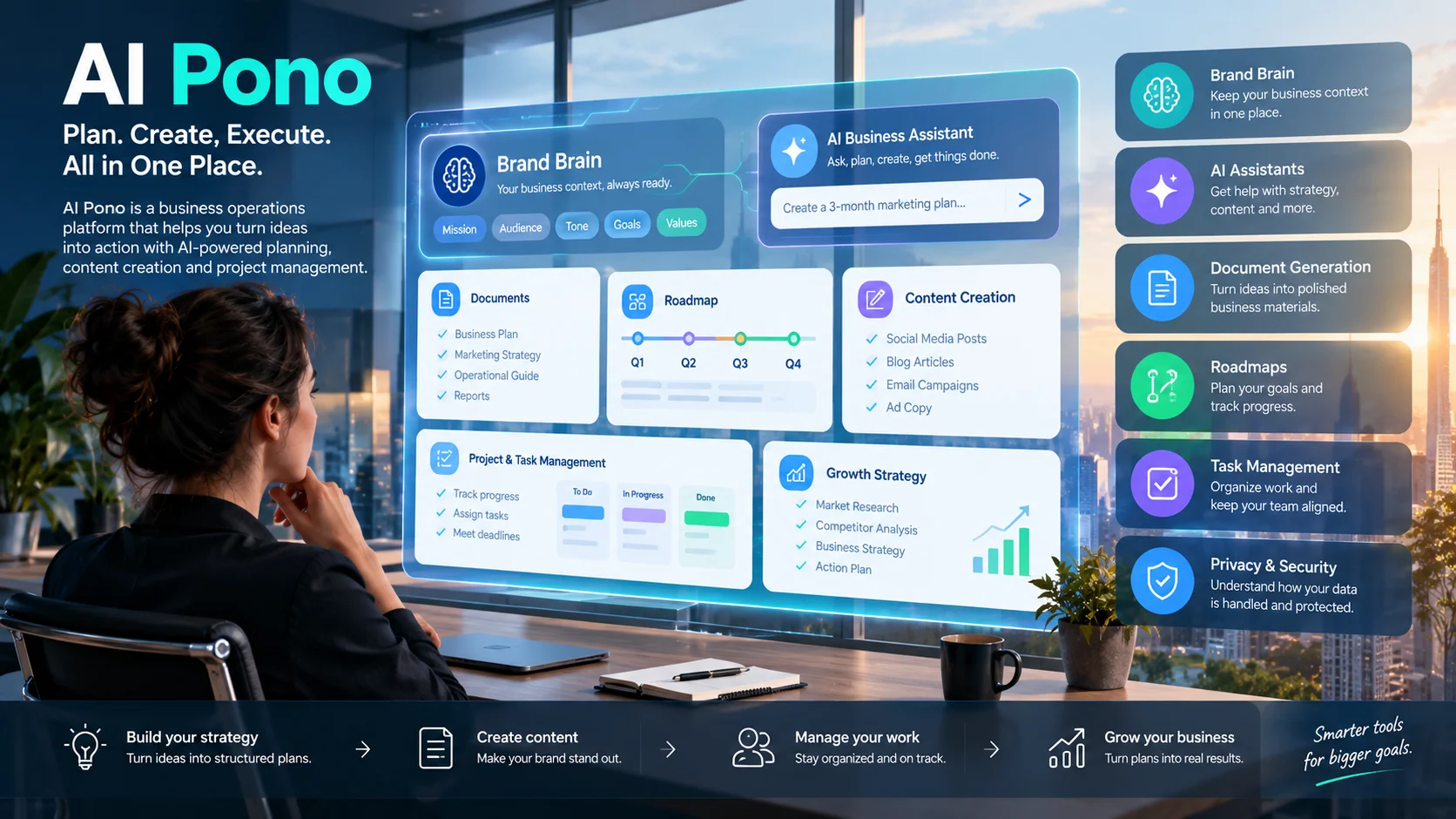
AI Pono is a business platform that helps entrepreneurs and teams manage strategy, content, projects, and business growth. Its Brand Brain feature stores brand information to support AI-generated documents, marketing content, and business plans.
AI Pono is a search term worth understanding before choosing a business automation platform. The name can refer to different products, including Pono AI’s business workspace and PONO Video, an AI-powered video creation app.
This guide focuses primarily on Pono AI at pono.ai, the business planning and operations platform. It explains the advertised features, how the workflow fits together, what to evaluate before paying, and which alternatives may better suit particular needs.
AI Pono at a Glance
- Primary purpose: AI-assisted business planning, content creation, and operational organization.
- Intended users: Entrepreneurs, small businesses, marketing teams, and agencies.
- Central concept: Brand Brain, a profile of a business’s identity, audience, tone, and goals.
- Advertised capabilities: Documents, project and task management, roadmaps, content planning, and growth strategies.
- Potential advantage: Bringing several business planning activities into one workspace.
- Important caveat: Current prices, usage allowances, integrations, and data-handling terms should be verified directly with the provider.
These points describe the business platform, not every product that uses the Pono name. Its published feature descriptions are useful for understanding its intended purpose, but they should not be treated as independent proof of performance.
What Is AI Pono?
Pono AI is a business operations platform that aims to bring AI-assisted planning, content creation, and project organization into one workspace. Instead of treating every task as an isolated AI prompt, its approach connects generated work to a business’s goals and brand identity.
The platform is positioned around helping businesses move from ideas to organized execution. A user might develop a growth strategy, turn it into a roadmap, create marketing content, and organize the resulting tasks within the same general workflow.
That approach addresses a common problem for small teams: business information often becomes scattered across documents, spreadsheets, project boards, and separate AI chat tools.
What Does the Name Pono Mean?
Pono is a Hawaiian word associated with goodness, correctness, righteousness, and well-being. Its meaning depends on context, and it carries cultural significance beyond a simple English translation.
The business platform uses PONO as its brand name. However, the word’s traditional meaning should not be interpreted as evidence that the software is more accurate, ethical, or reliable than competing products.
Is AI Pono a General-Purpose AI Chatbot?
Not exactly. Pono AI is presented as a business workspace rather than simply a standalone chatbot.
A general-purpose chatbot primarily responds to prompts and generates text. A business operations platform aims to connect that generation with structured activities such as planning, document creation, project tracking, and team collaboration.
The distinction matters because the value of a business tool depends on its workflow, not just its ability to produce convincing text.
How Does Pono AI Work?
Pono AI’s current website describes a workflow built around learning about a business and using that context to support ongoing work. Its product pages promote a business-specific knowledge foundation, an AI Chief of Staff, AI staff agents, task management, and document generation.
The basic workflow can be understood in four stages.
1. Build a Business Profile
The first step is to provide information about your business. This may include its products, audience, goals, brand voice, operating procedures, and current priorities.
The quality of this information matters. An AI assistant cannot reliably tailor its recommendations to your business if the information it receives is incomplete, outdated, or contradictory.
Pono’s Brand Brain concept is intended to provide this context to its AI features.
2. Explain the Task
Once the business context is established, describe the problem you want to solve.
For example, a small business owner might ask for a product launch plan, a customer onboarding process, or a marketing campaign outline. More specific instructions generally make it easier to assess whether the result meets the business requirement.
A useful request includes the objective, intended audience, available resources, constraints, and desired output.
3. Generate Plans and Business Materials
Depending on the features available to your account, Pono AI can help generate business documents, roadmaps, and other structured materials. Its product pages also describe AI assistants designed around different business functions.
Generated content should be treated as a working draft. Check figures, assumptions, dates, market claims, and legal requirements before using it for important decisions.
4. Organize and Follow Through
Planning is useful only when someone acts on it. Pono’s product descriptions emphasize connecting strategy with task management and execution.
For instance, a launch plan can be reviewed, divided into milestones, and assigned to the people responsible for completing the work. The exact degree of automation and available integrations should be confirmed with the provider.
The key distinction: AI-generated recommendations are not the same as completed business operations. Verify which steps the platform can perform directly and which still require human action.
Key Features of AI Pono
Pono’s current product pages describe several components intended to support founders and small teams. The following overview distinguishes the advertised capabilities from the practical questions buyers should ask.
Brand Brain
Brand Brain is designed to give AI features a shared understanding of a business’s identity and priorities.
This may help reduce repetitive prompting. Instead of explaining the company’s tone and audience every time, users can draw on a central source of business context.
However, a shared profile is useful only when it stays accurate. Assign someone to review business information whenever products, prices, policies, or target customers change.
AI Chief of Staff
Pono’s website presents its AI Chief of Staff as an assistant that retains business context and helps users work through business problems. The provider describes applications involving planning, strategy documents, and task creation.
This type of feature may suit founders who handle several responsibilities at once. It can help organize ideas and identify next steps without requiring a separate prompt for every small task.
Still, the label “Chief of Staff” describes a product role, not an actual human executive. Important decisions, financial commitments, and personnel matters require appropriate human oversight.
AI Staff Agents
The company also advertises role-specific AI assistants for business functions such as marketing, operations, strategy, and content creation. These assistants are described as using the business’s context to tailor their responses.
The practical question is whether these agents can complete useful work within your existing processes. Before relying on them, test a real task and measure how much editing, checking, and manual follow-up it requires.
Document Generation
Pono’s document-generation materials describe creating and editing business documents, including plans, operational guides, and project materials. The documentation also indicates that document limits depend on the applicable pricing plan.
This can help teams prepare structured first drafts more quickly. It does not eliminate the need to verify information or customize documents for their intended audience.
Roadmaps and Task Management
Roadmaps help break broad objectives into phases, milestones, and tasks. Pono’s roadmap page presents this as a way to translate business priorities into actionable plans.
A roadmap is most useful when it reflects actual deadlines, available resources, and dependencies. An AI-generated timeline that ignores staffing or budget constraints may look organized without being realistic.
Practical Uses of AI Pono
The usefulness of a business AI platform becomes clearer when applied to specific work.
Business Planning
An entrepreneur preparing to launch a new service could use an AI assistant to draft a business plan, identify key milestones, and organize preliminary research.
The owner would still need to validate demand, estimate costs, and confirm that the plan fits available resources.
Marketing and Content Development
A marketing team could provide its brand guidelines and target audience, then use AI assistance to draft campaign ideas, social media content, and product messaging.
A consistent brand profile may help maintain a recognizable voice. Human review remains important for factual accuracy, originality, and alignment with the campaign’s objectives.
Standard Operating Procedures
Small businesses often rely on undocumented knowledge. An AI-assisted workflow could help turn notes about recurring tasks into draft standard operating procedures.
For example, a business could document how it handles customer enquiries, processes orders, or responds to common service problems. Employees should review the instructions before adopting them.
Project and Product Launches
A team preparing to release a product could organize work into research, development, testing, marketing, and launch phases.
An AI-generated roadmap can provide a starting structure. Project owners should then assign responsibilities, confirm dependencies, and adjust deadlines to reflect reality.
Agency and Client Work
Agencies handling multiple brands may benefit from keeping each client’s information and tone clearly separated.
Before using Pono for several clients, confirm how the platform supports separate brand profiles, user permissions, collaboration, and data isolation. Do not assume every account includes these capabilities simply because the product targets agencies.
Benefits and Limitations
Pono AI’s potential value depends on how well its workflow matches the way a business operates.
Potential Benefits
- Centralized planning: Related business materials may be easier to organize within a shared workspace.
- Reusable context: A business profile can reduce the need to repeat background information.
- Faster first drafts: AI can help prepare documents, plans, and marketing materials.
- Structured execution: Roadmaps and tasks can help translate broad goals into concrete activities.
- Support for small teams: Business owners may gain assistance with recurring planning and documentation.
These are plausible benefits of the advertised product design, not guarantees of measurable savings or better business performance.
Important Limitations
- Incorrect outputs: AI may produce inaccurate information or unsupported assumptions.
- Setup effort: A useful business profile takes time to prepare and maintain.
- Human review: Financial, legal, strategic, and customer-facing decisions still require appropriate checks.
- Workflow fit: A consolidated platform may not replace every specialist tool a company already uses.
- Unclear implementation details: Buyers should verify available integrations, automation limits, export options, and account-level features.
- Changing product scope: Product pages, early-access offerings, and development roadmaps may change over time.
The strongest reason to adopt a tool is a demonstrated improvement in a real workflow, not the number of features listed on its website.
AI Pono Pricing: What Does It Cost?
Pricing is an important part of evaluating AI Pono, particularly for entrepreneurs comparing it with separate subscriptions for writing, planning, and project management.
The current Pono.ai website advertises an early-access offer of $49.99 as a one-time setup payment, with a stated 24-hour guarantee subject to the provider’s terms. The page describes this offer as including a business-specific Brand Brain. Treat this as a published promotional offer, not a guarantee that every feature or future service is included indefinitely.
Before purchasing, confirm the offer directly on the official website.
What to Check Before Paying
- What’s included: Confirm which features are available immediately and which remain in development.
- Additional charges: Ask whether AI usage, credits, integrations, or future services require separate payments.
- Ongoing costs: Verify whether the offer includes recurring subscriptions, optional upgrades, or other charges.
- Usage restrictions: Check limits on document generation, AI requests, uploaded files, and staff agents.
- Refund eligibility: Read the actual guarantee terms, including any eligibility conditions and the process for requesting a refund.
- Business ownership: Determine whether you can export your documents and business information if you stop using the service.
A low initial price can make experimentation easier, but it does not establish the long-term cost of running a business on a platform.
Privacy and Security: What Businesses Should Verify
A business AI workspace may handle confidential information, including customer details, internal procedures, marketing plans, financial documents, and strategic decisions.
Pono AI publishes a privacy policy describing its collection and handling of personal information. However, businesses should review the current policy and contractual terms themselves before uploading sensitive material.
Questions to Ask Before Uploading Business Data
How is information stored? Determine what information the platform retains, where it is processed, and how long it remains available.
Are third-party AI providers involved? Ask which external services process your inputs and what restrictions apply to those providers.
Can your information be used for model training? Look for an explicit explanation of whether customer data may be used to train or improve AI systems.
What happens when you delete data? Confirm whether deletion covers uploaded files, generated documents, conversation histories, backups, and associated records.
Can employees access each other’s information? Check account permissions, team controls, and whether separate clients’ information can be isolated.
Are security claims independently verified? If a vendor mentions certifications or audits, examine their scope and date rather than relying on a general marketing statement.
A SOC 2 report, if available, would not automatically mean that the provider offers Zero Data Retention. These are different questions about controls and data handling.
Until the relevant terms are clear, avoid uploading passwords, payment credentials, confidential customer records, or sensitive information that the platform does not need.
AI Pono Alternatives and Competitors
Pono AI competes in a broad category that includes general AI assistants, project management software, and business content tools. The most suitable alternative depends on which part of its workflow you need.
| Platform | Best suited to | Main strength | Pricing transparency | Main limitation |
|---|---|---|---|---|
| Pono AI | Founders and small teams | Business-specific context and integrated planning | Verify the current offer and terms | Product scope and account limits need confirmation |
| ChatGPT | Individuals and teams needing a flexible AI assistant | General-purpose writing, analysis, and problem-solving | Check current plans and usage limits | A dedicated business workflow may require configuration |
| Notion | Teams organizing knowledge and projects | Documents, knowledge management, and structured workspaces | Check current plans and AI availability | May require setup to create a tailored business system |
| ClickUp | Teams managing tasks and projects | Project tracking, workflows, and collaboration | Verify plan-specific features | Can require configuration and ongoing administration |
| Jasper | Marketing teams | Marketing-focused content workflows | Verify current plans and usage terms | More specialized than an all-purpose operations workspace |
These platforms are not direct substitutes in every situation. Their features, pricing, and integrations change, so verify current information on the respective official websites before making a purchasing decision.
- ChatGPT
- Notion
- ClickUp
- Jasper
- Pono AI
Pono AI vs. ChatGPT
ChatGPT is a general-purpose AI assistant that can help users write documents, brainstorm strategies, analyze information, and solve problems.
Pono AI’s advertised approach focuses more specifically on retaining business context and connecting it with structured planning and execution. This may be attractive to founders who want a dedicated workflow rather than assembling one themselves.
However, the practical comparison depends on the features available in each account. Test both approaches using the same task and compare output quality, editing time, ease of use, and total cost.
Pono AI vs. Notion and ClickUp
Notion and ClickUp are established work-management products with their own approaches to documents, projects, and AI-assisted tasks.
Pono AI emphasizes a business-specific context layer and AI assistants. Notion may be a natural fit for knowledge-heavy workflows, while ClickUp may suit teams that prioritize structured project management.
A business should avoid adding another platform unless it solves a real problem. If existing tools already manage tasks and documents effectively, the additional setup and migration costs may outweigh the benefits.
Pono AI vs. Jasper
Jasper focuses on marketing and content workflows. Pono AI positions itself more broadly around business planning, AI assistance, and operational execution.
A marketing team that primarily needs content production may prefer a specialized platform. A founder who also needs business roadmaps, operational documents, and task organization may value a broader workspace.
The decision should be based on actual requirements rather than a general claim that one product is superior.
How to Evaluate AI Pono Before Committing
A short, structured test can reveal more than a feature comparison.
- Choose a real business task. Select something you regularly do, such as creating a campaign plan or documenting a process.
- Prepare accurate context. Use realistic business information without including unnecessary sensitive data.
- Generate the output. Record how long the process takes and how much guidance it needs.
- Check the result. Look for factual errors, missing requirements, generic recommendations, and unrealistic assumptions.
- Test the workflow. Determine whether you can move from a generated plan to organized tasks without excessive manual work.
- Calculate the total cost. Include setup, recurring fees, usage limits, staff time, and any necessary integrations.
- Review exit options. Confirm that you can retrieve important documents and business information if you switch providers.
For a fair comparison, run the same task through an existing tool. Measure time saved, quality, and the amount of correction required.
This approach helps distinguish a useful productivity improvement from an impressive demonstration that may not translate into everyday work.
Who Should Use AI Pono?
Pono AI may be worth investigating if you are:
- A solo founder who needs help organizing business strategy and recurring tasks.
- A small business owner who wants a more structured approach to documents and planning.
- A marketing team looking to maintain consistent brand context across content.
- An agency exploring ways to organize work across multiple clients.
- A growing team that wants to connect strategic plans with day-to-day execution.
It may be less suitable if you need a narrowly specialized tool, have strict data-governance requirements that the provider cannot meet, or already have an efficient system for business planning and project management.
Businesses with complex security, compliance, or integration requirements should obtain detailed technical documentation before adoption.
Frequently Asked Questions About AI Pono
1. What is AI Pono used for?
AI Pono helps entrepreneurs and teams with business planning, document creation, marketing content, and task organization.
2. Is Pono AI free to use?
Pono AI has advertised a $49.99 one-time early-access setup offer. Check its official website for current pricing and terms.
3. Is AI Pono the same as PONO Video?
No. Pono AI focuses on business management, while PONO Video helps create short videos from photos and ideas.
4. Can Pono AI run a business automatically?
It offers AI-assisted workflows and agents, but automation capabilities depend on available features and integrations.
5. Is Pono AI safe for confidential business information?
Review its privacy policy, security measures, and data-retention practices before sharing sensitive business information.
Conclusion
AI Pono helps businesses organize information, create content, plan strategies, and manage workflows using AI. Before signing up, compare its features, pricing, privacy policies, and compatibility with your existing tools