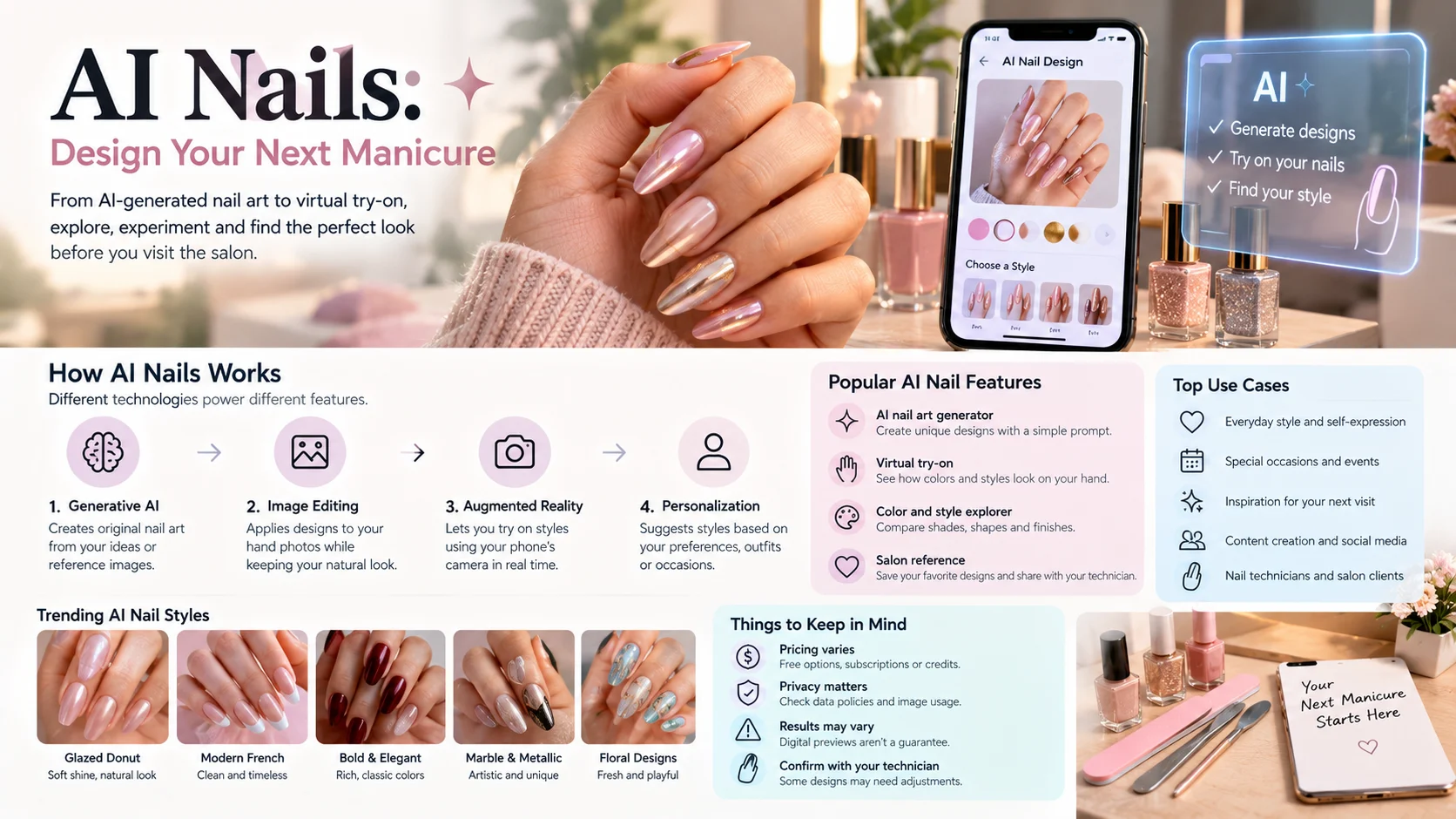
AI nails uses AI tools to generate nail art ideas and preview different colors, shapes, and styles on hand photos. Users can create custom designs, virtually try manicures, and save reference images for their nail technician.
AI nails is changing how people plan manicures. Instead of relying entirely on inspiration photos or trying to explain a design verbally, users can explore digital nail art and see how a proposed look might appear on their own hands.
These tools range from AI nail art generators to virtual polish simulators and photo-editing apps. Some focus on creative designs, while others help users compare existing colors and nail shapes.
The important distinction is that AI nail design, virtual nail try-on, and conventional nail filters are not the same thing. Understanding what each tool actually does can help you choose one that fits your needs, budget, and preferred workflow.
AI Nails at a Glance
- Design generation: Turn written descriptions into original manicure concepts.
- Virtual try-on: Preview nail colors, shapes, and artwork on a photo or through a camera.
- Personalization: Explore designs that complement an outfit, occasion, or preferred aesthetic.
- Salon preparation: Save a visual reference to communicate your desired manicure.
- Pricing: Free access, subscriptions, and credit-based purchases vary by app.
- Main limitation: A digital preview cannot guarantee an identical result on real nails.
What Is AI Nail Design?
AI nail design uses artificial intelligence to create or modify manicure concepts. You can describe a design in words, select visual references, or upload a photo for a personalized preview.
For example, a prompt might request almond-shaped nails with a milky pink base, fine gold lines, and a glossy finish. A suitable generator can produce a concept that you can refine or share with a nail artist.
Some tools generate a new design from scratch. Others apply predefined patterns to a photo, use augmented reality to simulate polish, or edit an existing image.
AI Nail Art Generator vs. Virtual Nail Try-On
These two features often appear together, but they solve different problems.
| Capability | AI nail art generator | Virtual nail try-on |
|---|---|---|
| Main purpose | Create new design concepts | Preview a look on your hand |
| Typical input | Text prompt or reference image | Hand photo or live camera |
| Typical output | A designed manicure image | A preview of the manicure on your nails |
| Best use | Exploring creative possibilities | Comparing colors and styles before a salon visit |
| Main limitation | Generated details may be difficult to reproduce | The preview may not match real-world results exactly |
A general-purpose image editor can also create nail art, but it may require more precise instructions and manual corrections than a dedicated nail application.
How Does AI Nails Technology Work?
AI nail tools use different techniques depending on the feature. Understanding these differences helps explain why some previews look convincing while others distort the original photograph.
1. Generative AI Creates New Designs
Generative image models produce visual content based on patterns learned during training. A prompt guides the model toward particular colors, textures, shapes, and decorative elements.
For nail art, this can mean generating French tips, chrome effects, floral patterns, marble textures, geometric designs, or elaborate themed manicures.
The model may produce a visually appealing result without following every instruction precisely. Tiny details, repeated patterns, and nail anatomy can still contain errors.
2. Image Editing Applies Designs to Hand Photos
Photo-based tools attempt to identify the fingers and nail surfaces in an uploaded image. They then modify the relevant regions while preserving the surrounding hand as much as possible.
This process can involve image segmentation, which separates one part of an image from another, and image generation or editing to render the selected design.
The quality depends on the photograph, nail visibility, finger position, lighting, and the tool’s ability to preserve the original image.
3. Augmented Reality Enables Live Try-On
Some applications use augmented reality (AR) to place virtual colors or patterns over nails viewed through a phone camera.
Unlike a static photo preview, live try-on lets users move their hands and observe how the simulated manicure appears from different angles.
However, AR polish previews and generative image editing are not interchangeable. One may be better for quickly comparing colors, while the other may offer more creative freedom.
4. Personalization Suggests Styles
Some nail applications advertise personalized recommendations based on selected preferences, uploaded outfits, or hand photographs.
These recommendations may help users narrow down choices, but they should be treated as suggestions rather than objective judgments about which colors suit a person.
An app’s claim to analyze skin tone or nail condition also does not establish medical accuracy. Use visual recommendations for styling, not as a substitute for professional medical advice.
Popular AI Nail Design Ideas to Try
AI nails tools are useful when you have a general aesthetic in mind but have not decided on the final details.

1. Glazed donut nails
A translucent nude or milky base with a pearlescent finish. Ask for a soft shine and natural-looking proportions for a subtle result.

2. Modern French manicure
Try classic white tips, colored edges, micro-French lines, or a soft ombré transition. Specify the tip width to keep the design consistent.

3. Minimalist solid colors
Compare burgundy, nude pink, chocolate brown, deep red, or muted lavender. These designs are useful when color is more important than decoration.

4. Marble and metallic art
Explore marble veining, gold foil, chrome accents, and mixed finishes. Keep the pattern scale in mind because intricate details may be difficult to reproduce on short nails.

5. Floral and seasonal designs
Generate delicate flowers, seasonal colors, festive patterns, or themed artwork for weddings, holidays, and special events.
These are design directions, not a claim that every AI nail app includes these presets. A text-based generator may support them even when its built-in library does not.
How to Use AI Nails: A Step-by-Step Guide
You do not need professional design skills to start. The key is to work from a clear idea and check the result before relying on it.
Step 1: Choose the Right Tool
Decide whether you want to create an original design, preview a manicure on your hand, or simply test polish colors.
A dedicated virtual try-on app is convenient for personal previews. A prompt-based image generator may be more suitable for unusual artwork or detailed patterns.
Step 2: Prepare a Clear Hand Photo
If the application requires a photo, take one in even natural light. Keep your fingers separated enough to show the nails clearly, and avoid strong shadows or heavy filters.
A clean background can also help the system distinguish your fingers from surrounding objects.
Step 3: Select the Nail Shape and Length
Choose the shape you want to explore, such as almond, square, oval, coffin, or stiletto. If length matters, state whether you prefer short natural nails, medium extensions, or long dramatic nails.
The preview can help you compare styles, but it cannot tell you exactly how comfortable or practical a particular length will be in everyday life.
Step 4: Enter a Specific Prompt
Describe the base color, shape, finish, pattern, and overall style. Avoid adding too many unrelated visual elements in the first attempt.
For example, specify a sheer pink base, short almond nails, thin white French tips, and a glossy finish. You can then request variations if you want a softer or more dramatic look.
Step 5: Compare and Refine
Review the output for uneven nail shapes, inconsistent patterns, altered fingers, and unrealistic reflections.
If the design misses the mark, change one or two instructions at a time. Save the strongest version so you can compare it with the original image.
Step 6: Share the Reference With Your Nail Technician
Show the saved image to your nail artist and discuss the shape, length, polish, finish, and technique required.
Ask whether the design suits your natural nails or requires extensions. The technician can also explain which details may need to change to achieve a practical result.
AI Nails Prompt Examples
A well-written prompt makes the desired design easier to communicate. You can adapt these examples for a dedicated AI nail generator or a general-purpose image model.
Prompt for Elegant Everyday Nails
Create a realistic manicure design featuring short almond-shaped nails, a sheer milky pink base, thin white micro-French tips, and a glossy natural finish. Use clean lines, consistent proportions, soft daylight, and a minimal luxury beauty aesthetic.
Copy prompt
Prompt for Luxury Nail Art
Design medium almond nails with a deep burgundy base, delicate gold foil accents, subtle marble details on two accent nails, and a high-gloss finish. Keep the design balanced, elegant, and visually consistent across all ten nails.
Copy prompt
Prompt for Virtual Try-On
Apply a soft lavender chrome manicure to the existing nails in the uploaded hand photograph. Preserve the original skin tone, finger positions, lighting, jewelry, and background. Keep the nail shape realistic and the reflections consistent with the light source. Do not alter any other part of the image.
Copy prompt
The results will depend on the image model or application. A tool that does not support image editing may generate a separate manicure image instead of modifying your uploaded photograph.
Best AI Nails Apps and Tools to Consider
The market includes dedicated nail applications, general beauty editors, and prompt-based image generators. Their features overlap, but their workflows differ.
The following options have identifiable product pages and published feature descriptions. Product capabilities below reflect those descriptions, not independent laboratory testing.
1. Glazii
Glazii, previously called Nails AI according to its App Store version history, combines nail design generation with virtual try-on. Its listing describes nail-shape options, patterns, outfit matching, product scanning, and an AI nail assistant.
- Best suited to: Users who want several nail-planning features in one app.
- Key strength: Combines design creation and hand-photo previews.
- Pricing: Free download with in-app purchases. The Pakistan App Store listing displays weekly, monthly, and yearly Pro plans, with prices subject to change.
- Main limitation: Its listed features and supported devices may not match every user’s needs.
Official listing: Glazii on the App Store.
2. BeautyPlus
BeautyPlus is a broader photo editor with a nail-art feature. Its published guide describes automatic hand detection, preset styles, and the ability to use a reference design.
- Best suited to: Users who want nail edits alongside general beauty and photo editing.
- Key strength: Nail styling within a multipurpose editing workflow.
- Pricing: Some features are available without payment; premium features may require a subscription.
- Main limitation: It is not exclusively a nail design tool, so dedicated nail features may be less central to the overall experience.
Official website: BeautyPlus.
3. YouCam Nails
YouCam Nails focuses on virtual manicure experimentation. Published comparisons describe a design library and options for testing colors and nail styles.
- Best suited to: Users who want to explore existing nail designs and color combinations.
- Key strength: A nail-focused experience rather than a general-purpose photo editor.
- Pricing: Check the current app-store listing for available free features and purchases.
- Main limitation: A design library may not offer the same flexibility as generating a completely new concept from a text prompt.
4. AI Nails: Nail Art Try-On
This Android application, published by 26 Branding Agency Inc., describes a workflow in which users photograph their hands, choose a design, and receive four visual variations. Its listing also describes shape and length options, a salon reference card, and one-time session purchases rather than a subscription.
- Best suited to: Users who want a photo-based preview and a reference to show a nail technician.
- Key strength: Design variations and a shareable salon card.
- Pricing: The listing describes one free design followed by paid session packs; verify current in-app prices.
- Main limitation: Availability and features depend on the supported platform and current app version.
Official listing: AI Nails on Google Play.
5. Fotor
Fotor is a general-purpose photo editor and AI image generator. It can be used to experiment with nail art through text prompts and image editing, although its dedicated nail try-on capabilities differ from those of specialist applications.
- Best suited to: Users who want to explore creative nail concepts using a broader image-editing tool.
- Key strength: Prompt-driven creative flexibility.
- Pricing: Check current free-use limits, subscription terms, and export restrictions.
- Main limitation: Prompt-based editing may require more trial and error than a dedicated manicure interface.
Official website: Fotor.
Quick Comparison
| Tool | Primary workflow | Target user | Pricing model to verify | Main limitation |
|---|---|---|---|---|
| Glazii | Generate designs and preview them on hands | All-in-one manicure planning | Subscription and in-app purchases | Some features may be paid |
| BeautyPlus | Edit hand photos and apply nail art | General beauty editing | Free and paid features | Nail design is one part of a larger editor |
| YouCam Nails | Browse and test manicure designs | Nail art enthusiasts | Current app-store terms | Creative freedom depends on available options |
| AI Nails | Generate variations on hand photos | Salon planning | Paid sessions listed | Platform availability |
| Fotor | Generate or edit nail art with prompts | Creative users | Free limits and paid plans | May require more manual prompting |
How to interpret this comparison: If you mainly want to preview colors, start with a virtual try-on tool. If you want a completely new design, prioritize prompt-based generation. If you want to take a reference to a salon, check whether the app preserves the chosen shape, length, and colors in its exported image.
AI Nails Pricing: What Should You Check?
There is no universal price for AI nail design. Some tools offer limited free access, others sell subscriptions, and some charge for individual generation sessions.
The payment model can affect the real cost more than the advertised starting price.
Before paying, check:
- Free generation allowance: How many designs can you create before payment is required?
- Credit expiry: Do unused credits expire, or can you use them later?
- Subscription renewal: Does the plan renew automatically?
- Export restrictions: Are high-resolution images, downloads, or watermark removal included?
- Feature access: Are virtual try-on, advanced shapes, or reference-image editing reserved for paid users?
- Refund and cancellation terms: Can you cancel through your app store, and what happens to unused purchases?
A one-time purchase can be convenient if you only need a few designs. A subscription may be more practical for frequent experimentation, but only if its limits and features justify the cost.
Because app-store prices can vary by country, verify the amount shown in your own store before subscribing.
Privacy and Accuracy: What AI Nails Cannot Guarantee
AI nail tools may process hand photographs, uploaded reference images, account details, and purchase information. The specific data practices depend on the provider.
Read the privacy policy before uploading personal images. Check whether photos are retained, whether they may be used to improve models, and whether the provider offers deletion controls.
For example, Glazii’s App Store privacy disclosure identifies categories of data that its developer says may be linked to users, including contact information and user content. Apple notes that these developer-provided privacy disclosures have not been verified by Apple.
That is why a general claim such as “AI nail apps are completely private” would be misleading. Review the relevant provider’s actual policy rather than relying on the presence of AI or a paid subscription.
Why Virtual Nail Colors May Look Different in Real Life
A digital manicure is a visual estimate, not a physical swatch.
Several factors can affect the result:
- Lighting: Warm indoor light and cool daylight can change the apparent color.
- Screen settings: Display brightness, color calibration, and night modes influence what you see.
- Material finish: Real chrome, glitter, gel, and glossy polish reflect light differently from a simulated image.
- Nail condition: The natural nail’s length, curve, and surface affect how a design can be applied.
- Application technique: A nail technician may need to adjust fine patterns or proportions to make the design achievable.
Use the image to narrow your preferences, then discuss practical details with your nail technician. If the exact shade matters, compare a physical polish swatch under similar lighting.
Who Should Use AI Nails Tools?
AI nail design can be useful for several audiences, but the ideal workflow depends on the goal.
- Beauty enthusiasts: Explore colors and styles before committing to a manicure.
- Salon clients: Prepare a visual reference and communicate preferences more clearly.
- Nail technicians: Use generated concepts as inspiration when discussing designs with clients.
- Content creators: Create manicure concepts for beauty posts, mood boards, and visual campaigns.
- DIY nail artists: Experiment with patterns and color combinations before working with real polish.
Professional nail artists should treat generated images as creative references, not guaranteed production-ready instructions. Some designs may require specialist techniques, extra time, or adjustments to suit the client’s natural nails.
Common AI Nails Mistakes to Avoid
Choosing an App Without Checking Its Workflow
An app that generates beautiful nail art may not place the design on your own hand. Confirm whether it supports the exact task you need.
Using Poor-Quality Photos
Blurry images, overlapping fingers, and harsh shadows can make virtual try-on less convincing. Take a clear photograph before judging the tool’s capabilities.
Expecting an Exact Salon Match
A generated image may include impossible patterns or unrealistic proportions. Ask your nail technician which elements can be reproduced and which need adjustment.
Ignoring the Total Cost
A low starting price may exclude premium styles, downloads, or additional generations. Review the full payment terms before purchasing.
Treating AI Nail Analysis as Medical Advice
A styling app may offer visual feedback about nail appearance, but that does not establish its ability to diagnose nail disease. Consult a qualified healthcare professional about persistent discoloration, pain, swelling, or other concerning changes.
Frequently Asked Questions About AI Nails
1. What is AI nails?
AI nails uses artificial intelligence to generate nail art ideas and preview manicure colors, shapes, and designs.
2. Can I try nail designs on my own hands using AI?
Yes. Some tools let you upload a hand photo to preview different nail colors and designs.
3. Which AI nails app should I choose?
Choose virtual try-on for realistic previews or a text-based generator for creating unique nail designs.
4. Are AI nail design apps free?
Some offer free features, while others require subscriptions or paid credits. Check current pricing before choosing.
5. Can I show an AI nail design to my nail technician?
Yes. Save the design as a reference and discuss its shape, length, colors, and finish with your technician.
Conclusion
AI nails tools make it easier to explore manicure ideas and compare designs before visiting a salon. Choose a tool based on its features, pricing, privacy, and image quality, and remember that actual results may differ from AI previews.