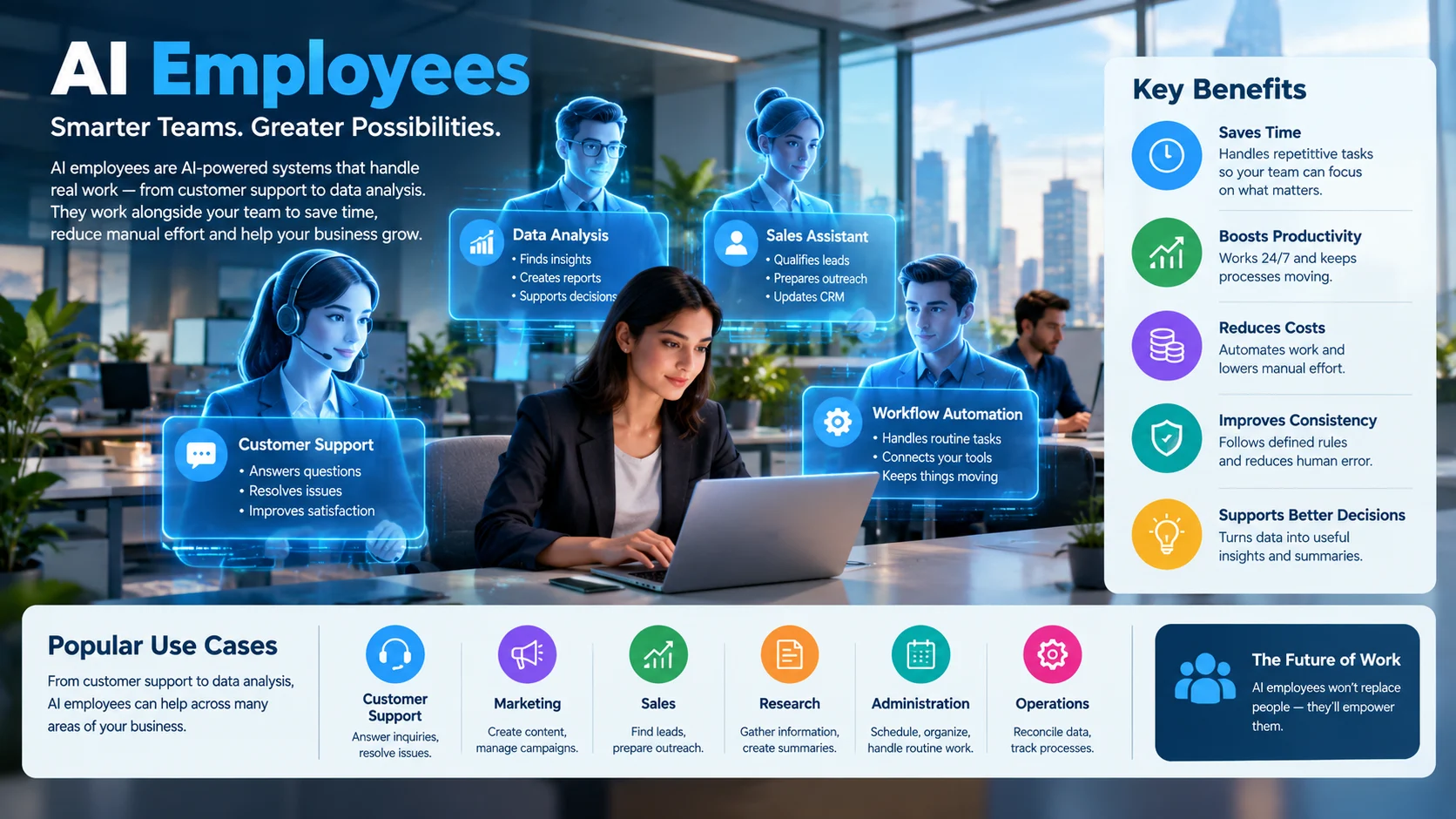
AI employees are AI-powered systems that handle workplace tasks such as customer support, research, content creation, and data analysis. They can work as digital assistants or autonomous agents, but their reliability depends on the task, available data, integrations, and human oversight.
Businesses are increasingly exploring AI employees to handle repetitive work, support decision-making, and improve operational efficiency. Unlike a traditional chatbot that mainly answers questions, an AI employee may follow a workflow, use connected software, and complete multiple steps toward a defined goal.
However, the term does not describe one standardized technology. Some products are simple AI assistants marketed as digital employees, while others combine language models, business integrations, and automation tools.
Understanding this distinction helps businesses evaluate what these systems can actually do, how much they cost, and where human supervision remains essential.
AI Employees at a Glance
- What they are: AI-powered assistants or agents designed to perform specific business tasks.
- Common uses: Customer service, sales support, marketing, research, reporting, and administrative work.
- How they work: They combine AI models with instructions, business data, tools, and defined workflows.
- Main benefits: Faster routine tasks, greater availability, and reduced manual workload.
- Key limitations: Errors, incomplete context, integration failures, and potential privacy risks.
- What to evaluate: Task performance, total cost, security controls, human oversight, and measurable business value.
What Are AI Employees?
AI employees are software systems designed to perform defined work activities with varying levels of independence. They can answer customer questions, prepare reports, qualify leads, summarize documents, and coordinate tasks across connected applications.
The phrase is a business-oriented label, not a formal technical category. Vendors may use it to describe AI agents, virtual assistants, automated workflows, or packaged services that perform a particular business function.
AI Employees vs. AI Assistants vs. AI Agents
These terms overlap, but they describe different approaches to workplace automation.
| Type | Primary purpose | Typical example |
|---|---|---|
| AI assistant | Helps a person complete tasks | Drafting emails or summarizing a report |
| AI agent | Pursues a goal through multiple steps and actions | Researching a prospect and updating a CRM |
| AI employee | A product or service marketed as a digital worker | An AI sales representative that handles initial lead qualification |
| Traditional automation | Executes predefined rules | Sending an invoice after a payment is recorded |
An AI employee may combine all four approaches. For example, a customer support product could use a language model to understand a request, retrieve order details, follow a workflow, and prepare a response.
The important distinction is what the software can actually do. A system that generates text is not automatically capable of independently completing an entire business process.
How Do AI Employees Work?
Most AI employees combine several technical components. Each component contributes a different capability.
1. The AI Model Understands Instructions
A large language model (LLM) interprets natural-language requests and generates responses. It can summarize information, classify requests, draft content, and help plan the steps needed to complete a task.
However, a model does not automatically know your company’s current inventory, internal policies, or customer records. It needs access to appropriate information.
2. Business Data Provides Context
AI systems can use approved documents, databases, and connected business applications to answer questions with relevant information.
One technique is retrieval-augmented generation (RAG). It retrieves relevant information from an external knowledge source and supplies it to the model when generating an answer.
For example, an AI support agent could retrieve a company’s return policy before responding to a customer’s refund question. This can improve relevance, although outdated documents or poor retrieval can still lead to incorrect answers.
3. Integrations Allow the System to Take Action
An AI employee becomes more useful when it can interact with business software through approved integrations or APIs.
Depending on its permissions, it might:
- Create a draft email.
- Retrieve a customer record.
- Add information to a CRM.
- Schedule a meeting.
- Generate a report.
- Trigger an approved workflow.
These actions require working integrations, suitable permissions, and clear instructions. The availability of an integration does not guarantee that every task will work reliably.
4. Workflows Define the Boundaries
Businesses should define what the system can do, what it must avoid, and when it needs human approval.
A sales agent, for instance, might research a lead and prepare a personalized email. A human employee could review the message before sending it.
This arrangement allows automation to handle repetitive preparation while keeping consequential decisions under human control.
5. Monitoring Measures Performance
AI employees should be evaluated against real business outcomes, not just impressive demonstrations.
Useful measures include completion rate, error rate, response time, cost per completed task, customer satisfaction, and the percentage of cases requiring human intervention.
A system that finishes tasks quickly but produces frequent errors may create more work than it saves.
Common Business Uses of AI Employees
AI employees are most useful when a business can define the task, provide the necessary information, and measure the result.
Customer Support
A customer service agent can answer common questions, retrieve help articles, classify incoming requests, and route complicated cases to human staff.
More advanced implementations may connect to order-management systems to check delivery status or initiate approved actions. Refunds, account changes, and other sensitive operations should follow explicit permission and approval rules.
Best fit: Businesses handling high volumes of repetitive customer inquiries.
Sales and Lead Generation
Sales-focused AI systems can research prospects, summarize CRM records, prepare outreach drafts, and help qualify incoming leads.
They can also assist with follow-up reminders and meeting preparation. However, inaccurate contact data, generic messaging, and excessive automated outreach can damage customer relationships.
Best fit: Sales teams with established lead qualification criteria and well-maintained CRM data.
Marketing and Content Creation
Marketing teams can use AI employees to research topics, generate content outlines, draft social posts, summarize campaign results, and organize content calendars.
Human review remains important for factual accuracy, brand voice, originality, and legal compliance. Publishing large volumes of unreviewed content can create reputational and search-quality problems.
Best fit: Teams producing recurring content with clear editorial guidelines.
Administrative Work
Administrative agents can summarize meetings, organize documents, prepare agendas, draft emails, and help coordinate calendars.
These tasks often offer a practical starting point because the business can compare the AI-generated output with an existing process. Access to calendars, email, and documents should be limited to what the workflow requires.
Best fit: Small businesses and teams with repetitive coordination work.
Research and Data Analysis
AI employees can gather information from approved sources, extract details from documents, categorize records, and prepare initial analytical summaries.
The output should identify its sources and distinguish verified facts from assumptions. Important calculations should be checked using reliable tools rather than trusting generated text alone.
Best fit: Analysts and managers who need faster preparation, not unsupervised decision-making.
Finance and Operations
AI systems can help classify expenses, extract invoice fields, reconcile records, and flag unusual transactions for review.
They should not receive unrestricted authority over payments or financial approvals simply because they can execute a workflow. Sensitive actions need authorization controls, audit trails, and appropriate separation of duties.
Best fit: Businesses with documented procedures and clear approval thresholds.
Benefits of AI Employees
The benefits depend on the task and how well the system is implemented. Several advantages are worth evaluating.
Reduced Repetitive Work
AI employees can take over routine drafting, categorization, information retrieval, and other repeatable activities. Employees can then spend more time on customer relationships, judgment, and complex problems.
Faster Task Completion
Automating several steps within one workflow may reduce delays between applications or departments. The actual improvement depends on integration quality and the amount of human review still required.
Support Beyond Standard Office Hours
Some AI services can respond to requests outside normal business hours. Availability depends on the provider, deployment, connected systems, and service reliability.
Consistent Execution of Defined Procedures
A well-designed workflow can apply the same instructions and checks to similar cases. This is particularly useful for routine processes with documented rules.
Consistency is not the same as correctness, however. A flawed instruction can produce the same mistake repeatedly.
Flexible Business Scaling
An AI system may handle additional routine requests without requiring a proportional increase in staffing. Yet usage charges, model limits, supervision, and exception handling can increase as workload grows.
For this reason, businesses should measure the cost of successfully completed work rather than assuming automation always reduces expenses.
AI Employee Tools and Platforms to Consider
There is no single platform suitable for every business. Some tools help organizations build their own agents, while others provide ready-made assistants or automated workflows.
The following comparison focuses on established products and their broad positioning. It does not imply that every product provides a complete autonomous AI employee.
| Platform | Target user | Key strength | Pricing transparency | Core limitation |
|---|---|---|---|---|
| Microsoft Copilot Studio | Organizations using Microsoft services | Building agents connected to business data and workflows | Review current licensing and consumption terms | Setup, permissions, and integrations require planning |
| Salesforce Agentforce | Sales, service, and CRM teams | Building AI agents around customer and business workflows | Check current editions and usage-based charges | Most useful when aligned with Salesforce data and processes |
| Zapier | Small businesses and operations teams | Connecting applications and automating workflows | Check plan limits and AI-related usage terms | Complex workflows can require testing and maintenance |
| OpenAI API | Developers and technical teams | Building custom AI-powered applications and agents | Usage-based pricing depends on the services used | Requires development, monitoring, and integration work |
| Hugging Face | Developers and AI researchers | Exploring and deploying models from a broad model ecosystem | Costs vary by model, hosting, and infrastructure | Self-managed deployments require technical expertise |
Microsoft documents agents that combine generative AI, business knowledge, actions, and integrations. Zapier focuses on connecting applications through automated workflows, while the OpenAI API provides building blocks for custom AI applications. Microsoft Learn · OpenAI API documentation
Ready-Made AI Employees vs. Custom Agents
Ready-made products are designed to reduce setup work. They may offer a preconfigured sales, marketing, support, or administrative assistant.
Custom agents give technical teams more control over instructions, tools, data sources, and workflow logic. They also require more development effort and ongoing maintenance.
Choose a ready-made product when the supplied workflow closely matches your needs. Consider a custom solution when your process requires specialized integrations, strict controls, or capabilities the packaged product does not offer.
How to Compare Platforms Fairly
Before committing to a vendor, test the same representative task across your shortlisted options.
For example, ask each candidate to retrieve a customer record, draft a response based on an approved policy, and prepare an update for your CRM. Check whether it completes every step, respects permissions, and handles missing information correctly.
This approach provides more useful evidence than comparing marketing claims alone.
How Much Do AI Employees Cost?
AI employee pricing varies considerably because products use different commercial models. Some charge a subscription, others charge by usage, and custom deployments may require development and infrastructure budgets.
A useful cost comparison includes more than the monthly fee.
The Main Cost Components
- Software subscription: The recurring fee for a packaged product or business platform.
- Model usage: Charges based on tokens, requests, or other provider-defined usage units.
- Integration costs: Expenses associated with connecting CRM, email, databases, and other applications.
- Implementation: Time spent configuring workflows, testing outputs, and preparing business data.
- Human supervision: Employee time required to review, correct, or approve work.
- Maintenance: Ongoing monitoring, troubleshooting, and updates as business processes change.
Some platforms also apply task limits, credit allowances, or consumption charges. Review the current pricing page and contract rather than assuming the advertised starting price covers every capability.
Calculate the Cost per Completed Task
A simple way to evaluate value is to estimate the full cost of the workflow.
For example, suppose an automated process handles 1,000 tasks each month. Its software, model usage, supervision, and maintenance cost a combined $600.
If 900 tasks are completed successfully, the cost is approximately $0.67 per successful task.
That figure excludes any additional business costs not included in the $600 estimate. It also assumes the 900 successful tasks meet your quality requirements.
Compare this result with the fully loaded cost of completing the same work manually. Include error correction and exception handling on both sides.
The goal is not to automate everything. It is to identify tasks where automation produces a worthwhile, measurable improvement.
Risks and Limitations of AI Employees
AI employees can create operational problems when businesses give them unclear objectives or excessive permissions.
Inaccurate Outputs
Language models can produce plausible but incorrect answers. This risk matters when systems handle financial information, customer commitments, compliance questions, or other consequential work.
Use approved information sources, validate important outputs, and define when a task must be escalated.
Integration Failures
An agent may misunderstand a request, encounter an unavailable API, or fail to update a business system correctly.
Design workflows to detect incomplete actions. For important operations, confirm the result rather than assuming that a successful-looking response means the underlying change occurred.
Excessive Autonomy
An AI employee with permission to send messages, modify records, or approve transactions can create consequences beyond a poor answer.
Start with read-only access or draft-only workflows where practical. Expand permissions only after testing, and require human approval for high-impact actions.
Unclear Accountability
A vendor’s software does not replace a business’s responsibility for its decisions and customer commitments.
Assign a human owner to every production workflow. That person should monitor performance, investigate incidents, and decide when the system needs to be paused.
Vendor Lock-In
A packaged AI employee may depend on proprietary prompts, workflow formats, integrations, or data structures. Moving to another platform can require rebuilding those components.
Before adopting a vendor, check whether you can export relevant records, retrieve logs, preserve business data, and migrate important workflows.
Privacy and Security: What Businesses Should Check
An AI employee may access customer records, internal documents, emails, or financial information. Its privacy requirements therefore depend on both the model provider and the applications connected to it.
Review these areas before deployment:
- Data usage: Determine whether submitted business information may be used for model training or improvement.
- Retention: Establish how long prompts, responses, logs, and uploaded files are stored.
- Access control: Restrict the agent to the data and actions required for its role.
- Auditability: Ensure important actions can be traced to a workflow and reviewed by an authorized person.
- Third-party integrations: Check the data policies of external services that receive information.
- Deletion and export: Confirm how records can be retrieved or deleted when required.
For example, OpenAI states that data from its business products and API is not used to train or improve its models by default. Its API documentation also describes retention practices and eligibility requirements for Zero Data Retention controls. These terms vary by product, endpoint, and configuration, so businesses should review the applicable documentation directly. OpenAI business data and privacy · OpenAI API data controls
Important: SOC 2 does not automatically mean Zero Data Retention. A security report and a data-retention commitment address different questions.
Businesses should verify the scope of a vendor’s audit, its actual retention policy, and the settings available for their particular deployment. Do not send confidential information into a system until its data-handling arrangements have been assessed.
How to Implement AI Employees in a Business
A controlled rollout is usually more useful than trying to automate an entire department immediately.
Step 1: Choose One Repetitive Task
Identify a process with clear inputs, predictable steps, and measurable outcomes. Preparing meeting summaries or classifying support tickets can be easier to evaluate than making complex sales or financial decisions.
Step 2: Document the Existing Workflow
Record how employees complete the task today. Include the information they need, the systems they use, common exceptions, and the conditions that require judgment.
This becomes the baseline for evaluating the AI system.
Step 3: Connect Only Necessary Data
Provide the minimum access required to complete the task. Test whether the agent can retrieve accurate information without exposing unrelated records.
Step 4: Test Before Granting More Authority
Run the system on representative examples, including incomplete requests and unusual cases. Compare its outputs with work reviewed by experienced employees.
Start with recommendations or drafts before allowing actions that affect customers, payments, or business records.
Step 5: Measure Results
Track completion quality, time saved, operating costs, error rates, and human intervention. Review these metrics regularly and pause the workflow if performance deteriorates.
Step 6: Expand Gradually
Once the initial workflow performs reliably, consider additional tasks. Reassess permissions, costs, and risks each time the system gains new capabilities.
Frequently Asked Questions About AI Employees
1. What is an AI employee?
An AI employee is an AI-powered system that handles tasks such as customer support, research, sales, and administration.
2. Can AI employees replace human employees?
They can automate repetitive tasks, but human judgment, accountability, and relationship-building remain important.
3. What is the difference between an AI employee and an AI agent?
An AI agent performs tasks toward a goal, while AI employee is a broader business term for AI-powered digital workers.
4. How much do AI employees cost?
Costs vary by subscription, usage, integrations, and supervision requirements. Compare total costs before choosing a solution.
5. Are AI employees safe for business data?
They can be safe with proper safeguards. Check data retention, privacy policies, access permissions, and security controls.
Conclusion
AI employees help businesses automate tasks, improve efficiency, and reduce manual workloads. Choose a platform based on its capabilities, total cost, security, and reliability, and begin with a small workflow under human supervision.