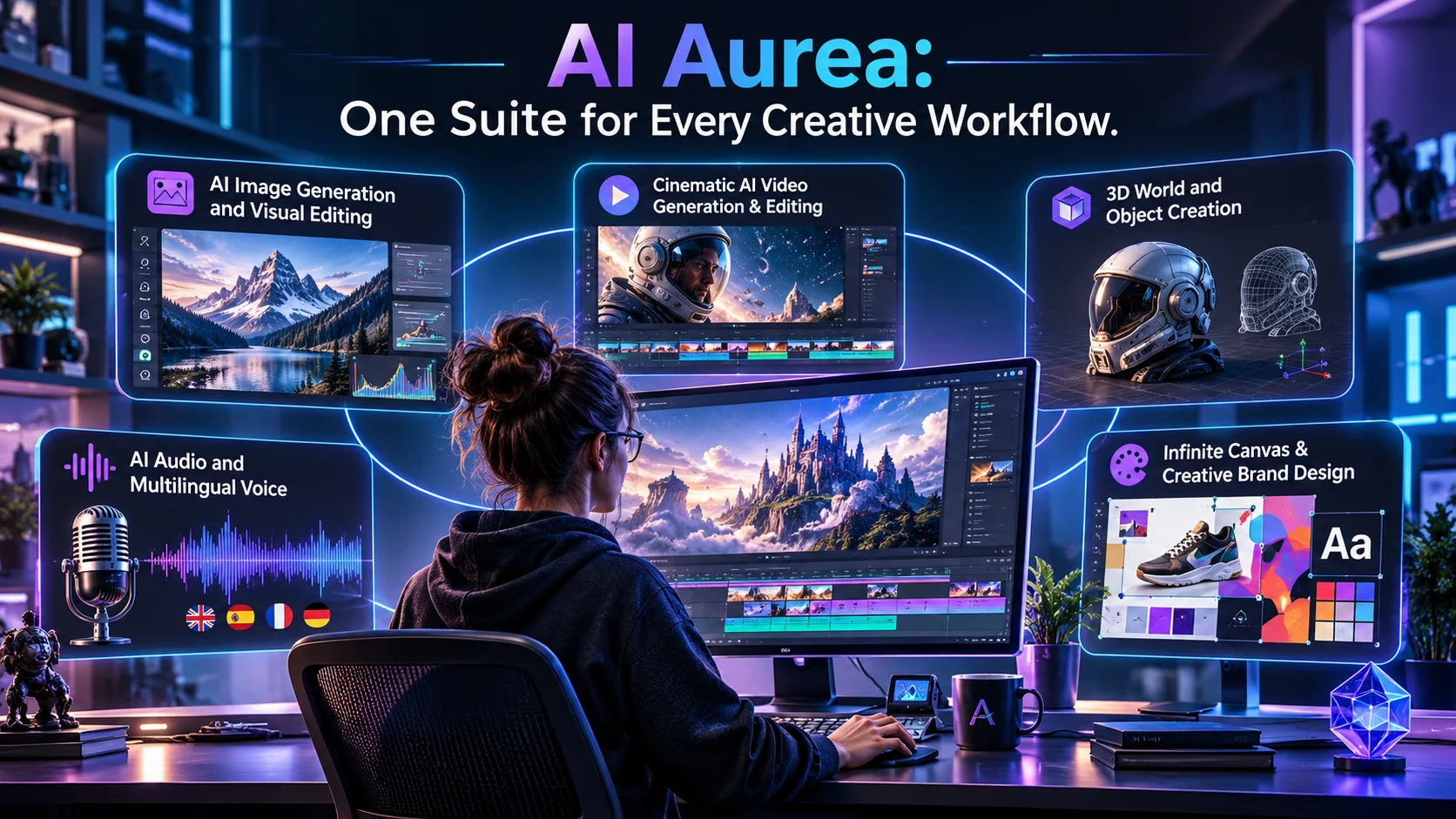
Quick Answer: AI Aurea, also known as Aurea Suite, is an AI-powered creative platform that brings image, video, audio, voice, and 3D generation into one workspace. It combines multiple generative models with editing tools, 3D production features, and video workflows for creators, agencies, studios, and marketing teams.
AI Aurea is a browser-based creative suite designed to bring several AI content-generation workflows together.
Its official website describes a workspace where users can create images, videos, audio, voice content, and 3D assets. Instead of switching between separate generation platforms and editing applications, users can access multiple creative tools through one interface.The platform targets creators, studios, and brand teams that produce visual and multimedia content. Its features extend beyond simple text-to-image generation.
For example, a marketing team could develop a campaign concept, generate visual assets, create video content, add audio, and prepare different formats for social media. A 3D artist could generate an environment, adjust its lighting, refine its geometry, and export the result. Aurea also promotes AI-based model routing. Its website says the platform can select and route requests across hundreds of models for different creative tasks.
How does AI Aurea work?
AI Aurea brings different creative tools into a shared environment. Users select a task, provide a prompt or reference material, and use the relevant generation or editing workflow.
The platform describes a system that combines multiple generative models with AI-assisted tools.
1. Choose a creative task
Start by deciding what you want to produce.
Depending on the project, you can work with:
- Images and visual compositions
- AI-generated videos
- Voice and audio
- 3D environments and objects
- User-generated content
- Visual editing on an infinite canvas
Each task uses a different workflow. Creating a 3D object, for example, requires different controls from editing a video.
2. Provide a prompt or reference
Describe the result you want using written instructions. Some workflows also accept images or video as references.
For example, a product designer might provide a product image and request a 3D representation. A video creator could describe a scene and generate a visual starting point.
Clear instructions help communicate the intended result. Reference materials can also guide the visual direction.
3. Generate and refine the output
Aurea’s platform brings together different models and editing capabilities. Its website describes AI-based routing that selects models according to the task and prompt.
After generation, users can refine their work through the available editing tools. Depending on the workflow, this may involve adjusting layers, lighting, video effects, or 3D geometry.
4. Export the finished project
Aurea lists several professional export formats for video, audio, images, and 3D assets.
This is important for creators who need to continue working in other applications. Export compatibility can determine whether a generated asset fits an existing production pipeline. aureasuite.ai
Key features of AI Aurea
Aurea’s feature set covers several creative disciplines. The following sections explain its main capabilities and where they may be useful.
1. AI image generation and editing
Aurea includes image-generation capabilities within its broader creative workspace.
Users can create visual assets and continue refining them through the platform’s editing environment. The official website also describes an infinite 2D canvas with several editing functions.
Its canvas includes:
- Multiple layers
- Masks and blend modes
- Filters
- Non-destructive editing
- An integrated creative workspace
Non-destructive editing means you can make changes without permanently replacing the original content. This is useful when experimenting with different visual directions.
For marketing teams, an integrated canvas can help organize campaign assets and refine designs. However, the exact image models and their individual capabilities should be checked inside the platform. aureasuite.ai
2. AI video generation and editing
Aurea promotes a video pipeline that combines AI generation with editing tools.
Its official website lists several production features:
- Multitrack video timeline
- Keyframe controls
- Frame-by-frame editing
- Live histogram
- Adjustment layers
- Professional effects
- Automatic cropping
- Export presets
The automatic cropping feature supports formats such as 9:16, 1:1, and 16:9. These formats are useful for adapting content to different publishing platforms.
A multitrack timeline also gives creators more control over how video and other elements fit together.
Aurea advertises 32-bit color depth for its AI video workflow. This is a company-stated specification, not an independently verified benchmark. Users working with professional footage should test the actual output quality and compatibility before adopting it for production. aureasuite.ai
3. AI 3D generation
3D generation is one of the more distinctive parts of Aurea’s offering.
The platform says users can generate 3D environments, objects, and scenarios from text, images, or video. This could help artists develop early concepts without building every asset manually.
The advertised 3D features include:
- 3D world generation
- 3D object creation
- AI-assisted UV mapping
- Manual UV editing
- AI retopology
- Rigging and retexturing
- Cinematic lighting
- Physics simulations
These tools target more than casual image creation. They are relevant to 3D artists, product designers, visual effects teams, and creators developing digital environments.
4. AI relighting and virtual cameras
Lighting can change the appearance and mood of a 3D scene.
Aurea advertises scene relighting with photorealistic lights and AI-generated HDRIs. HDRI stands for High Dynamic Range Image, a type of image commonly used to represent environmental lighting in 3D workflows.
The platform also lists animatable virtual cameras. These allow users to compose shots and adjust camera movement within a scene.
For product visualization, advertising, and cinematic content, lighting and camera control can make a significant difference.
5. Physics simulation
Aurea lists physics simulation tools for working with dynamic elements inside 3D scenes.
Its advertised simulation categories include:
- Cloth
- Particles
- Rigid bodies
- Fluids
These features can help artists create more realistic movement and interactions.
For example, a creator might simulate fabric movement in a product scene or add particles to an animated environment. The actual quality and performance should be evaluated through hands-on testing, particularly for complex scenes. aureasuite.ai
6. AI model aggregation and automatic routing
One of Aurea’s central selling points is its model aggregation system.
The company says it brings hundreds of models for image, video, audio, voice, and 3D into one interface. It also advertises automatic routing based on the user’s prompt.
This approach can reduce the need to maintain separate accounts across multiple generation services.
However, model aggregation does not mean every model is available on every plan. Access, usage costs, output quality, and generation limits may differ.
The company does not provide a complete public model-by-model list in the website information reviewed for this article. Buyers should confirm which models are currently available before choosing a subscription.
7. AI UGC video creation
Aurea also offers a dedicated AI UGC workflow.
UGC means user-generated content. In advertising, it often refers to videos that resemble authentic customer reviews, demonstrations, or creator recommendations.
Aurea lists these capabilities:
- AI avatars
- Multilingual voices
- Lip-sync
- Animated captions
- Vertical and horizontal video formats
- Multiple creative variations
This workflow may help marketing teams produce variations of an advertisement for different audiences and platforms.
For example, a brand could prepare several versions of a product presentation with different scripts and voice languages. The output would still require review to ensure accurate product information and natural delivery.
What can you create with AI Aurea?
The platform’s range of tools makes it relevant to several creative projects.
| Project | Relevant Aurea features | Potential use |
|---|---|---|
| Marketing campaign | Image, video, and UGC tools | Create campaign assets and advertisements |
| Product visualization | 3D generation and lighting | Develop product scenes and renders |
| Social media content | Video editing and auto-cropping | Prepare content for different formats |
| Digital environments | 3D world generation and physics | Develop scenes and virtual spaces |
| Brand design | 2D canvas and image editing | Create and refine visual materials |
| Multimedia production | Video, voice, and audio | Combine different content types |
These are practical examples based on the advertised capabilities. They are not guarantees of production quality or specific project outcomes.
AI Aurea pricing and plans
Aurea uses a token-based pricing structure. Its official pricing page lists four subscription options: Starter, Basic, Pro, and Max.
The website displays the following monthly prices and usage allowances. It also advertises a 20% yearly discount, so check the billing toggle before subscribing.
| Plan | Displayed monthly price | Monthly tokens |
|---|---|---|
| Starter | €8 | 7,800 |
| Basic | €39 | 38,000 |
| Pro | €89 | 91,000 |
| Max | €179 | 194,000 |
The pricing page also displays estimated generation quantities for different content types. aureasuite.ai
What can each plan generate?
The following estimates are taken from Aurea’s published pricing table.
| Output type | Starter | Basic | Pro | Max |
|---|---|---|---|---|
| Images | 70 | 345 | 827 | 1,763 |
| Videos | 6 | 29 | 70 | 150 |
| Image edits | 78 | 380 | 910 | 1,940 |
| Video edits | 37 sec | 184 sec | 441 sec | 941 sec |
| Image upscales | 23 | 115 | 275 | 587 |
| Video upscales | 5 | 24 | 58 | 125 |
| Songs | 48 | 237 | 568 | 1,212 |
| Voice generation | 600 sec | 2,923 sec | 7,000 sec | 14,923 sec |
These are platform estimates, not guaranteed output quantities under every setting. Different models, resolutions, and generation options may consume different amounts of tokens.
Which plan should you choose?
Starter: Suitable for individuals who want to explore Aurea and create a limited amount of content.
Basic: Worth considering for freelancers and creators who use several creative tools regularly.
Pro: More appropriate for users producing images, videos, audio, and other assets at a higher volume.
Max: Designed for heavier creative workloads that require a substantially larger token allowance.
Before purchasing, check whether the plan includes the specific models and editing features your workflow requires.
Understand the token system
Token-based pricing requires more attention than a simple unlimited subscription.
Aurea displays estimates for different types of output. This helps users understand the approximate production capacity of each plan.
However, buyers should confirm several details:
- How many tokens each model consumes
- Whether high-resolution outputs cost more
- Whether editing and upscaling use separate allowances
- Whether unused tokens carry over
- Whether additional tokens can be purchased
- What happens to existing projects after cancellation
The public pricing information reviewed for this article does not clearly establish all these conditions. Check the current subscription terms before committing to a long-term plan.
AI Aurea alternatives and competitors
Aurea operates in a competitive market that includes AI image generators, video platforms, and broader creative suites.
The closest alternatives depend on which part of Aurea you intend to use.
| Platform | Target user | Key strength | Pricing transparency | Main consideration |
|---|---|---|---|---|
| Aurea Suite | Creators, studios, and brand teams | Multiple creative models and integrated workflows | Four public token-based plans | Model-level costs and limits need checking |
| Adobe Firefly | Designers and creative professionals | AI generation with Adobe creative workflows | Public plans and credit allowances | Premium features consume generative credits |
| Runway | Video creators and production teams | AI video generation and editing | Public plans and credit documentation | Video generation can consume credits quickly |
| Freepik | Designers, marketers, and agencies | AI models, editing tools, and stock assets | Public plans and credit estimates | Credit costs vary by model and output |
Aurea vs. Adobe Firefly
Adobe Firefly combines image, video, and audio generation with Adobe’s wider creative ecosystem.
Its plans include monthly generative credits, and higher tiers provide larger allowances and access to additional features.
Firefly may be more suitable for people already working with Adobe applications. Aurea may appeal to users who want a broader collection of creative models and specialized 3D tools in one workspace.
Aurea vs. Runway
Runway focuses heavily on AI video creation and editing.
Its credit system varies by plan and model. The official help documentation explains generation costs, monthly allowances, and credit expiration rules.
Runway may be a stronger fit for creators whose main requirement is AI video production. Aurea offers a wider advertised range of creative categories, including dedicated 3D and UGC workflows.
Aurea vs. Freepik
Freepik combines AI generation with stock content and professional editing tools.
Its plans include image, video, and audio models, as well as credit-based usage. It also publishes model-specific generation estimates.
Freepik may suit designers who need stock assets alongside AI-generated content. Aurea is worth comparing when integrated 3D production and its specific creative workflows are more important.
Benefits of using AI Aurea
Aurea’s main appeal is its attempt to combine several creative tasks in one environment.
Multiple creative tools in one workspace
Users can access image, video, audio, voice, and 3D features without treating each task as a completely separate project.
This can simplify workflows for teams that regularly produce multimedia content.
Access to multiple AI models
The advertised model aggregation system gives users a single interface for different generation tasks.
This may reduce the need to compare and manage multiple standalone tools.
More control over creative editing
Aurea includes editing features rather than focusing only on generation.
Its video timeline, adjustment layers, 2D canvas, and 3D controls provide additional ways to refine content.
Support for professional export formats
The website lists formats such as USD, GLB, FBX, OBJ, ProRes, H.264, H.265, WAV, and MP4.
These formats can help users move assets into other production applications. Actual compatibility should be tested with the software and workflow they use. aureasuite.ai
Limitations and considerations
Aurea’s wide feature set is appealing, but buyers should evaluate more than the number of tools listed on its website.
1. Model-level transparency
The platform advertises hundreds of models but does not provide a complete public list in the information reviewed.
Users should confirm the exact models available for their intended tasks. They should also check whether access changes between subscription tiers.
2. Token consumption
Different creative tasks may consume tokens at different rates.
Video generation, high-resolution images, and repeated editing can use a substantial portion of an allowance. Estimate your typical monthly workload before selecting a plan.
3. Learning curve
Aurea covers several creative disciplines. Users who only need simple image generation may find the wider interface unnecessary.
Its 3D and video tools may also require time to learn.
4. Output quality requires testing
A platform’s advertised features do not establish the quality of every generated result.
Test representative prompts and export files before using Aurea for client deliverables or commercial campaigns.
5. Privacy and commercial terms need review
The official website provides links to its privacy policy, terms, website terms, and cookie information. However, the public product information reviewed here does not establish detailed data-retention periods, model-training rules, or a Zero Data Retention guarantee.
Do not assume that a platform is ZDR-compliant or SOC 2 certified without specific documentation.
Businesses should review the applicable legal documents before uploading confidential client assets, unreleased campaigns, or proprietary product designs.
Who should use AI Aurea?
AI Aurea may be relevant to several groups.
- Content creators: Generate and edit images, videos, and audio for digital publishing.
- Marketing agencies: Develop campaign concepts, advertisements, and social media variations.
- 3D artists: Experiment with generated environments, objects, lighting, and geometry tools.
- Product designers: Explore 3D product visualization and presentation workflows.
- Video producers: Combine AI generation with timeline-based editing.
- Brand teams: Develop visual content across different formats and channels.
It may be less suitable for users who need only one simple AI feature. A dedicated image or video generator could be easier and more economical for those projects.
How to get better results from AI Aurea
Aurea brings many creative tools together, but the quality of your workflow still depends on planning and review.
Start with a defined project
Decide whether you need an image, video, audio track, 3D asset, or complete campaign.
A clear objective helps you choose the appropriate tool and avoid unnecessary token consumption.
Use detailed prompts
Describe the subject, visual style, intended mood, composition, and output format.
For a product advertisement, include details about the product’s shape, material, branding, lighting, and environment.
Test different models
When multiple models are available for a task, compare their outputs.
A model that works well for a simple image may not produce the best result for a complex video or 3D scene.
Monitor your token usage
Track how much each generation and editing task consumes.
This helps you estimate the actual monthly cost of your workflow and select a suitable subscription.
Review exports before delivery
Check resolution, format, color, audio quality, and compatibility with your production software.
Do not assume that an exported asset is ready for commercial delivery without review.
Frequently asked questions about AI Aurea
1. What is AI Aurea used for?
AI Aurea is used to create and edit images, videos, audio, voice content, and 3D assets. It combines multiple generative models and creative tools in one workspace for creators, studios, and marketing teams.
2. Is AI Aurea free to use?
Aurea’s website advertises a free starting option without requiring a credit card or installation. Its published paid plans begin with Starter at €8 per month. Check the current sign-up conditions to confirm what free access includes.
3. How much does AI Aurea cost?
Aurea lists four plans: Starter at €8, Basic at €39, Pro at €89, and Max at €179 per month. The platform also advertises a 20% yearly discount. Check the billing page for the final amount and token allowance.
4. Does AI Aurea support 3D model generation?
Yes. Aurea advertises 3D environment and object generation from text, images, or video. Its 3D tools also include UV editing, retopology, rigging, retexturing, lighting, physics simulations, and exports in formats such as USD, GLB, FBX, and OBJ.
5. Who is AI Aurea best suited for?
Aurea is aimed at creators, studios, agencies, and brand teams that need several types of digital content. Its broad feature set may be particularly relevant to users combining image, video, audio, and 3D workflows.
Conclusion
AI Aurea is a multi-purpose creative suite that brings generative models, editing tools, and multimedia production workflows into one platform.Its main strengths are its broad creative coverage, advertised model aggregation, specialized 3D capabilities, and video editing environment. These features may appeal to agencies, studios, and creators who regularly produce different types of content.
However, the platform’s value depends on model access, token consumption, output quality, and the details of its subscription and privacy terms. Test the workflows you actually need before committing to a larger plan.For users who want a unified creative workspace, Aurea is worth evaluating. Those who need only one specific AI capability may find a dedicated alternative simpler.