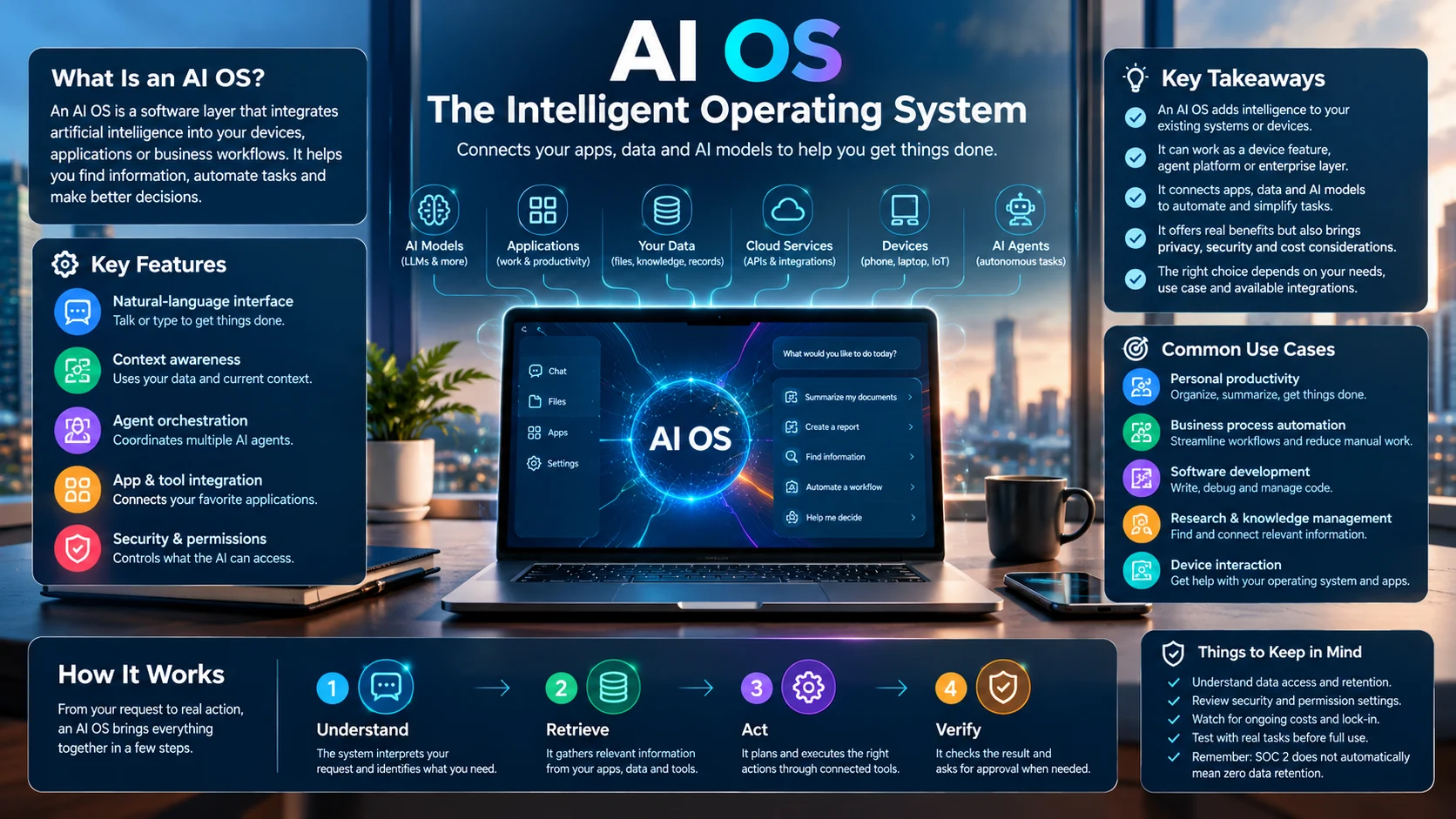
An AI OS (AI operating system) integrates artificial intelligence into devices or workflows to help users process information, automate tasks, and make decisions. It can enhance traditional operating systems, coordinate AI agents, or connect business data with AI-powered actions.
AI is moving beyond standalone chatbots and into the software people use every day. Instead of opening separate tools for every task, users increasingly expect technology to understand their goals, access relevant information, and help complete work.
This shift has made AI OS an increasingly useful term in computing and business technology. However, it does not refer to one universally standardized product.
Some AI operating systems add intelligent features to Windows or mobile devices. Others coordinate AI agents, connect applications, or help businesses manage decisions across departments. Understanding these differences is essential before choosing a platform.
AI OS at a Glance
- Meaning: An AI operating system integrates AI into computing, workflows, or application control.
- Main purpose: Reduce manual work by helping users find information, automate processes, and coordinate tasks.
- Common forms: AI-enhanced device operating systems, agent orchestration platforms, and enterprise AI management layers.
- Core technologies: Language models, APIs, memory systems, application integrations, and sometimes on-device AI hardware.
- Main benefits: Greater workflow efficiency, natural-language interaction, and better coordination between tools.
- Key concerns: Data access, permissions, reliability, operating costs, and dependence on particular vendors.
What Is an AI OS?
An AI OS is a system that uses artificial intelligence to make computing or business operations more intelligent and responsive. Unlike a conventional operating system, which primarily manages hardware, applications, files, and system resources, an AI OS adds capabilities such as language understanding, intelligent assistance, and automated task execution.
The exact meaning depends on the product and context. The term is used in at least three distinct ways.
1. AI-Enhanced Device Operating Systems
This category includes traditional operating systems that incorporate AI into their existing features.
For example, Microsoft’s Windows platform includes AI components on supported Copilot+ PCs. These components can use dedicated neural processing hardware to support local AI tasks, including image processing and language-related functions.
Apple also integrates Apple Intelligence into supported operating systems and applications. Available capabilities depend on the device, language, region, and software version.
These products do not replace the operating system with an entirely new AI architecture. They add AI capabilities to established computing environments.
2. AI Agent Operating Systems
An AI agent operating system coordinates software agents that perform tasks on a user’s behalf.
An AI agent is a software system that can interpret a goal, choose actions, use permitted tools, and respond to results. Depending on its configuration, it may search the web, retrieve documents, interact with applications, or execute a multistep workflow.
An agent operating system can provide a shared layer for managing these activities. It may coordinate models, memory, tools, permissions, and task execution.
For example, a user might request a summary of customer feedback. A connected agent system could retrieve authorized records, categorize recurring complaints, and prepare a report for review.
The system still needs clear permissions and safeguards. An agent that can access sensitive files or send messages should not receive unrestricted authority simply because it can interpret natural-language instructions.
3. Enterprise AI Operating Systems
An enterprise AI OS focuses on coordinating information and decisions across an organization.
It can connect internal knowledge, business applications, AI models, and workflow automation. The aim is to help employees find relevant information and complete work without switching between disconnected systems.
McKinsey has described the enterprise AI OS as a management layer that connects organizational knowledge, decision-making, and execution. This is a strategic framework, rather than a universal technical definition that every vendor follows.
The distinction matters because a business AI OS may not manage a computer’s hardware or boot process. It operates above existing infrastructure to coordinate AI-assisted work.
How Does an AI OS Work?
An AI OS typically combines several components. The exact architecture varies between consumer devices, agent platforms, and enterprise systems.
Step 1: Understand the User’s Request
The user provides an instruction through text, voice, or another supported interface.
A language model interprets the request and helps determine what the user wants to accomplish. The system may need additional context before it can choose the appropriate action.
For example, “Prepare a weekly sales report” could require sales records, a reporting template, and a defined date range.
Step 2: Retrieve Relevant Information
The system obtains the information needed to perform the task.
Depending on its permissions, it may access local files, databases, business applications, or external services through APIs. Some platforms also use retrieval-augmented generation (RAG), which supplies relevant documents to a language model when generating a response.
Access controls remain important. The AI should retrieve only information that the user and application are authorized to access.
Step 3: Plan the Actions
The system determines which steps may be needed to reach the requested outcome.
A simple request might need only one model response. A more complex task could require several actions, such as finding data, calculating totals, checking the results, and preparing a document.
Some systems use specialized agents for different tasks. Others use a single model with access to approved tools.
Step 4: Execute Through Connected Tools
The system calls the relevant applications, services, or local capabilities.
For instance, it might retrieve a spreadsheet, calculate monthly totals, and draft a summary. Actions that affect external systems, such as sending a report or changing a customer record, may require user confirmation.
The extent of automation depends on the platform’s design and permissions.
Step 5: Check the Result
The system presents its response or completed work. More advanced workflows may validate outputs, record actions, or ask another component to review the result.
Verification is especially important when a task involves financial records, customer information, or other consequential decisions. AI-generated results can contain errors even when the workflow runs as intended.
Key Features of an AI Operating System
The most useful features depend on the problem the platform is designed to solve.
| Feature | What it does | Why it matters |
|---|---|---|
| Natural-language interface | Accepts requests in everyday language | Reduces the need to learn complex commands |
| Context awareness | Uses relevant files, conversations, or system information | Makes responses more relevant to the task |
| AI agent orchestration | Coordinates one or more agents | Supports multistep workflows |
| Application integration | Connects software through APIs or built-in connectors | Reduces repetitive data entry |
| Memory and state | Retains selected information or task progress | Helps continue longer workflows |
| Permissions and controls | Limits what the AI can access or change | Reduces operational and privacy risks |
| Monitoring and logs | Records selected actions and results | Supports troubleshooting and accountability |
| Model selection | Uses different models for different tasks | Can balance cost, capability, and latency |
Not every AI OS includes all these features. A device-level AI feature may work entirely within one application, while an enterprise platform may require extensive integrations and administrative controls.
What Makes an AI OS Different From a Chatbot?
A chatbot primarily responds to user messages. An AI OS may also connect the response to a broader computing environment and help execute tasks.
| Capability | Standard chatbot | AI OS or agent platform |
|---|---|---|
| Answer questions | Common | Common |
| Use connected applications | Sometimes | Often a central design goal |
| Coordinate multiple steps | Limited or tool-dependent | May be built into the workflow |
| Manage permissions across tools | Usually limited to its environment | Can be a core administrative function |
| Execute external actions | Depends on integrations | May support approved actions |
| Manage ongoing workflows | Varies | May support persistent task state |
These categories overlap. Modern chatbots can use tools and agents, while some products marketed as AI operating systems offer little beyond a conversational interface. Examine the actual architecture and functionality rather than relying on the product label.
AI OS Examples and Leading Platforms
There is no single product that represents every meaning of AI OS. The following examples illustrate different approaches, from AI built into existing devices to software designed around autonomous agents.
1. Microsoft Windows and Copilot
Windows combines a conventional operating system with AI features available through Copilot and supported device capabilities.
Microsoft documents built-in AI components for Copilot+ PCs that can run selected workloads locally using dedicated AI hardware. The exact features depend on supported hardware and software.
Best suited to: Windows users who want AI assistance integrated with their everyday computing environment.
Important limitation: Not every Windows computer supports the same on-device AI features. Copilot availability also does not mean every task runs locally.
Official website: Microsoft Windows
2. Apple Intelligence
Apple Intelligence integrates AI capabilities into supported Apple operating systems and applications. Its features can assist with tasks such as working with text, generating images, and interacting with system functions, depending on the supported device and software release.
Best suited to: Users who already work within the Apple ecosystem and want AI capabilities integrated into supported devices.
Important limitation: Device compatibility, supported languages, regional availability, and individual feature requirements can restrict access.
Official website: Apple Intelligence
3. Rabbit OS3
Rabbit announced the general release of OS3 in September 2026, describing it as an agentic operating system centered on a conversational interface. Its announced approach lets users specify outcomes while the system coordinates AI models, web services, and connected devices.
Best suited to: Users interested in outcome-based interaction and AI-assisted tasks across connected devices.
Important limitation: Vendor descriptions establish the intended design, not independent proof of reliability across every supported task. Check actual compatibility, availability, and permissions before relying on it.
Official website: Rabbit
4. Unicity AOS
Unicity introduced Unicity AOS as a modular operating system for AI agents in July 2026. Its published description emphasizes agent organization, governance, and the management of tools, memory, and model components.
Best suited to: Developers and organizations exploring structured management of AI agents.
Important limitation: Evaluate its current maturity, documentation, supported integrations, and operational requirements before using it in production.
Official website: Unicity
AI OS Comparison
| Platform | Primary focus | Target user | Pricing transparency | Main consideration |
|---|---|---|---|---|
| Windows with Copilot | AI-assisted desktop computing | Everyday users and businesses | Depends on device, account, and product | Features vary by hardware and software |
| Apple Intelligence | AI integrated into Apple devices | Apple users | Depends on the device and associated services | Compatibility and regional restrictions |
| Rabbit OS3 | Agentic task execution | Users exploring connected AI workflows | Verify current commercial terms | Confirm device compatibility and task reliability |
| Unicity AOS | Agent management and governance | Developers and organizations | Verify current licensing and service terms | Requires technical evaluation |
This comparison describes each platform’s stated focus. It is not a benchmark of speed, accuracy, security, or overall quality.
Main Use Cases of an AI OS
An AI operating system becomes useful when it connects intelligence with a practical task. Here are several applications that illustrate its potential.
Personal Productivity
A personal AI assistant can help organize information, summarize documents, draft messages, and prepare schedules.
A more integrated system may also interact with supported applications. For example, it could identify meeting notes, prepare a follow-up email, and create a task list.
Users should review generated content and approve consequential actions before they are completed.
Business Process Automation
Businesses often perform repetitive tasks across several applications. An AI OS can coordinate parts of these workflows when the required data and integrations are available.
Potential examples include:
- Categorizing incoming customer support requests.
- Summarizing sales activity from authorized records.
- Preparing draft reports from structured data.
- Routing documents to the appropriate team.
- Extracting information from invoices for human review.
Automation is most practical when the process has clear rules, measurable outcomes, and a reliable way to handle exceptions.
Software Development
Developers can use AI-enabled environments to explain code, generate tests, locate relevant documentation, and assist with debugging.
Agent-based systems can extend these capabilities by running approved tools or coordinating tasks across a development workflow. However, generated code still requires testing, review, and security checks.
Research and Knowledge Management
An enterprise AI OS can help employees locate information spread across documents, knowledge bases, and business applications.
RAG can improve this process by retrieving relevant material before a model produces an answer. The quality of the result still depends on document quality, access permissions, retrieval accuracy, and how faithfully the model uses its sources.
Device Interaction
AI integrated into an operating system can make some tasks easier to perform through natural language.
Instead of navigating several menus, a user might ask for help locating a setting or understanding information on the screen. Available functions depend on the operating system, the installed assistant, and the permissions granted.
Benefits of an AI OS
The potential value of an AI OS comes from combining intelligence with access to useful tools and information.
Less repetitive work: Systems can automate routine steps when the necessary integrations exist.
More natural interaction: Users can describe an intended outcome instead of learning every application command.
Better information access: Connected systems can retrieve relevant information from multiple approved sources.
Workflow coordination: Agent platforms can divide complex tasks into smaller steps and coordinate their execution.
Flexible model use: Some platforms can route different tasks to different models based on cost, capability, or response time.
Potential for local processing: Supported devices can run selected AI tasks on-device, reducing the need to send those specific inputs to a cloud service.
These benefits are not automatic. Poor integration, unclear workflows, unreliable outputs, and excessive permissions can eliminate much of the expected value.
Limitations and Risks of AI Operating Systems
AI OS technology can simplify complex work, but it introduces challenges that traditional software does not always face in the same way.
1. Incorrect Results and Unreliable Actions
Language models can misunderstand instructions, generate false information, or select an inappropriate tool. An agent can also execute a technically valid action that does not achieve the user’s intended outcome.
Use verification steps for important tasks. Keep human approval in place for actions involving money, confidential records, account changes, or external communications.
2. Privacy and Data Access
An AI OS may connect to email, documents, customer databases, calendars, or other sensitive information. Its privacy implications depend on what data it accesses, where processing occurs, and how the provider handles the information.
Before deployment, establish clear access permissions and review the provider’s data-retention policies.
Do not assume that on-device AI means every feature operates locally. Some workflows may still use cloud models or external services.
3. Security and Excessive Permissions
An agent with broad access can create problems if it follows malicious instructions hidden in a document or retrieves untrusted content.
This is sometimes called prompt injection. An attacker may try to manipulate the AI into ignoring its intended task or misusing connected tools.
Useful safeguards include:
- Granting only the permissions required for each task.
- Separating read access from write access.
- Requiring approval for sensitive actions.
- Validating inputs and outputs.
- Recording important actions for review.
- Testing how the system responds to malicious instructions.
No individual safeguard guarantees complete protection. Security must cover the full workflow, including connected applications and external services.
4. Costs and Vendor Lock-In
An AI OS may involve subscription fees, model usage charges, infrastructure expenses, and integration costs.
Enterprise deployments can also require ongoing maintenance, monitoring, and staff training. A low initial price may not reflect the total cost of running the system.
Vendor lock-in is another consideration. If workflows depend on proprietary memory formats, specialized connectors, or one provider’s agents, moving to another platform may require substantial redevelopment.
5. Hardware and Performance Requirements
On-device AI depends on compatible hardware, available memory, storage, and software support. Cloud-based systems shift some of that workload to remote infrastructure but introduce network dependencies and potential usage costs.
The right balance depends on the workload. Local processing may suit tasks that benefit from offline availability, while cloud models may be preferable for workloads that exceed the device’s capabilities.
How to Choose an AI OS
Start by identifying the problem you want to solve. A personal productivity assistant, a device-level AI feature, and an enterprise agent platform require different evaluation criteria.
A Practical Evaluation Checklist
- Use case: Does the platform solve a specific, measurable problem?
- Integration: Can it connect to your existing applications and data sources?
- Permissions: Can administrators control which information and actions it can access?
- Reliability: Can it complete representative tasks consistently?
- Human oversight: Can sensitive actions require approval?
- Privacy: Are data retention, model training, and deletion practices clearly documented?
- Cost: Can you estimate the total expense of typical usage?
- Portability: Can you export data and migrate workflows if necessary?
- Support: Are documentation, maintenance, and troubleshooting resources available?
Test Before Committing
Choose a small workflow and test it using realistic, non-sensitive data.
Measure the time required, the number of errors, the amount of human intervention, and the cost per completed task. Compare those results with your existing process.
For business deployments, also test failure handling. The system should have a clear response when an API becomes unavailable, a document cannot be accessed, or an agent produces an uncertain result.
A short pilot can reveal integration problems that a polished demonstration might not show.
Frequently Asked Questions About AI OS
1. Is an AI OS the same as a normal operating system?
No. A traditional OS manages hardware and applications, while an AI OS adds AI-powered features or coordinates automated workflows.
2. Is there a dedicated AI OS for computers?
Several options exist, including AI-enhanced systems such as Windows and platforms designed to coordinate AI agents. The best choice depends on your needs.
3. Can an AI OS work without an internet connection?
Yes. Some systems support offline AI processing through local models, while cloud-based features require internet access.
4. Is an AI OS safe to use for business?
It can be safe with appropriate security controls, access permissions, data protection, and human oversight. Always review the provider’s security practices.
5. Will AI OS replace traditional operating systems?
Not necessarily. Many AI OS solutions build on traditional operating systems and enhance them with intelligent features and automation.
Conclusion
An AI OS integrates artificial intelligence into devices and workflows to simplify tasks, process information, and coordinate AI agents. Its effectiveness depends on its features, integrations, security, and cost. Choosing the right solution requires evaluating your needs and verifying its capabilities, privacy protections, and compatibility with existing systems.