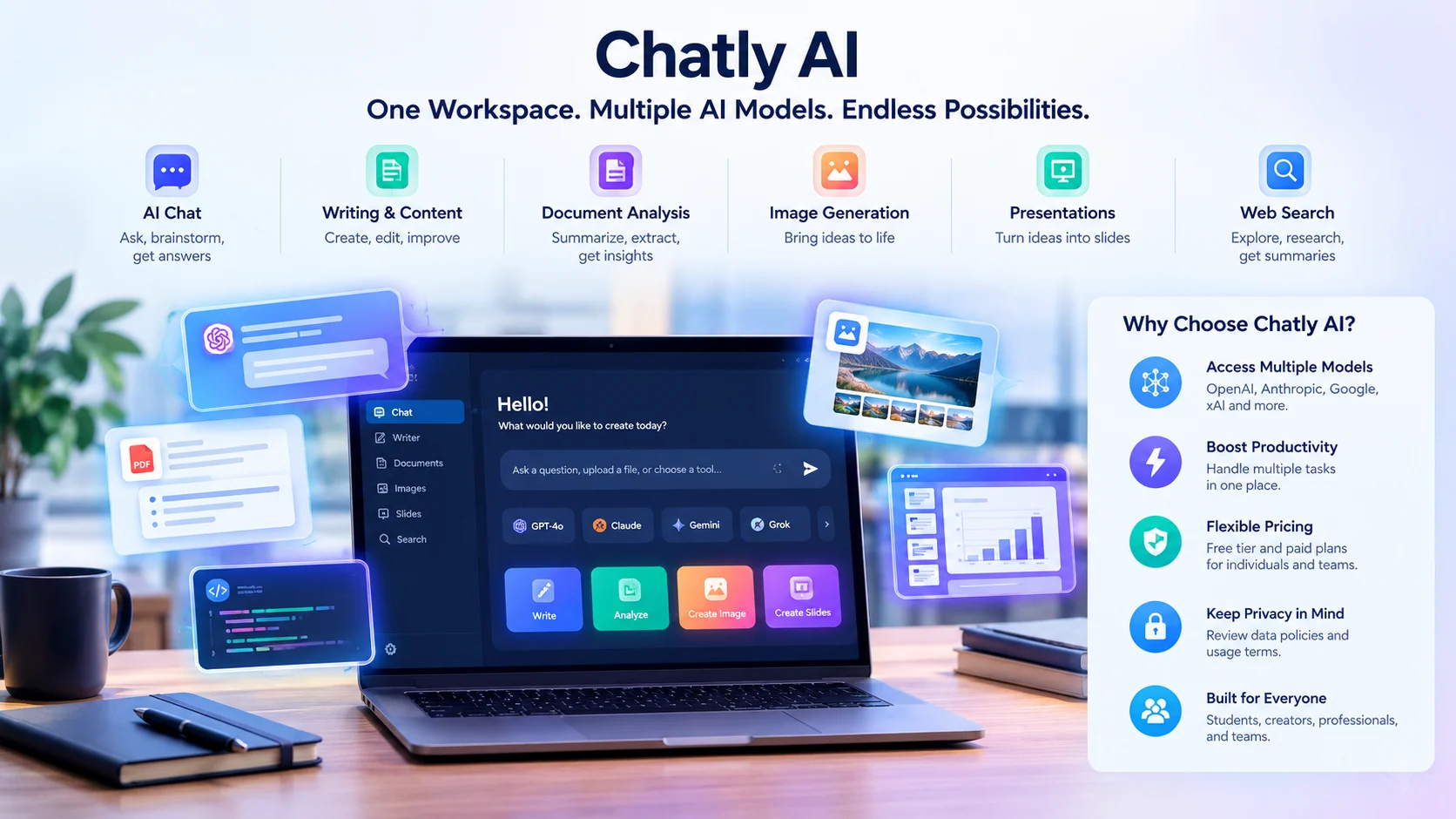
Chatly AI is an AI productivity platform that brings conversational AI, writing assistance, document analysis, image generation, and presentation creation into one workspace. It is designed for people who want to use multiple AI models and creative tools without constantly switching between separate applications.
At a Glance: Chatly AI
What it is
An all-in-one AI workspace for chat, writing, research, documents, presentations, and visual content.
Multiple AI models
The platform advertises access to models from providers including OpenAI, Anthropic, Google, and xAI. Availability depends on the current offering and plan.
Productivity tools
Generate and refine text, analyze uploaded files, summarize web pages, and create presentations or images.
Pricing
A free tier is advertised. A published help-center pricing table also lists paid subscriptions, credits, and usage allowances. Check the live checkout before purchasing.
Privacy
The published privacy policy describes sharing submitted content with AI processing providers. Review the applicable terms before uploading confidential information.
Best suited for
Students, researchers, marketers, writers, developers, and professionals who want several AI capabilities in one interface.
What Is Chatly AI?
Chatly AI, available at ChatlyAI.app, is a productivity platform that combines several AI-powered tools within one digital workspace. Rather than limiting users to a single chatbot, it advertises access to multiple AI models alongside tools for writing, research, document creation, image generation, and presentations.
The central idea is convenience. You can use an AI assistant to brainstorm a blog post, analyze a spreadsheet, summarize a research paper, and prepare presentation content without managing an entirely separate application for each task.
Chatly AI is therefore relevant to people who use AI for more than casual questions. It targets practical workflows in education, content production, business communication, software development, and research.
An important distinction: ChatlyAI.app is not the same product as Chatly.gg. Chatly.gg focuses on AI-powered customer support, including customer conversations, knowledge sources, and integrations with business systems. This article covers the general-purpose productivity workspace at ChatlyAI.app.
How Is Chatly AI Different From a Standalone Chatbot?
A standalone chatbot typically centers on one provider’s models and tools. Chatly AI emphasizes bringing multiple model options and different productivity features together.
That distinction can matter when a task benefits from different approaches. For example, you might prefer one model for writing, another for code analysis, and another for exploring a complicated research question.
However, access to several models does not automatically make a platform more accurate. Output quality still depends on the selected model, prompt, available context, and task.
Key Features of Chatly AI
Chatly AI’s published documentation and product pages describe several core capabilities. The precise availability of models, tools, and usage allowances can change, so check the current interface before relying on a particular feature.
1. Multi-Model AI Chat
The AI chat interface is the central feature. Users can ask questions, generate ideas, improve writing, solve problems, and work through technical topics.
The platform advertises models from several AI providers, including OpenAI, Anthropic, Google, and xAI. Some model names and availability may differ by subscription tier or change as providers release new systems.
Multi-model access offers a useful advantage: comparison.
For example, a content strategist could ask two available models to develop competing article outlines. They could then compare the proposed structure, factual coverage, and readability before creating a final draft.
Practical tip: Compare model outputs using the same prompt and evaluation criteria. A confident answer or polished writing style is not proof of factual accuracy.
2. AI Writing and Content Creation
Chatly AI can assist with drafting and refining different types of written content, including emails, articles, reports, scripts, and marketing copy. Its chat-based workflow also lets users request revisions without restarting the entire task.
Common applications include:
- Creating first drafts of blog posts and landing pages.
- Rewriting technical explanations for general readers.
- Developing social media captions and email campaigns.
- Brainstorming headlines and content angles.
- Improving sentence structure, tone, and clarity.
For SEO professionals, the platform can help organize search intent, develop outlines, generate related questions, and identify gaps in a draft.
It should not replace editorial review. Check factual claims, originality, search intent, and the usefulness of the finished content before publishing.
3. Document Analysis and File Uploads
Chatly AI advertises tools for working with documents and datasets. Depending on the feature and current limits, users can upload files, ask questions about their contents, summarize information, and extract relevant details.
This can be useful when a document contains too much information to review manually.
Consider a researcher reviewing several reports. Instead of reading every page immediately, they could ask the assistant to summarize each report’s objectives, methods, findings, and limitations.
The result provides a starting point for deeper analysis, not a substitute for checking the source.
When analyzing files, ask specific questions rather than requesting a vague summary. For example:
- Which conclusions does the report support with numerical evidence?
- What limitations do the authors acknowledge?
- Which figures describe year-over-year changes?
- Does the document contain conflicting statements?
These questions make it easier to assess whether the AI has interpreted the source correctly.
4. AI Document Generation
The platform also advertises document creation and editing capabilities. Users can turn prompts, outlines, or existing material into structured documents and refine the result.
Potential uses include:
- Project proposals.
- Business reports.
- Research summaries.
- Meeting briefs.
- Training materials.
- Content plans.
For professional work, provide the intended audience, purpose, required sections, source material, and preferred tone. Then review the generated document for unsupported statements, missing context, and formatting errors.
5. AI Presentation Creation
Chatly AI’s AI Slides feature is designed to help users create presentations from prompts or existing documents. This can reduce the time needed to turn raw information into a structured presentation.
A useful workflow starts with the narrative rather than the visual design.
First, define the audience and the presentation’s objective. Next, create a logical sequence of ideas. Finally, inspect the generated slides for readable text, appropriate visuals, accurate figures, and a clear takeaway on each slide.
Generated slides may still need substantial editing, particularly for investor presentations, executive briefings, and technical training.
6. AI Image Generation
Chatly AI also advertises image generation and editing through supported image models. The feature can help users create visual concepts, illustrations, and marketing assets from text prompts.
Useful applications include blog illustrations, campaign concepts, presentation graphics, and early-stage design exploration.
Before using generated visuals commercially, check the platform’s current usage terms, the selected model’s restrictions, and any applicable disclosure requirements. Do not assume every plan provides identical image-generation rights or privacy settings.
7. Web Search and Page Summarization
The platform advertises web search and tools for summarizing URLs. These capabilities can help users explore topics, review online material, and extract important points from longer pages.
For research, ask the assistant to distinguish between established facts, attributed claims, and its own interpretation. When citations are provided, open the original sources and confirm that they actually support the claims.
A summary can omit qualifications, rely on outdated information, or misinterpret a source. Current research still requires source verification.
8. Browser Extension
Chatly’s documentation describes a browser extension that brings AI assistance into webpages. Its listed functions include contextual questions about page content, document uploads, and access to synchronized chat history.
This can help users summarize articles or analyze information without repeatedly copying text into a separate tab.
Because a browser extension may process text from the pages you use, review its permissions and data-handling policy before enabling it in a work environment.
How Does Chatly AI Work?
At a practical level, Chatly AI provides an interface through which users submit prompts, select available tools or models, and receive generated responses.
A typical workflow looks like this:
1. Submit a prompt or file
Enter a question, paste a URL, or provide supported documents.
2. Select an available AI capability
Choose a model or a tool suited to the task.
3. Generate a response
The service processes the request and returns generated content or analysis.
4. Verify and refine
Check the evidence, correct mistakes, and improve the output.
The underlying language models generate responses by processing input and predicting appropriate output. Some tools may also use external services, web retrieval, or file-processing systems.
Chatly AI’s user-facing model selection does not, by itself, establish how its backend routes every request. Nor does multi-model access prove that every task uses a different model automatically.
For users, the key questions are straightforward: Which model handled the request? What information did it receive? What usage limits apply? Can the output be checked against reliable sources?
Chatly AI Pricing: Is It Free?
Chatly AI advertises free access with limited usage, alongside paid plans that offer additional credits, model access, and higher usage allowances. Its pricing documentation describes Standard, Professional, Teams Creator, and Teams Scale subscriptions.
The published help-center pricing table lists the following monthly prices. These figures are a reference, not a guarantee of today’s checkout price.
| Plan | Listed monthly price | Listed team capacity |
|---|---|---|
| Standard | $20 | Up to 3 members |
| Professional | $40 | Up to 6 members |
| Teams Creator | $60 | Up to 20 members |
| Teams Scale | $80 | Up to 40 members |
Source: Chatly’s published subscription documentation. Confirm current prices, included credits, and billing terms on the official subscription page.
The documentation also describes quarterly and yearly billing. However, promotional offers, regional taxes, and subscription terms can change.
What Should You Check Before Paying?
The headline price does not tell you how much useful work you can complete. Review these details before choosing a plan:
- Credit allocation: Determine how many credits you receive per billing cycle and how each feature consumes them.
- Model availability: Confirm that the specific models you need are included.
- Feature limits: Check the allowances for chat, documents, slides, and image generation separately.
- Renewal terms: Verify the renewal date, billing interval, cancellation process, and refund policy.
- Unused credits: Check whether credits expire, roll over, or reset at the start of a new cycle.
- Team access: Confirm seat limits and whether each member receives separate usage allowances.
Chatly’s documentation states that usage allowances and token allocations can refresh according to the billing cycle. The exact cost of a task can vary by feature and model, so do not assume every interaction consumes credits at the same rate.
For occasional users, a free tier may be enough to assess the interface. Frequent users should test representative tasks before committing to an annual subscription.
Is Chatly AI Safe? Privacy and Security Considerations
Privacy deserves particular attention when an AI platform accepts documents, prompts, research notes, and business information.
Chatly’s published privacy policy, effective March 11, 2025, describes collecting account details, device and usage information, and other data required to operate the service. It also states that user-submitted text may be shared with third-party AI model providers for processing.
The policy describes security measures such as encryption in transit, access controls, and data deletion procedures. These are statements made by the provider, not independent verification of the platform’s security posture.
Does Chatly AI Keep Your Data Private?
The policy says Chatly does not sell personal data and states that its AI processing partners are not permitted to use customer data for model training. It also describes typical account-data deletion within 30 days of account termination, subject to legal retention requirements.
These disclosures are useful, but they do not answer every enterprise security question. The published material reviewed here does not independently establish a universal zero-data-retention arrangement or a SOC 2 certification.
Before uploading sensitive information, investigate:
- Whether prompts and files are retained, and for how long.
- Which AI providers process your content.
- Whether deletion requests cover backups and third-party processors.
- Whether business plans offer contractual privacy commitments.
- Whether an independent security audit or relevant compliance report is available.
Practical recommendation: Do not upload passwords, confidential client records, proprietary source code, or regulated personal information until the applicable data-processing terms have been reviewed and approved.
Chatly AI Pros and Cons
The following assessment distinguishes the product’s documented capabilities from practical considerations when choosing a multi-model AI workspace.
| Advantages | Limitations and trade-offs |
|---|---|
| Combines several AI tools in one interface | Model and feature availability can depend on the subscription |
| Offers access to multiple model providers | Access does not guarantee identical capabilities or limits across models |
| Supports writing and document workflows | Generated content still requires fact-checking and editing |
| Includes image and presentation tools | Creative usage may consume credits |
| Advertises a free tier | Free usage may be limited |
| Offers a browser extension | Users should review permissions and data handling |
The Biggest Advantage: Workflow Consolidation
The clearest potential benefit is convenience. A user can move from research to drafting, document analysis, and presentation creation within a shared workspace.
This may reduce the friction of switching between tools. It does not necessarily reduce total costs, however, unless the subscription genuinely replaces tools the user would otherwise pay for.
The Biggest Trade-Off: Less Direct Control
Using a third-party workspace means relying on its model selection, feature implementation, usage rules, and integrations.
If a particular model changes its terms, becomes unavailable, or performs differently, the experience may change. Users who need direct control over API calls, deployment, or model configuration may prefer working with providers directly.
Chatly AI Alternatives: Which Tools Should You Compare?
Chatly AI competes with both general-purpose AI assistants and platforms that bring multiple models into a single interface. The most relevant alternative depends on whether you value model choice, specialized capabilities, direct provider access, or organizational controls.
The following comparison focuses on product positioning rather than claiming that one service consistently outperforms another.
| Platform or tool | Target user | Key strength | Pricing transparency | Core limitation |
|---|---|---|---|---|
| Chatly AI | Individuals and teams | Multi-model chat and creative productivity tools | Published plans; confirm current limits | Credits and feature access require careful checking |
| ChatGPT | General users, creators, and professionals | General-purpose assistant with integrated tools | Official plan information available | Access and limits vary by plan |
| Claude | Writers, researchers, and developers | Writing, coding, document work, and research | Official plan information available | Usage limits and capabilities vary by plan |
| Google Gemini | General users and Google ecosystem users | Google’s AI assistant and connected ecosystem | Check current consumer and business plans | Features depend on account, region, and subscription |
| Hugging Face Hub | Developers and AI researchers | Model discovery, documentation, and model artifacts | Varies by model, hosting, and service | Not a direct substitute for a polished all-in-one assistant |
Official provider pages describe ChatGPT’s subscription tiers and Claude’s available plans, while Hugging Face provides a hub for discovering machine-learning models. These are different product categories, so a direct feature-for-feature comparison needs a defined task and plan.
Chatly AI vs. ChatGPT
ChatGPT is worth considering if you prefer a single provider’s assistant and integrated tools. Chatly AI is relevant when you want to compare multiple model families in one workspace.
The right choice depends on the specific models available to you, your preferred workflow, and the limits that apply to your plan. Test both with the same tasks before deciding.
Chatly AI vs. Claude
Claude is a useful comparison for writing, coding, document work, and research. Its official pricing page describes free and paid plans with different capabilities and usage allowances.
Chatly AI may appeal to people who want several model providers alongside additional creative tools. Claude may suit users who prefer working directly within Anthropic’s ecosystem.
Chatly AI vs. Hugging Face
Hugging Face serves a different audience. Its model hub helps developers and researchers discover models and inspect their associated documentation, licenses, and artifacts.
Chatly AI emphasizes a ready-to-use interface. Hugging Face is more relevant when you want to investigate models, experiment with implementations, or evaluate deployment options.
For production systems, check each model’s license, inference requirements, data-handling implications, and operating costs. A model’s presence on a repository does not mean it is unrestricted or free to operate.
Who Should Use Chatly AI?
Chatly AI may be useful for people whose work regularly spans several AI-assisted tasks.

Content creators and SEO professionals
Develop article outlines, refine drafts, brainstorm search-intent angles, summarize sources, and prepare creative briefs. Human editing and source verification remain essential.

Students and researchers
Summarize readings, compare explanations, organize notes, and identify questions for further investigation. Verify citations and follow academic-integrity rules.

Business professionals
Draft reports, prepare presentations, explore datasets, and streamline routine writing. Confirm that document handling meets workplace policies.

Developers and technical users
Explore code, troubleshoot errors, compare model-generated approaches, and explain unfamiliar concepts. Test code before deploying it.
Chatly AI may be less suitable for organizations that require a specific compliance certification, guaranteed zero data retention, dedicated model hosting, or extensive infrastructure control without documented contractual support.
Common Mistakes to Avoid When Using Chatly AI
Even a capable AI workspace can produce poor results when users overlook its limitations.
1. Treating AI Answers as Verified Facts
Language models can generate plausible but incorrect information. For research and professional content, confirm important claims against primary sources.
2. Choosing a Model by Name Alone
A model’s reputation does not guarantee the best result for every task. Compare output quality, factual accuracy, response time, and usage cost using your own examples.
3. Ignoring Credit Consumption
Before generating large documents, many images, or repeated model responses, check the current credit rules. A low subscription price can be misleading if your actual workflow consumes credits quickly.
4. Uploading Sensitive Documents Without Review
Read the privacy policy and any applicable business terms. Remove unnecessary personal information and avoid sharing confidential data without authorization.
5. Publishing AI-Generated Content Without Editing
Generated content may be repetitive, inaccurate, poorly sourced, or too generic for the intended audience. Add original analysis, reliable evidence, relevant examples, and editorial judgment.
Frequently Asked Questions
1. Is Chatly AI free to use?
Chatly AI advertises a free tier with limited access to its tools and models. Paid subscriptions provide additional credits and usage allowances, so check the current pricing page to confirm what is included.
2. What can you do with Chatly AI?
Chatly AI supports conversational assistance, writing, document analysis, image generation, presentation creation, and web research. The available tools and model options depend on the current platform offering and subscription.
3. Is Chatly AI safe for confidential information?
Chatly’s published privacy policy describes security measures and sharing submitted text with third-party AI providers for processing. However, users should verify applicable retention terms, provider arrangements, and contractual safeguards before uploading confidential information.
4. Is Chatly AI better than ChatGPT?
Neither platform is automatically better for every user. Chatly AI emphasizes access to multiple model providers and productivity tools, while ChatGPT offers an integrated assistant experience within OpenAI’s ecosystem. Compare the specific features, limits, output quality, and costs relevant to your work.
5. Who should use Chatly AI?
Chatly AI may suit students, researchers, content creators, marketers, developers, and professionals who want several AI capabilities in one workspace. Organizations with strict compliance or data-retention requirements should verify the platform’s contractual and technical safeguards before adopting it.
Conclusion
Chatly AI is a multi-model productivity workspace that combines conversational AI with writing, document analysis, image generation, presentation creation, and related tools. Its main appeal is the convenience of bringing several AI-assisted workflows into one interface.
Whether it is worth paying for depends on your actual workload. Compare the models you can access, the credit system, the quality of outputs, and the privacy terms before committing to a subscription.
For occasional users, start with the free tier. For regular professional use, test representative tasks and calculate the cost of completing them. For sensitive business work, obtain clear answers about data retention, third-party processing, and contractual security commitments.
The most useful measure is not how many AI models a platform advertises. It is whether the available tools consistently help you complete real tasks with acceptable quality, cost, and risk.