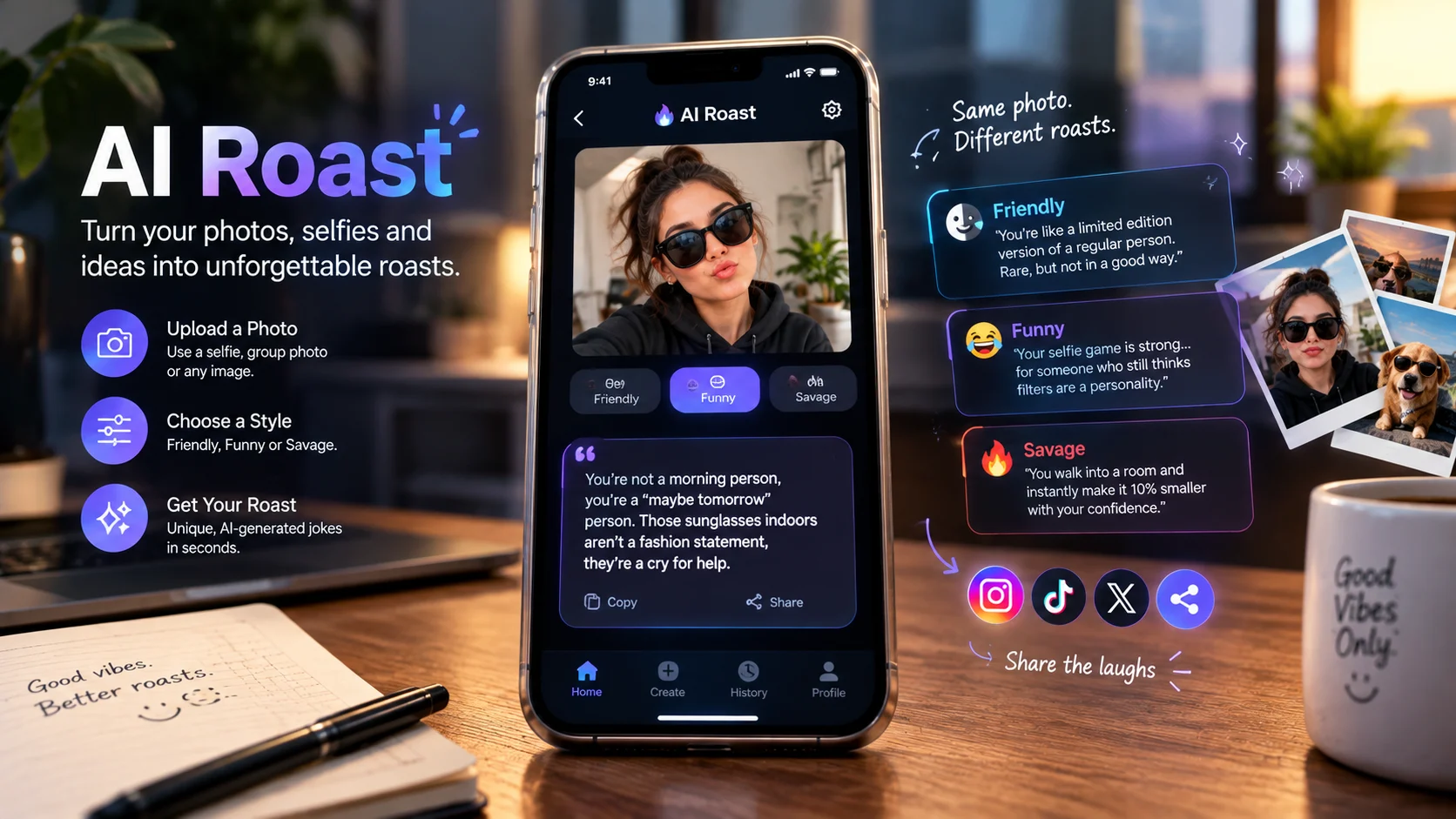
An AI roast generator uses artificial intelligence to create funny, sarcastic or brutal jokes about a photo, selfie, social media profile, or written prompt. Depending on the tool, you can upload an image, choose a roast style, adjust the intensity, and generate shareable jokes for group chats and social media.
AI Roast at a Glance
- What it does: Generates personalized jokes, playful insults, and sarcastic captions.
- Popular inputs: Selfies, portraits, group photos, social media profiles, and text prompts.
- Common features: Roast intensity controls, multiple humor styles, AI photo analysis, and shareable results.
- Free options: Some tools provide free trials or limited credits; others require payment for additional generations.
- Best use cases: Friendly banter, party games, meme creation, and social media entertainment.
- Main caution: Photo uploads may be processed by external AI services, so review privacy policies before submitting personal images.
What Is an AI Roast?
An AI roast is a humorous insult or sarcastic comment generated by artificial intelligence. Instead of asking a friend to invent a comeback, users can enter a prompt or upload a picture and let an AI system create a joke.
The goal is entertainment, not a serious assessment of someone’s appearance, personality, intelligence, or worth.
Modern AI roast generators can use text prompts, image understanding, and language generation to produce jokes that reference visible details. For example, an AI might comment on an elaborate outfit, an overly dramatic selfie pose, or a desk covered in unfinished projects.
The term AI roast describes a category of tools rather than one specific product. Some services work entirely through a browser, while others are dedicated Android or iPhone apps.
Popular options include Toast2Roast, Roast That Face, Roast App, and several similarly named mobile applications. Their capabilities, pricing, and privacy practices differ, so it is worth comparing them before choosing one.
How Does an AI Roast Generator Work?
Most AI roast tools follow a straightforward process. The details vary depending on whether the tool accepts text, images, or both.
Step 1: Upload a Photo or Enter a Prompt
Start with a selfie, portrait, group picture, profile photo, or written description.
Text-only generators may ask you to describe a situation instead. For example, you could enter, “My friend spends 20 minutes choosing a movie and then falls asleep.”
A photo-based generator can use visible context to make the joke more specific.
Step 2: Choose the Roast Style
Many generators offer different humor settings, such as:
- Friendly: Gentle teasing suitable for close friends.
- Funny: Light sarcasm and everyday observations.
- Brutal: Sharper jokes with more exaggerated punchlines.
- Dark humor: Edgier comedy that requires careful judgment.
- Wholesome: Playful comments without aggressive insults.
- Custom: A particular voice, theme, or situation described in a prompt.
Not every tool supports every style. Check the available controls before assuming a generator can produce a particular type of humor.
Step 3: Let AI Generate the Joke
An image-capable AI system may interpret the visible contents of a picture and pass relevant details to a language model. The language model then uses those details, along with the requested tone, to produce a joke.
This is different from a basic random insult generator. A contextual roast can reference something actually visible in the photo.
However, image interpretation is imperfect. AI can misidentify objects, misunderstand context, or produce a joke that does not make sense.
Step 4: Review and Share the Result
Read the generated roast before sharing it. If the joke misses the point, adjust the prompt, select another style, or generate a different version.
Many tools let users copy text or export a shareable image. Some mobile apps also advertise voice output or video creation.
The best result is not necessarily the harshest one. It is the joke that fits the audience and situation.
Best AI Roast Generators to Consider
There is no single winner for every use case. The right choice depends on whether you want a quick browser-based roast, a mobile app, multiple character voices, or more elaborate social content.
The following comparison uses current product information published by the respective providers and app stores.
| Platform or tool | Target user | Key strength | Pricing transparency | Main limitation |
|---|---|---|---|---|
| Toast2Roast | Users who want photo roasts and memes | Multiple AI personas, adjustable intensity, and a positive “Toast” mode | Advertises three free uses per week; paid persona packs and other purchases are available | Images are sent to a server and AI provider for processing |
| Roast That Face | People who want browser-based photo roasting | Style controls, multiple languages, and shareable results | One guest roast, then five signup credits; Premium listed at $2.99 per month | Requires uploading an image for photo-based generation |
| Roast App: AI Roast Bot | iPhone users and social groups | Multiple roasts per image and adjustable intensity | Free download with in-app purchases; prices vary by storefront | Mobile-first experience and paid access options |
| AI Roast: Roast Me | Android users seeking selfie roasts | Image-specific jokes with selectable intensity | In-app purchases; detailed current pricing should be checked in Google Play | Less publicly documented information about technical architecture |
| Roast Me: AI Insult Generator | Users who want several roast formats | Advertises text, voice, image, and video outputs | In-app purchases; review the current store listing | Mature language and potentially aggressive humor |
Sources: Toast2Roast’s official website and App Store listing, Roast That Face’s website and pricing page, and the respective Google Play and Apple App Store listings.
Which AI Roast Tool Should You Choose?
For a quick browser-based roast: Roast That Face offers a web interface with photo uploads, language options, and several roast styles. Its website describes one free guest roast and five credits after signup.
For character-based humor: Toast2Roast offers AI personas such as Grandma, Robot, and Gym Coach. It also supports a positive mode for users who want a playful compliment instead of an insult.
For mobile use: Roast App and other dedicated selfie-roasting applications may be more convenient if you want to generate jokes directly from your phone.
For content creators: Look for tools that export clean images or video, support your preferred language, and let you control the humor before publishing.
These recommendations describe different workflows rather than claiming that one generator produces objectively funnier results.
How to Get Better Results From an AI Roast
A good roast needs a clear target, a specific observation, and an appropriate punchline. Generic prompts often produce generic insults.
Use Specific, Harmless Details
Instead of asking, “Roast this person,” provide a more focused direction.
For example:
- “Roast my overly serious LinkedIn profile picture.”
- “Make a playful joke about this gym selfie.”
- “Give me three witty captions for a photo of my messy desk.”
- “Roast my dramatic vacation pose without being cruel.”
- “Write a sarcastic but friendly joke about my coffee obsession.”
These prompts establish a comic angle without requiring the AI to invent a person’s background or character.
Set Boundaries Before Generating
Tell the generator what to avoid.
A useful prompt might be:
“Write five witty, brutal-but-friendly roasts based on visible details in this photo. Keep the jokes original and concise. Avoid sensitive personal traits, degrading comments, and unsupported assumptions.”
This encourages the model to focus on observable details instead of personal attacks.
Ask for Multiple Variations
Humor is subjective. The first generated joke may not land.
Ask for several alternatives with different structures, such as a one-line punchline, an exaggerated comparison, or a playful caption. Then select the one that best suits the audience.
Keep the Punchline Short
Short jokes generally work better in captions and group chats than long paragraphs.
For instance:
- “That outfit has more plot twists than a mystery series.”
- “Your desk looks like productivity filed a missing-person report.”
- “This selfie has the confidence of a movie trailer for a film that never came out.”
These are original examples, not results from a particular AI tool.
What Makes an AI Photo Roast Different From a Text Roast?
The main difference is the context available to the generator.
A text-only roast depends on the information supplied in a prompt. If the prompt contains little detail, the result may rely on familiar joke patterns.
An AI photo roast can use visible elements, such as clothing, poses, objects, or the setting, to create a more specific comment.
However, a photo does not reveal everything about a person. It cannot reliably establish someone’s occupation, income, intelligence, relationship status, or personality.
A well-designed generator should avoid presenting guesses as facts. Users should also avoid interpreting an AI-generated joke as an accurate personal judgment.
Example: The Same Photo, Three Different Styles
Imagine a picture of someone wearing sunglasses indoors.
Friendly roast: “Those sunglasses have seen more indoor lighting than the sun.”
Brutal roast: “You entered the room like the paparazzi were waiting outside.”
Wholesome roast: “Main-character energy, even when the setting is a living room.”
The humor changes with the requested tone, even though the visible context stays the same.
This is why style controls can be more useful than simply asking for the most brutal possible insult.
Is an AI Roast Generator Free?
Some AI roast tools are free to try, but free access does not necessarily mean unlimited generations.
Providers use different pricing models, including limited free credits, recurring subscriptions, one-time purchases, and paid feature packs.
For example, Toast2Roast advertises three free roast or toast uses per week. Roast That Face advertises one guest roast, five credits after signup, and a Premium plan listed at $2.99 per month. These offers may change, and prices can vary by region or platform.
Before paying, check:
- How many free generations are included?
- Do credits reset or expire?
- Is payment recurring or one-time?
- Does a subscription include unlimited use?
- Are premium styles or exports sold separately?
- Can you cancel easily?
- Are there limits on image size or supported formats?
A tool with a low entry price may become expensive if each new image requires credits. For occasional jokes, a generous free allowance may matter more than advanced features.
AI Roast Privacy: What Happens to Your Photos?
Privacy is one of the most important differences between AI roast services.
When a tool processes an uploaded photo through a remote AI model, the image may leave your device. The service may also use third-party providers for image interpretation, content moderation, or text generation.
The exact data flow depends on the provider.
For example, Toast2Roast’s published privacy policy says selected images and prompts are sent to its server and forwarded to AI model providers. It states that images and prompts are not persisted on its servers after generation, although temporary processing copies and limited diagnostic metadata may be retained. These are the provider’s published claims, not an independent audit.
By contrast, other services describe different retention practices. Roast Me’s published privacy policy says uploaded photos may be stored with generated results in roast history until the corresponding entry is deleted.
These differences show why it is not enough to assume all AI roast generators handle images the same way.
How to Protect Your Privacy
Before uploading a selfie or another person’s picture:
- Read the privacy policy and check whether images are sent to external AI providers.
- Look for explicit retention and deletion terms.
- Avoid photos containing addresses, identification documents, or other sensitive information.
- Ask permission before uploading or sharing someone else’s photo.
- Remove the generated content if you no longer want it stored.
- Choose on-device processing when available and when its privacy claims are clearly documented.
Do not assume that an app-store label, encrypted connection, or general privacy statement proves that images are never retained or used by third parties.
Are AI Roasts Safe and Appropriate?
AI roasting is intended to be humorous, but the results can cross a line.
A joke that works among close friends may be inappropriate in a workplace or public social media post. AI can also generate discriminatory, humiliating, or personally invasive content if the prompt encourages it.
A few practical guidelines help keep the experience enjoyable.
- Roast choices, not vulnerabilities. Focus on poses, outfits, habits, or funny situations.
- Respect consent. Avoid uploading private pictures without permission.
- Consider the audience. A group chat among close friends has different expectations from a public account.
- Avoid sensitive characteristics. Do not target race, religion, disability, sexuality, gender identity, or other protected or deeply personal traits.
- Review before posting. AI-generated content can contain inaccurate assumptions or unexpectedly offensive language.
For younger users, check the app’s age rating and content controls. Some roast applications contain profanity, mature humor, or aggressive language.
The purpose should be shared laughter, not public humiliation.
Can You Use AI Roast Tools for Social Media Content?
Yes. AI roast generators can help creators produce captions, reaction posts, memes, and short-form comedy.
They are particularly useful when a creator needs several variations of a joke quickly. A photo can provide the starting context, while the creator adjusts the tone and chooses a final punchline.
Potential uses include:
- Funny captions for selfies
- Meme text for reaction images
- Friendly roast challenges
- Group-chat entertainment
- Comedy clips with spoken jokes
- Audience participation posts
- Lighthearted gaming or sports commentary
However, AI-generated content still needs editorial review. A joke that sounds funny in isolation may become misleading or offensive when paired with a real person’s photograph.
Creators should also check the service’s licensing and terms before using generated content in sponsored campaigns or commercial projects.
Common AI Roast Mistakes to Avoid
Asking for a Generic Roast
A vague prompt often produces predictable jokes. Provide a specific, visible detail or situation to give the model something useful to work with.
Assuming AI Can Read Personality From a Photo
A photograph provides limited context. The generator may describe what it sees, but it cannot reliably determine someone’s character, intelligence, or private life.
Choosing Maximum Intensity Every Time
A harsher roast is not automatically a funnier roast. Match the tone to the audience and situation.
Ignoring Credit Limits
Free trials and credit systems vary. Check usage allowances before starting a large batch of images.
Uploading Sensitive Photos
An entertaining result is rarely worth exposing private information. Understand the service’s data handling before uploading.
Publishing Without Reviewing
Always read the generated joke and inspect the image or video before sharing. The model may misread a detail or produce a line that does not fit the context.
Frequently Asked Questions
What is the best free AI roast generator?
The right choice depends on your needs. Toast2Roast advertises three free uses per week, while Roast That Face offers one guest roast and five credits after signup. Compare current limits, supported formats, and privacy terms before choosing.
Can AI roast my photo automatically?
Yes. Image-capable roast generators accept a photo and generate jokes based on visible context. Results depend on image quality, the model’s interpretation, and the style settings you choose.
Can I use an AI roast generator without uploading a photo?
Yes. Text-based AI tools can generate roasts from a written description or prompt. This approach can also reduce the need to share personal images with an online service.
Are AI photo roast apps safe to use?
Safety depends on the app’s data practices and how you use it. Review its privacy policy, understand whether photos are sent to third parties, and avoid uploading sensitive images or sharing someone else’s picture without permission.
Can I use AI-generated roasts for commercial content?
Possibly, but check the tool’s terms of service, content licensing, and any restrictions on commercial use. Review each joke for accuracy, originality, and potential harm before publishing it.
Conclusion
An AI roast generator turns a selfie, photograph, or written prompt into a personalized joke. It can make group chats more entertaining, speed up meme creation, and give social media creators a fresh starting point for comedy.
The best option depends on your preferred format, humor style, free-generation allowance and privacy requirements. Compare the actual limits and data-handling policies rather than relying on broad claims about accuracy or quality.
Start with a harmless photo or text prompt, choose a tone that fits your audience, and review the result before sharing. The funniest roast is usually the one that makes people laugh without making someone feel targeted.