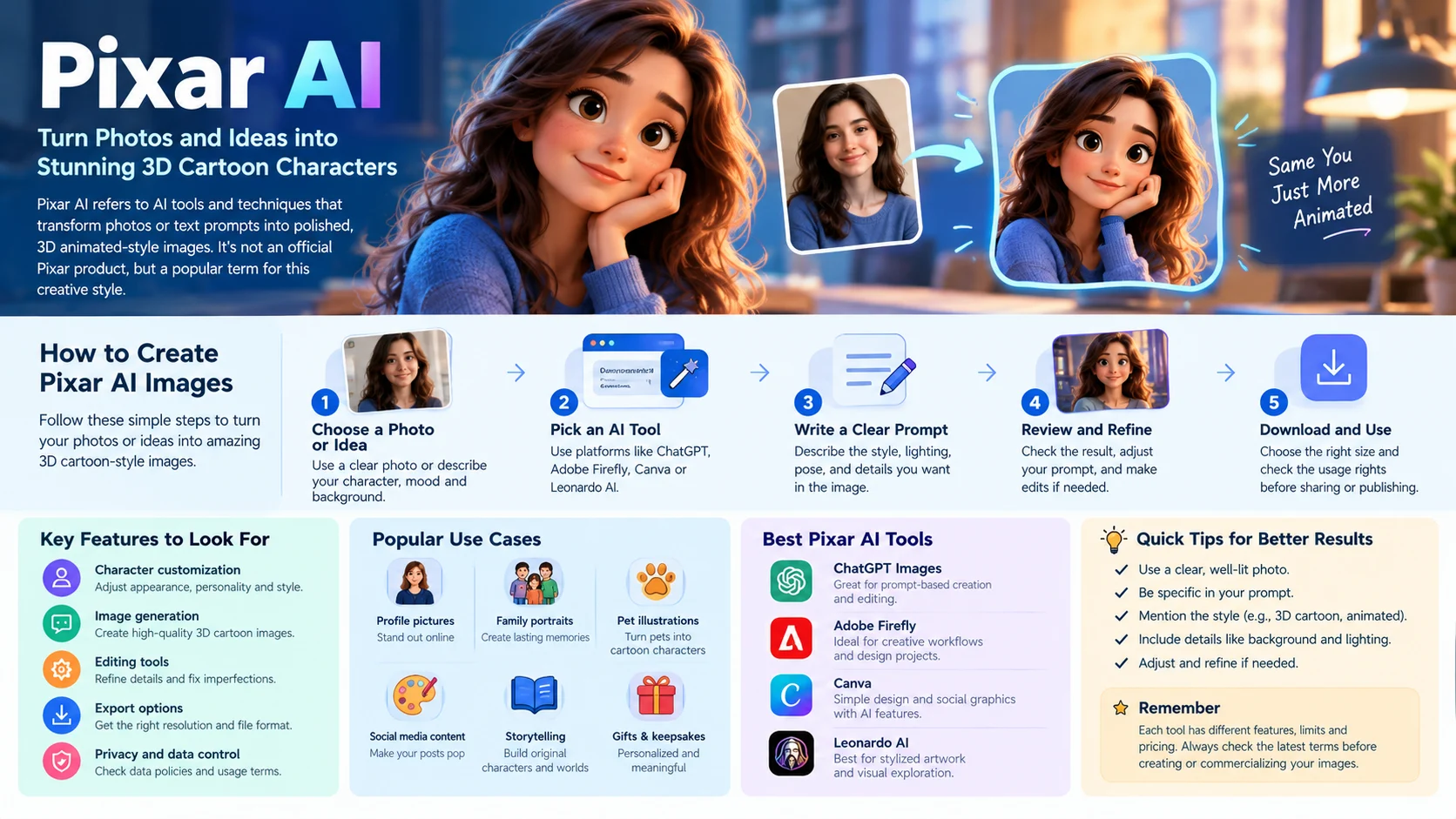
Pixar AI refers to AI tools that transform photos or text prompts into colorful, 3D animated cartoon-style images. Features, pricing, and results vary by platform, and the style is inspired by animated films rather than an official Pixar tool.
The Pixar AI trend makes it possible to reimagine yourself, your family, your pets, or an original character as a stylized animated figure. Instead of manually modeling a character, you can upload a photo or describe the image you want.
The appeal comes from recognizable visual traits: expressive eyes, rounded shapes, detailed textures, soft lighting, and cinematic backgrounds. These elements can give a simple portrait the feel of a frame from an animated movie.
However, Pixar AI is not the name of one official AI product. It is a popular search term for a visual style inspired by polished 3D animation. Understanding the available tools, their limitations, and the rights associated with your output will help you get better results.
Pixar AI at a Glance

What it does
Creates stylized 3D cartoon portraits and characters from photos or text descriptions.
Common uses
Profile pictures, family portraits, pet illustrations, social posts, and fictional characters.
How to create it
Upload a suitable photo or write a detailed prompt, then refine the generated result.
What affects quality
Facial resemblance, lighting, composition, prompt clarity, and the capabilities of the model.
What to check
Photo privacy, free-tier restrictions, download quality, and commercial-use terms.
What Is Pixar AI?
Pixar AI is a broad term for using artificial intelligence to create images with the visual qualities associated with high-end 3D animated films.
These images often feature expressive faces, smooth but detailed surfaces, appealing proportions, carefully designed environments, and cinematic lighting. A photo-to-cartoon tool may preserve the subject’s identity while changing the rendering style. A text-to-image generator can instead create an entirely new character.
The name refers to the style people want, not necessarily the technology or company behind the tool.
Why Is the Pixar-Inspired Look So Popular?
Traditional 3D character production can involve modeling, texturing, rigging, lighting, and rendering. AI image tools reduce the technical effort needed to create a similar type of visual result.
The style also works well for online content. A recognizable face transformed into an expressive cartoon is easy to understand at a glance and can make a distinctive profile image or social media post.
Common reasons people try Pixar-style AI include:
- Personal avatars: Turn a selfie into a polished cartoon portrait.
- Family portraits: Create a stylized group image from reference photos.
- Pet illustrations: Reimagine dogs, cats, and other animals as animated characters.
- Creative storytelling: Design original characters for fictional worlds.
- Marketing content: Produce visual concepts for presentations, campaigns, or mood boards.
- Digital gifts: Make personalized illustrations for birthdays and special occasions.
The result is not necessarily a Pixar production or an image endorsed by Pixar. It is an AI-generated interpretation of a related visual aesthetic.
How Does Pixar AI Work?
Most Pixar-style image tools use generative AI to interpret visual information and produce a new image. The exact process depends on whether you start with an existing photo or a written description.
1. Photo-to-Cartoon Transformation
A photo-based tool analyzes visual features such as facial structure, hair, clothing, and pose. It then generates a stylized version of the image.
Some tools preserve recognizable features better than others. A heavily stylized output may change your eye shape, face proportions, hairstyle, or skin tone.
For better results, start with a clear photo showing the face in good lighting. Avoid strong filters, heavy shadows, and images where the subject is partly hidden.
2. Text-to-Image Generation
Text-to-image models create visuals from written instructions. You describe the character, appearance, environment, lighting, and artistic style, and the model produces an image based on those details.
Many modern image-generation systems use diffusion-based methods or other learned image-generation architectures. These systems learn visual patterns during training and use them to generate new compositions.
For example, a prompt might describe a cheerful cartoon astronaut with large expressive eyes, a rounded spacesuit, and a colorful alien landscape. The generator interprets the description rather than following a fixed template.
3. Refinement and Editing
The first image may not match your expectations. You might need to adjust the expression, background, clothing, or facial resemblance.
Tools with image-editing capabilities may allow targeted changes while retaining much of the existing composition. Other services require you to generate another image and compare the results.
This is why prompt quality and editing controls matter as much as the initial generation.
How to Create Pixar AI Images Step by Step
You do not need advanced design skills to get started. Choose a suitable tool, prepare a reference photo if needed, and follow a structured process.

Step 1: Choose a photo or character idea
Use a clear, front-facing photo for a portrait transformation. For an original character, decide on age, appearance, clothing, personality, and setting.

Step 2: Select an AI image generator
Choose a tool that supports image uploads if you want to transform a photo. For text-only creation, check its prompt-based image-generation capabilities.

Step 3: Write a specific prompt
Describe the 3D animation aesthetic, facial expression, lighting, composition, clothing, and background. Ask for recognizable features if you are using your own photo.

Step 4: Review and refine
Check facial resemblance, proportions, hands, clothing, and background details. Adjust the prompt or use editing controls to correct visible errors.

Step 5: Export for your intended use
Check image dimensions, watermarking, download limits, and licensing. Use a square crop for avatars or a landscape composition for banners and thumbnails.
Best Pixar AI Prompts to Try
A good prompt describes the desired visual result without becoming unnecessarily complicated. Use the examples below as starting points, then adapt them to your subject.
1. Pixar-Inspired Selfie Prompt
For personal avatars
Transform the uploaded portrait into a polished, family-friendly 3D animated character. Preserve the person’s recognizable facial features, hairstyle, skin tone, and expression. Use expressive eyes, softly rounded features, detailed hair, realistic fabric textures, warm cinematic lighting, gentle shadows, and a clean, colorful background. High-quality 3D character rendering, natural proportions, centered composition, crisp details.
Copy prompt
2. Pixar-Inspired Family Portrait Prompt
For group photos
Create a warm, polished 3D animated family portrait based on the uploaded reference photo. Preserve each person’s recognizable facial features, hairstyle, skin tone, clothing colors, and relative position. Give everyone friendly expressions and softly stylized proportions. Use warm studio lighting, subtle depth of field, detailed clothing, a welcoming background, balanced composition, and consistent character rendering. Include every person in the reference.
Copy prompt
3. Pixar-Inspired Pet Prompt
For cats, dogs, and other pets
Turn the uploaded pet photograph into a charming, high-quality 3D animated character. Preserve the animal’s breed, fur color, distinctive markings, eye color, and recognizable features. Add expressive eyes, detailed soft fur, a natural pose, warm cinematic lighting, a colorful storybook environment, and carefully rendered textures. Keep the animal recognizable and the composition clean.
Copy prompt
4. Original 3D Cartoon Character Prompt
For original characters
Design an original, family-friendly 3D animated character: a curious young adult inventor wearing a teal jacket, practical boots, and round protective goggles. Give the character expressive eyes, appealing stylized proportions, detailed materials, and a confident pose. Place them in a colorful, imaginative workshop with small robots and warm cinematic lighting. Use a polished feature-animation aesthetic, clear silhouette, rich environmental detail, and a balanced composition. Do not copy an existing character.
Copy prompt
Prompting tip: If your image looks too realistic, emphasize stylized proportions, simplified shapes, expressive features, and polished 3D rendering. If it looks too generic, add distinctive details about the subject’s clothing, hairstyle, expression, or environment.
Best AI Tools for Pixar-Style Images
There is no single official Pixar AI filter that everyone must use. Several general-purpose creative tools can produce stylized 3D portraits, but their workflows and terms differ.
The following comparison focuses on established products rather than claiming that any one service produces the closest match.

ChatGPT Images
Best for prompt-based creation and iterative editing
Describe the character you want or provide a photo where image input is supported. You can refine the result through follow-up instructions. Availability and limits depend on your account and current product access.
Try ChatGPT

Adobe Firefly
Best for creative workflows and design-oriented editing
Firefly provides generative image tools within Adobe’s creative ecosystem. Check the current model options, generative-credit allowances, and applicable licensing terms before using an output commercially.
Explore Adobe Firefly

Canva
Best for social graphics and simple design projects
Canva combines design and AI features in one workflow. Its available image-generation capabilities depend on the current tools, account plan, and region. It can be useful when you want to place a generated character in a poster, presentation, or social post.
Explore Canva

Leonardo AI
Best for exploring stylized digital artwork
Leonardo offers AI image-generation workflows for visual creators. Check the current model selection, image-reference features, generation limits, and plan-specific rights before starting a project.
Explore Leonardo AI
Which Tool Should You Choose?
| Your goal | What to prioritize |
|---|---|
| Transform a selfie | Image uploads, identity preservation, and targeted editing |
| Create a cartoon from text | Prompt control and stylized image generation |
| Make a family portrait | Multiple-subject handling and facial consistency |
| Design a social media post | Templates, cropping, typography, and export quality |
| Create commercial artwork | Clear licensing terms and documented usage rights |
| Experiment without paying | A free tier or trial with sufficient generation access |
Free access does not always mean unrestricted use. Some services limit image resolution, add watermarks, restrict features, or charge credits for additional generations.
Pricing and product capabilities change frequently. Review the provider’s current plan page before making a purchasing decision.
Is Pixar AI Free?
Pixar AI can be free to try, depending on the tool you choose. Some image generators provide limited free access, while others require a subscription or credits for certain features.
Before choosing a service, check the following:
- Free-generation limits: Find out how many images you can create without paying.
- Credit consumption: Determine whether retries, edits, or higher-quality outputs use additional credits.
- Download restrictions: Check whether free users can download full-resolution images without watermarks.
- Subscription renewal: Confirm the billing period and cancellation policy.
- Commercial rights: Read the plan terms to see whether your intended use is permitted.
A tool with a generous free allowance may still be unsuitable if it cannot preserve your facial features. Test the output quality before paying for additional access.
Benefits and Limitations of Pixar AI
AI-generated cartoon portraits offer convenience, but the results depend on the input photo, the model, and the degree of control available.
Main Benefits
- Fast creation: Produce a stylized portrait without manually building a 3D model.
- Creative flexibility: Explore different expressions, outfits, backgrounds, and visual themes.
- Accessibility: Beginners can experiment using ordinary language rather than specialized 3D software.
- Multiple applications: Reuse suitable images in avatars, presentations, posters, and personal projects.
- Rapid iteration: Refine a concept through additional prompts or image edits.
Main Limitations
- Facial inconsistency: The generated face may look different from the original person.
- Anatomical errors: Hands, teeth, eyes, and body proportions can appear unnatural.
- Group-photo problems: The model may omit people or mix up individual facial features.
- Limited control: A prompt may not precisely reproduce a specific pose or composition.
- Changing costs: Free allowances, credits, and subscriptions differ across providers.
- Rights uncertainty: A generated image is not automatically cleared for every commercial or public use.
If accurate identity matters, compare the result with the original photo. If you need a professional asset, inspect the image closely and make any necessary corrections before publication.
Pixar AI, Copyright, and Responsible Use
The phrase “Pixar AI” can describe a visual aesthetic, but Pixar is a real animation studio owned by Disney. That distinction matters when generating, publishing, or selling artwork.
A general 3D cartoon aesthetic is not the same thing as reproducing a specific copyrighted character, scene, logo, or other protected expression. The legal position depends on the particular content, jurisdiction, and circumstances.
Disney’s published terms place restrictions on using its content for AI training and other unauthorized purposes. Disney has also publicly stated that it reserves rights concerning the use of its content in AI systems.
In December 2025, Disney and OpenAI announced a planned licensing partnership involving Disney, Pixar, Marvel, and Star Wars characters. However, OpenAI subsequently discontinued the Sora web and app experiences on April 26, 2026, and its Sora API on September 24, 2026. The original announcement should therefore not be treated as evidence that Sora is currently available for creating Pixar-character videos.
For everyday creative projects, these precautions are useful:
- Create original characters: Use your own designs rather than copying a named character’s distinctive appearance.
- Check commercial-use terms: A tool’s permission to generate an image does not necessarily grant every downstream right.
- Respect personal likenesses: Obtain permission before transforming and publishing another person’s photograph.
- Protect uploaded photos: Review the platform’s privacy and retention policies before uploading personal images.
- Keep claims accurate: Do not suggest that an AI-generated image was produced or endorsed by Pixar if it was not.
For legal questions about a commercial campaign, merchandise, or a potentially infringing character, consult a qualified intellectual-property professional in the relevant jurisdiction.
Frequently Asked Questions About Pixar AI
1. How do I turn a photo into a Pixar-style character?
Upload your photo to an AI image tool and request a 3D animated cartoon look while preserving your facial features, hairstyle, and expression.
2. Which AI tool is best for Pixar-style images?
ChatGPT Images, Adobe Firefly, Canva, and Leonardo AI offer image creation or editing features. Choose based on your needs, pricing, and licensing terms.
3. Can I use Pixar AI without uploading my photo?
Yes. Describe your character, appearance, clothing, and background in a text prompt to generate an original cartoon-style image.
4. Can I use Pixar AI images commercially?
It depends on the tool’s terms, image content, and applicable copyright laws. Review licensing requirements before commercial use.
5. Why does my Pixar AI image look different from my real face?
AI may exaggerate or reinterpret facial features. Use a clear reference photo and request specific details to improve resemblance.
Conclusion
Pixar-style AI tools let users create colorful 3D cartoon portraits and original characters from photos or text prompts. Choose a suitable tool, refine your prompts, and check privacy, pricing, and licensing before publishing or using images commercially..