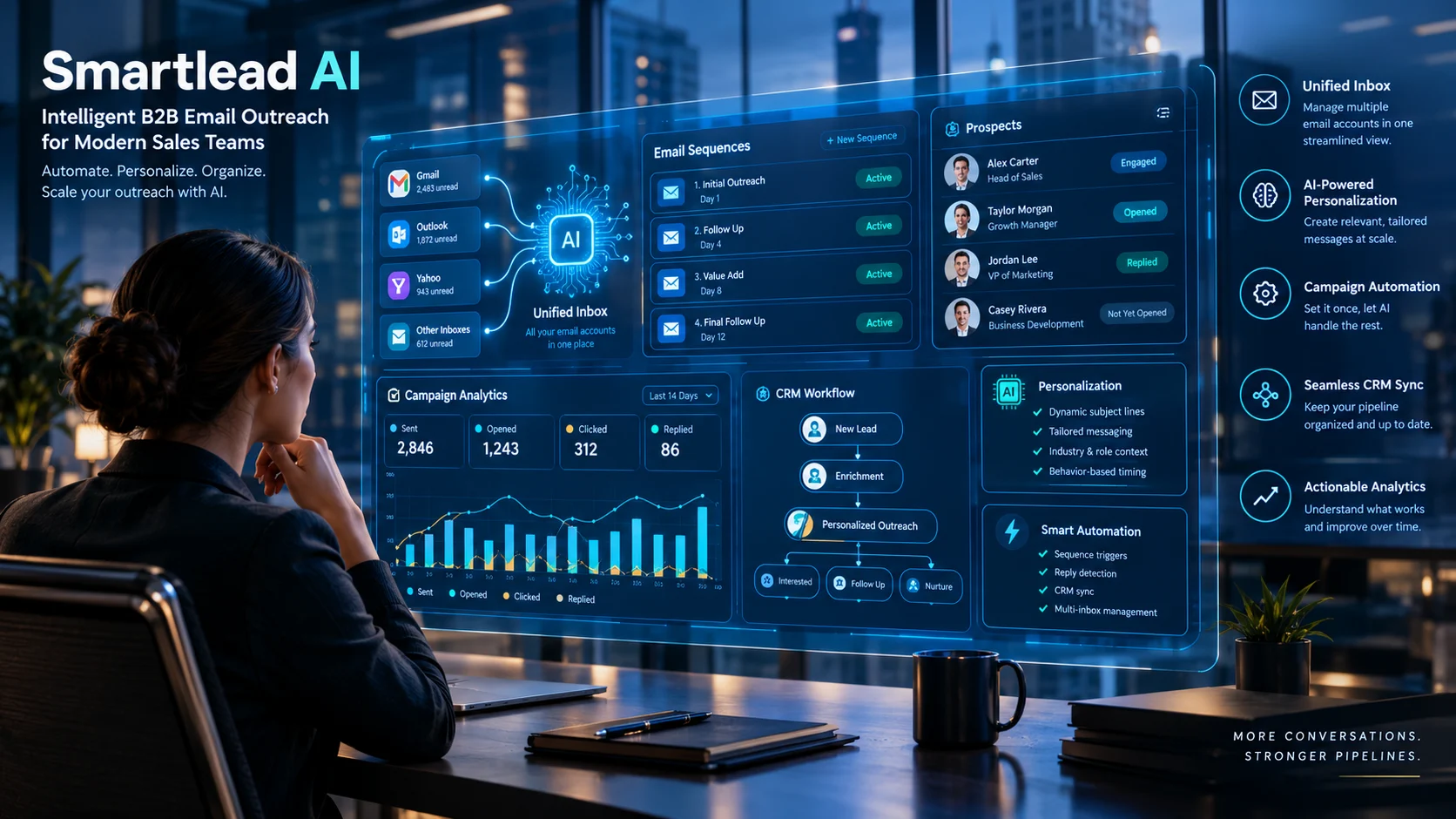
Smartlead AI is a sales outreach platform that helps businesses automate cold email campaigns, follow-ups, and lead generation. It offers email warm-up, deliverability tools, and multi-account management to support large-scale outreach.
Smartlead AI targets businesses that use cold email to reach potential customers. Rather than managing every mailbox and follow-up manually, sales teams can organize outreach campaigns through a centralized platform.
Its value depends on more than how many emails a business can send. Campaign quality, relevant targeting, sender reputation, and the ability to manage replies all influence whether outbound outreach produces meaningful opportunities.
This guide examines Smartlead AI’s main features, current published pricing, integrations, limitations, and alternatives. It also explains what to evaluate before using it for a real sales operation.
Smartlead AI at a Glance
Primary purpose
Cold email outreach, campaign automation, and outbound sales management.
Core capabilities
Email sequences, mailbox management, automated follow-ups, warm-up tools, and reply management.
AI-assisted workflows
Personalization, sales copy assistance, reply classification, and automation features, depending on the product and plan.
Integrations
Connections with sales CRMs and automation tools, including HubSpot, Salesforce, Pipedrive, Zapier, Make, and n8n.
Pricing model
Paid subscriptions with different sending limits, contact allowances, and optional add-ons.
Best-fit users
B2B sales teams, outbound agencies, SaaS businesses, and companies running multiple email campaigns.
Pricing and product details in this article were checked against Smartlead’s published materials available on October 22, 2026. Confirm the current terms before purchasing.
What Is Smartlead AI?
Smartlead AI is a sales outreach platform focused on cold email and outbound campaign management. It helps teams coordinate sending accounts, automate follow-up sequences, monitor campaign activity, and manage prospect conversations.
The platform is designed for businesses that need to contact prospects who have not necessarily interacted with them before. This makes it particularly relevant to B2B lead generation, agency outreach, and sales development.
Is Smartlead AI an AI Model?
No. Smartlead AI is a software platform, not a standalone large language model.
Its AI capabilities support particular sales tasks, such as generating or personalizing copy and assisting with outreach workflows. The broader product also relies on conventional software automation, email infrastructure, integrations, and campaign management.
This distinction matters when comparing Smartlead with general-purpose AI assistants. A chatbot can draft an email, but it does not automatically provide the complete infrastructure needed to run and monitor a large outbound campaign.
What Problem Does Smartlead Solve?
Managing cold email manually becomes difficult when a business uses several sending accounts and runs multiple campaigns simultaneously.
A sales team must organize prospect lists, write messages, schedule follow-ups, monitor replies, and identify interested leads. Poor coordination can result in missed responses, duplicated outreach, and unnecessary administrative work.
Smartlead brings many of these activities into a shared workflow. It can reduce repetitive tasks, although teams still need a sound targeting strategy, relevant messaging, and responsible sending practices.
Key Features of Smartlead AI
Smartlead’s main advantage is the combination of outbound campaign management and sending infrastructure. Its official website also describes newer AI-assisted sales workflows, a centralized inbox, prospecting capabilities, and an integrated CRM.
1. Cold Email Campaign Automation
Smartlead lets users create campaigns that send emails according to a planned sequence. A campaign can include an initial message and scheduled follow-ups, reducing the need to track every contact manually.
Teams can organize outreach around different audiences, offers, or customer profiles. This makes it easier to test messaging and review performance across campaigns.
Automation still requires careful configuration. Teams should stop or adjust sequences when a prospect replies, opts out, or no longer fits the campaign.
2. AI-Assisted Email Personalization
Personalization helps make an outreach email relevant to its recipient. Smartlead’s AI-oriented features support sales copy and personalization workflows, while integrations can help teams enrich prospect information and build more targeted campaigns.
For example, a SaaS company contacting an operations manager might explain how its software addresses a specific operational problem. That is more useful than inserting the recipient’s first name into an otherwise generic sales pitch.
AI-generated copy should always be reviewed before sending. Incorrect company details, invented compliments, and unsupported assumptions can damage credibility.
3. Email Warm-Up and Deliverability Tools
Email deliverability describes whether messages reach their intended destination, including the inbox rather than the spam folder. Smartlead offers warm-up infrastructure and additional deliverability tools intended to help users manage sending reputation.
Warm-up features may simulate email interactions and gradually increase sending activity. However, warm-up is not a guarantee of inbox placement, and artificial engagement should not replace genuine recipient interest.
Mailbox configuration also matters. Google requires email authentication and other safeguards, including SPF, DKIM, and DMARC requirements for qualifying bulk senders.
Before scaling a campaign, confirm that your domains are properly configured and that your messages comply with applicable provider requirements.
4. Master Inbox and Reply Management
Running multiple campaigns can create a fragmented workflow when replies arrive in different mailboxes.
Smartlead’s Master Inbox centralizes conversations so teams can review responses, organize leads, and manage follow-up actions in one place. The platform also describes AI-assisted reply management and intent categorization.
This can help sales representatives prioritize interested prospects instead of checking multiple accounts manually. Nevertheless, automated classifications can make mistakes. Review ambiguous replies before triggering a sales action.
5. CRM and Workflow Integrations
Smartlead supports integrations with tools such as HubSpot, Salesforce, Pipedrive, Clay, Zapier, Make, and n8n. It also offers API and webhook functionality for connecting systems and automating workflows.
These connections can help teams synchronize prospect information, pass campaign events to other applications, and reduce repetitive data entry.
Integration availability does not mean every workflow is native or included in every plan. Check the specific connector, permissions, subscription requirements, and setup process before building a business-critical automation.
6. Agency and Multi-Client Management
Lead-generation agencies often need separate campaigns, sending accounts, and reporting workflows for multiple customers.
Smartlead offers client workspace and white-label options, with availability and costs depending on the subscription. Its higher-tier plans include additional agency-oriented capabilities.
This can make account management more organized, but agencies should calculate the total cost of client workspaces, sending infrastructure, verification, and support before committing.
How to Use Smartlead AI
The platform is most useful when the outreach process has a clear goal. A practical setup focuses on targeting, configuration, message quality, and measurement before increasing sending volume.
- Define your ideal customer profile. Identify the industries, company sizes, job roles, and business problems that make a prospect relevant.
- Prepare and verify your prospect list. Remove duplicates, validate contact details, and document where the data came from.
- Configure your sending domains and mailboxes. Set up appropriate authentication, review sending limits, and follow the requirements of your email providers.
- Write a relevant email sequence. Keep messages concise, explain the reason for contacting each prospect, and provide a clear way to decline further communication.
- Test a small campaign first. Review delivery errors, replies, complaints, and positive responses before increasing volume.
- Measure qualified outcomes. Track positive replies, booked meetings, and opportunities rather than judging success by send volume alone.
Example: A B2B SaaS Outreach Campaign
Imagine a software company selling workflow automation to small and medium-sized businesses.
The sales team builds a list of relevant operations managers and prepares a sequence explaining how the product addresses common workflow bottlenecks. Smartlead schedules the messages, manages follow-ups, and consolidates replies.
When a prospect expresses interest, the team reviews the conversation and schedules a demonstration. If another prospect declines, the team records the outcome and stops further outreach.
This example illustrates the intended workflow, not a measured result or guarantee of conversions. Campaign performance depends on the offer, audience, timing, message quality, and market conditions.
Smartlead AI Pricing in 2026
Smartlead’s official pricing materials list four primary plans: Base, Pro, Unlimited Smart, and Unlimited Prime. The published prices below are the monthly billing rates shown in its current pricing documentation, rather than guaranteed prices for every account or region.
| Plan | Published starting price | Monthly sending allowance | Contact allowance |
|---|---|---|---|
| Base | $39/month | 6,000 emails | 2,000 contacts |
| Pro | $94/month | 90,000 emails | 30,000 contacts |
| Unlimited Smart | $174/month | 150,000 emails | Unlimited contacts |
| Unlimited Prime | $379/month | 500,000 emails | Unlimited contacts |
Source: Smartlead’s official pricing page and pricing guide, checked October 22, 2026. Promotional offers, billing options, taxes, and account-specific terms may affect the final amount.
The published plan structure includes different warm-up pools and account-level capabilities. The Unlimited plans also list verified prospect email allowances, while other features and infrastructure may require add-ons.
Is There a Free Trial?
Smartlead’s official FAQ advertises a 14-day free trial without requiring a credit card. Confirm the current offer and eligibility on the official website before signing up.
Costs Beyond the Subscription
The base subscription does not necessarily represent your total outreach budget. Depending on your workflow, additional expenses may include:
- Domains and mailbox provisioning.
- Prospect data and email verification.
- Optional client workspaces or white-label features.
- Dedicated sending infrastructure and deliverability testing.
- CRM subscriptions or third-party automation services.
- Staff time spent researching leads and reviewing AI-generated messages.
For example, an agency managing several clients may need to account for separate workspaces and infrastructure. A small business running one focused campaign may need fewer add-ons.
The practical approach is to calculate the total cost of running a campaign, then compare it with qualified meetings and opportunities generated.
Smartlead AI: Benefits and Limitations
Smartlead can simplify outbound operations, but its automation does not remove the need for good sales judgment.
Main Benefits
- Less manual work: Automates campaign scheduling and follow-ups.
- Centralized management: Brings multiple sending accounts and conversations into a shared workflow.
- Scalable outreach: Supports larger campaigns without requiring representatives to manage every email manually.
- Workflow integration: Connects outreach with CRM and automation systems.
- Agency support: Provides options for teams managing campaigns across multiple clients.
- Performance visibility: Helps teams monitor campaign activity and identify areas that need improvement.
Important Limitations
- Deliverability is not guaranteed. Even a well-configured campaign can encounter spam filtering, rejection, or throttling.
- AI personalization can be inaccurate. Incorrect prospect information can undermine trust.
- Costs can increase. Add-ons, data services, and additional infrastructure may expand the budget.
- Setup still requires expertise. Domain authentication, campaign configuration, and compliance need attention.
- Automation can amplify mistakes. Poor targeting or misleading copy becomes more damaging when distributed at scale.
- Integrations require verification. Not every connection supports every feature or plan.
One important consideration is that sending capacity is not the same as effective outreach capacity. A subscription allowing thousands of emails does not mean a business should send that many immediately.
Google’s guidance emphasizes authentication, controlled sending practices, and monitoring spam complaints. Its requirements also include unsubscribe mechanisms for applicable marketing messages.
Smartlead AI Alternatives
Smartlead is not the only platform designed for outbound sales. Alternatives differ in how they balance email infrastructure, prospect data, multichannel outreach, and sales engagement.

Instantly
A relevant comparison for teams seeking cold email automation, sending-account management, lead discovery, and AI-assisted sales workflows.
Consider it if you want to compare prospecting and sales automation alongside email sending.
Visit Instantly

Lemlist
Offers email outreach, prospect data features, deliverability tools, and multichannel options that include LinkedIn and calling on relevant plans.
Consider it if your sales strategy extends beyond email.
Visit Lemlist

Woodpecker
A B2B outreach platform worth evaluating when campaign sequencing, prospect follow-ups, and email deliverability are central requirements.
Compare its current sending limits, integrations, and subscription terms against your actual workflow.
Visit Woodpecker
Competitor Comparison
| Platform | Target user | Key strength | Pricing transparency | Core limitation to evaluate |
|---|---|---|---|---|
| Smartlead | Outbound agencies and B2B teams | Multi-mailbox campaign management and sending infrastructure | Public plans and limits | Some capabilities cost extra |
| Instantly | Sales teams and lead-generation businesses | Cold email combined with prospecting and AI-oriented workflows | Public plans, with separate feature and credit considerations | Verify which capabilities require additional subscriptions |
| Lemlist | Sales teams using multiple outreach channels | Email plus multichannel engagement | Public plan information | Costs and capabilities depend on plan and user requirements |
| Woodpecker | B2B outreach teams | Campaign sequencing and follow-up management | Check current published plans | Verify current limits and integrations |
These platforms overlap, but their pricing structures and included features are not directly interchangeable. Compare them using the same prospect volume, mailbox count, required channels, and expected workflow.
Privacy, Security, and Compliance
Smartlead processes business contact information and campaign data as part of its service. Before importing a prospect database, review its current privacy policy, data-processing terms, retention practices, and available access controls.
Pay particular attention to the following:
- Data handling: Understand how contact details, campaign content, and replies are stored and processed.
- Third-party integrations: Check what data connected CRMs and automation tools receive.
- Account permissions: Restrict access to people who need it, especially when managing multiple clients.
- Data retention: Confirm the available deletion controls and relevant retention terms.
- Compliance: Review the laws governing unsolicited commercial email in the jurisdictions where your business and recipients operate.
Do not assume that an email automation tool automatically makes a campaign legally compliant. Requirements vary by jurisdiction and message type.
For example, US commercial email is subject to the CAN-SPAM Act, while outreach involving recipients in other jurisdictions may trigger different requirements. Review the FTC’s CAN-SPAM compliance guide and obtain appropriate legal advice for your circumstances.
Who Should Use Smartlead AI?
Smartlead is worth evaluating if your business regularly runs outbound email campaigns and needs centralized management.
It may suit:
- B2B lead-generation agencies managing multiple clients.
- SaaS companies targeting specific business roles.
- Sales development teams coordinating several email campaigns.
- Founders building a repeatable outbound sales process.
- Businesses connecting email outreach with an existing CRM.
It may be less suitable for businesses that primarily need inbound email marketing, occasional personal emails, or a complete sales system without additional configuration.
Companies with strict data-governance requirements should also assess the available contractual controls before importing customer or prospect data.
Frequently Asked Questions
1. What is Smartlead AI used for?
Smartlead AI automates cold email campaigns, follow-ups, sending-account management, and prospect reply tracking to support lead generation.
2. How much does Smartlead AI cost?
Published monthly plans start at $39, with higher tiers offering additional features. Check the official pricing page for current prices.
3. Does Smartlead AI guarantee that emails reach the inbox?
No. Deliverability depends on sender reputation, email authentication, message quality, recipient engagement, and provider policies.
4. Is Smartlead AI suitable for small businesses?
Yes. It can help small businesses automate B2B outreach, provided the subscription cost matches their campaign needs and budget.
5. What are the main alternatives to Smartlead AI?
Alternatives include Instantly, Lemlist, and Woodpecker. Compare their features, integrations, outreach channels, and pricing.
Conclusion
Smartlead AI helps businesses automate cold email outreach, manage multiple sending accounts, and organize follow-ups. It is useful for B2B sales teams seeking scalable outreach, but results depend on targeting, email quality, and deliverability practices..