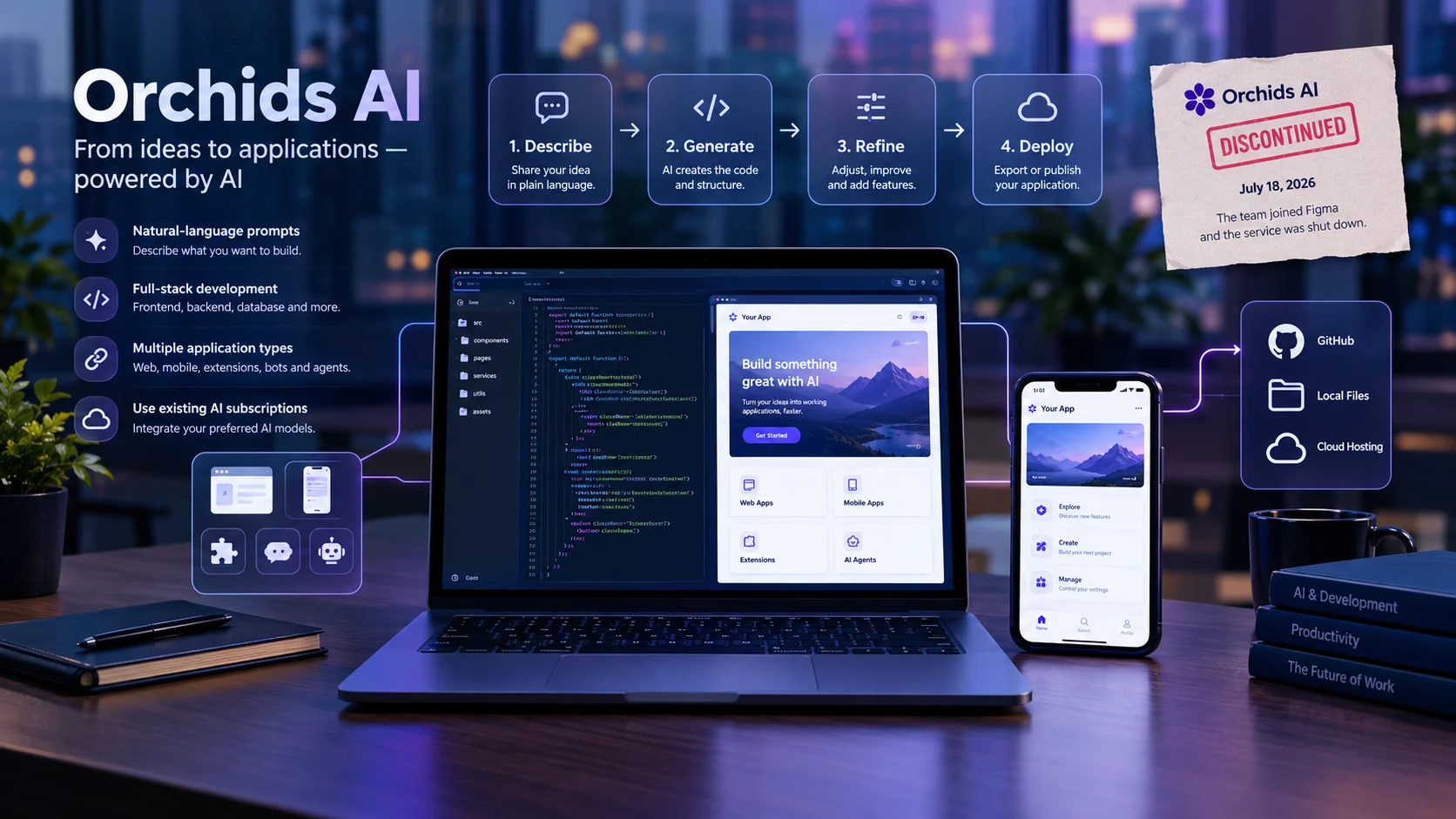
The most important fact about Orchids AI is that it was an AI-powered app-building platform, not a general-purpose chatbot. It let users create software through natural-language prompts, work across different programming stacks, and use existing AI subscriptions; however, reports indicate that Orchids shut down in July 2026 after its team joined Figma.
At a glance
What it was
An AI app builder that generated software from natural-language instructions.
What made it different
It supported multiple application types and offered ways to use existing AI subscriptions or API keys. orchids.
Current status
Discontinued on July 18, 2026, following the team’s move to Figma. orchids.app+1
Original audience
Developers, startup founders, designers, and people experimenting with AI-generated applications.
Pricing today
No current subscription is available because the service has shut down. Historical plan prices could not be reliably verified.
Important consideration
Generated code still requires security testing, maintenance, and appropriate hosting.
What is Orchids AI?
Orchids AI was an AI-powered software development platform designed to turn written instructions into working applications. Instead of manually creating every component, users could describe their requirements and let an AI coding agent generate and modify the code.
The platform emerged during the growth of vibe coding, an approach to software development in which people use conversational AI to build applications without writing every line themselves.
Orchids aimed to go beyond simple website generation. Its February 2026 release, Orchids 1.0, described support for web applications, mobile apps, Chrome extensions, Slack bots, AI agents, and other software projects. orchids.app+1
However, the product is no longer operational. On July 7, 2026, the team announced that it was joining Figma and that Orchids and its successor, Bud, would stop operating on July 18, 2026. The announcement instructed users to move their projects elsewhere. orchids.app+1
This distinction matters for anyone searching for an Orchids AI download, login page, pricing plan, or working alternative. Historical product descriptions can explain its capabilities, but they should not be mistaken for a currently available service.
How did Orchids AI work?
The original platform followed a conversational development workflow. Users described what they wanted to build, reviewed the generated application, and provided additional instructions to refine the result.
1. Describe the application
Explain the goal, design, features, and intended users.
2. Generate and modify code
The AI translates instructions into code and proposed implementation changes.
3. Refine the application
Give feedback, correct problems, and adjust functionality.
4. Export or deploy
Historically, users could save projects locally or through GitHub and deploy them elsewhere.
Historical workflow. The Orchids service itself is discontinued.
Natural-language instructions
The primary advantage was the ability to describe a feature in ordinary language. For example, a founder could request a customer dashboard with account registration, product listings, and an administrative interface.
The AI could then generate the initial implementation. Users could request changes through further prompts instead of editing every file manually.
Nevertheless, natural-language instructions do not eliminate the need for technical judgment. Vague requirements can produce inconsistent behavior, and generated code can contain bugs or incomplete implementations.
Full-stack application development
Orchids marketed itself as an AI full-stack engineer rather than a tool limited to front-end layouts.
A full-stack application can include:
- Frontend: The screens, forms, buttons, and interfaces users interact with.
- Backend: The application logic that processes requests and enforces rules.
- Database: The system that stores users, transactions, and other information.
- Authentication: The process of verifying user identities and controlling access.
- Integrations: Connections to external services and APIs.
Orchids 1.0 also emphasized support for different languages, frameworks, and project types. These were product capabilities described by the company, not a guarantee that every application could be completed without additional development. orchids.app+1
Existing AI subscriptions and API keys
One notable feature was the ability to bring existing AI subscriptions or API keys into the development workflow.
According to the February 2026 announcement, supported options included subscriptions associated with ChatGPT, Claude Code, Gemini, and GitHub Copilot, as well as API keys. The announcement said subscription-based access was available on desktop and paid plans at that time. orchids.app+1
This approach offered an alternative to paying exclusively through a builder’s own AI credit system.
However, the economics depended on the subscription’s terms, model access, usage limits, and whether the chosen integration supported the intended workflow. Using an existing subscription did not necessarily mean unlimited usage or zero overall cost.
Key features of Orchids AI
The following features describe the historical platform, not a service that readers can sign up for today.
| Feature | What it offered | Practical value |
|---|---|---|
| Prompt-based development | Generate and modify code from written instructions | Faster prototyping |
| Multiple application types | Web, mobile, extensions, bots, and agents | Broader project scope |
| Full-stack coding | Work on frontend and backend components | Fewer manual setup steps |
| Existing AI subscriptions | Use supported subscriptions or API keys | More flexibility over model access |
| Integrated code editor | Edit code within the platform | Easier manual adjustments |
| Project portability | Save projects locally or to GitHub | A route to independent deployment |
The integrated editor and broader project scope were part of the Orchids 1.0 announcement. Project migration options were also explicitly documented in the team’s shutdown announcement.
What these features did not guarantee
A generated interface is not the same as a production-ready application. Businesses still need to test authorization, data handling, payment flows, error recovery, and performance.
Similarly, support for a programming language does not guarantee compatibility with every library, deployment environment, or third-party API.
These distinctions are especially important for financial applications, healthcare software, and products that handle confidential customer information.
Who was Orchids AI designed for?
Orchids AI appealed to people who wanted to turn ideas into software without starting with a blank code editor.
Its intended audience included several groups.
Startup founders
Founders could use the platform to explore an idea, create a minimum viable product (MVP), and test a business concept before investing heavily in development.
For example, a founder could describe a booking platform with customer accounts, appointment scheduling, and an administrative dashboard. The generated application could provide a starting point for testing the idea.
Designers and product managers
Designers could explore interactive experiences rather than relying entirely on static mockups. Product managers could use generated prototypes to explain requirements and gather feedback.
This approach can shorten the distance between a concept and a demonstrable prototype, although the quality of the result depends on the instructions and implementation.
Developers and technical teams
Developers could use AI-generated code to accelerate routine implementation, experiment with different approaches, and make changes through conversational instructions.
However, experienced developers would still need to review architecture, dependencies, security, and maintainability before deploying applications for real users.
Beginners learning to build software
People with limited programming experience could explore application development through natural-language prompts. This lowered the initial learning barrier, but it did not remove the need to understand basic software concepts when troubleshooting more complicated projects.
Is Orchids AI still available?
No. Orchids AI is discontinued as of October 29, 2026.
The original team announced its move to Figma on July 7, 2026. The announcement confirmed that Orchids and Bud would remain active only until July 18, 2026. Hosted projects would no longer remain deployed after that date. orchids.app+1
The announcement recommended downloading project files or saving them to GitHub before the shutdown. Users were then expected to deploy their applications through another hosting provider. orchids.app
This has several practical implications:
- New users: Cannot start a new project on the discontinued service.
- Former subscribers: Should not expect the previous subscription or hosted environment to remain operational.
- Existing projects: Need an independent copy of the source code and any required data.
- Hosted applications: Need a replacement deployment environment.
- People searching for Orchids AI alternatives: Should evaluate currently operating tools instead of relying on archived tutorials.
The acquisition also does not automatically mean that Orchids has been relaunched inside Figma. The team’s announcement did not promise that the original product would continue under a new name.
Orchids AI pricing: What did it cost?
Orchids AI no longer offers an active pricing plan because the service has shut down.
Its February 2026 announcement introduced the option to use supported existing AI subscriptions or API keys. The company presented this as a way to build applications without relying exclusively on a separate builder-specific AI credit system. orchids.app+1
However, the available historical evidence does not establish a complete, reliable price list for every plan at shutdown. It would therefore be misleading to quote an unverified monthly subscription price as fact.
When evaluating a replacement, consider the entire cost rather than just the advertised starting price.
| Cost factor | Why it matters |
|---|---|
| Subscription | The recurring fee for access to the platform |
| AI credits | The amount of generation or agent usage included |
| Model access | Whether AI usage requires a separate subscription or API billing |
| Hosting | Whether the application can be published within the plan |
| Database | Whether storage and backend services incur extra charges |
| Integrations | Whether external services require their own paid accounts |
| Maintenance | The time or money needed to test, update, and secure the application |
A free entry-level plan can still become expensive when an application requires extensive AI revisions, external services, or paid hosting.
Orchids AI alternatives to consider in 2026
Since Orchids AI has closed, the most useful comparison is between currently available platforms that support similar workflows.
The following alternatives are selected according to their documented product capabilities, not a claim that one platform is universally superior.
Criador de aplicativos com IA grátis – Da ideia ao app | Figma
1. Figma Make
Design-led alternative
Figma Make generates interactive prototypes and web apps from natural-language prompts or existing Figma designs. It supports conversational refinement, code inspection, and publishing. Help Center+1
Best suited for: Designers, product managers, and teams working within Figma.
Limitation: Access and usage depend on the applicable Figma plan and seat permissions.
Explore Figma Make
Bolt.new | Devpost
2. Bolt.new
Bolt lets users generate applications from prompts, edit code in a browser-based environment, and deploy projects. Its official product information describes support for web apps, backend functionality, and application hosting. bolt.new+1
Best suited for: Founders and developers who want to build and publish web applications.
Limitation: Complex projects still require careful testing, and actual usage depends on the platform’s current limits and plan terms.
Explore Bolt.new
How to Build a Full-Stack App with Lovable (No Code Required) | Bytewaves
3. Lovable
Lovable focuses on building applications through conversation, including interfaces, application logic, authentication, and database functionality. It also documents code download and Git synchronization options. Lovable+1
Best suited for: Entrepreneurs and small teams building SaaS products, dashboards, and customer portals.
Limitation: Credit allowances, private-project access, and other capabilities depend on the plan.
Explore Lovable
Comparing the alternatives
| Platform | Target user | Key strength | Pricing transparency | Main consideration |
|---|---|---|---|---|
| Figma Make | Designers and product teams | Design-to-prototype workflow | Consult current plan details | Plan and seat restrictions |
| Bolt.new | Developers and founders | Browser-based development and deployment | Check current pricing and usage limits | Usage and project complexity |
| Lovable | Founders and small teams | Conversational full-stack app creation | Free entry and credit-based limits are documented; verify current plans | Credit consumption and backend requirements |
Product capabilities are based on the respective platforms’ documentation. Pricing details can change, so check the linked websites before purchasing. Help Center+3
Which alternative should you choose?
Choose Figma Make if your workflow starts with visual design and interactive prototyping. Consider Bolt.new if you want a browser-based environment for building and deploying applications.
Lovable is worth investigating if you need a conversational workflow for a full-stack application with data and authentication.
Before choosing any of them, test a small project using the same requirements. Compare the generated code, ease of correction, deployment process, and total cost. A polished first screen alone is not a reliable measure of software quality.
Privacy, security, and technical limitations
An important lesson from the Orchids AI story is that AI-generated software needs independent evaluation, even when a platform handles much of the development process.
Generated code can contain vulnerabilities
In July 2026, TechCrunch reported that a security researcher had identified vulnerabilities in applications created using Orchids, citing reporting by the BBC. This is a reason to assess application security carefully, rather than proof that every application built with Orchids was vulnerable. TechCrunch
For any replacement, check the following before launching an application:
- Authentication: Confirm that users cannot access other people’s accounts or records.
- Authorization: Test whether each user role can access only permitted resources.
- API keys: Keep secrets out of public source code and browser-visible files.
- Database security: Restrict access and validate requests on the server.
- Dependencies: Review packages for known vulnerabilities and update them appropriately.
- Payments: Test transaction handling, access controls, and failure scenarios.
- Backups: Maintain recoverable copies of source code and important data.
For applications involving sensitive information, arrange an appropriate security review before production deployment.
Understand data handling
An AI app builder may process prompts, source code, uploaded files, and information sent to connected AI providers. The exact data flow depends on the platform, integrations, and configuration.
Before sharing proprietary code or customer information, review the provider’s privacy policy and contractual terms. Look for data retention, model-training practices, subprocessors, deletion procedures, and access controls.
Do not assume that a platform’s use of a recognized security framework automatically guarantees zero data retention. These are separate questions, and claims require specific evidence.
Plan for portability and vendor lock-in
Orchids’ shutdown illustrates why code portability matters.
Even a useful development platform can become unavailable following an acquisition, business change, or product closure. A project that exists only in a provider’s hosted environment may be difficult to recover.
Prefer tools that offer practical ways to:
- Export the complete source code.
- Store code in a repository you control.
- Back up databases and uploaded files separately.
- Recreate environment variables and deployment settings.
- Deploy independently of the original builder.
GitHub integration alone does not guarantee complete portability. Confirm that your backups include the assets, configuration, data, and dependencies needed to run the application elsewhere.
Common mistakes when using AI app builders
Assuming a prototype is production-ready
A prototype can demonstrate an idea without implementing every required security or reliability control. Test the full user journey, including error conditions, before launching publicly.
Giving vague prompts
Instructions such as “build a complete business app” leave too many decisions open. Specify user roles, required pages, data fields, validation rules, and expected behavior.
Ignoring recurring costs
AI generation, databases, hosting, and third-party APIs may have separate billing arrangements. Estimate ongoing costs before committing to a particular architecture.
Failing to back up the project
Do not treat an online preview as your only copy. Keep source code and data in locations you control, and periodically verify that you can restore them.
Trusting benchmark rankings without examining the methodology
AI app builder benchmarks may use different prompts, scoring criteria, model configurations, and evaluation methods. A vendor-reported score should not be interpreted as proof of superior performance across every project.
Instead, test each candidate with representative tasks and evaluate the resulting code, functionality, accessibility, and maintainability.
Frequently asked questions about Orchids AI
1. What is Orchids AI used for?
Orchids AI was used to create and modify software through natural-language prompts. Its platform supported multiple application types, including web apps, mobile projects, browser extensions, Slack bots, and AI agents.
2. Is Orchids AI still working in 2026?
No. Orchids AI and its successor, Bud, were discontinued on July 18, 2026, after the team announced that it was joining Figma. The original hosted services are no longer available. orchids.app+1
3. Was Orchids AI free to use?
Orchids offered options for using existing AI subscriptions or API keys, according to its February 2026 announcement. However, the historical pricing details are incomplete, and the service is now discontinued. orchids.app+1
4. What is the best alternative to Orchids AI?
There is no universally best replacement. Figma Make suits design-led prototyping, Bolt.new supports prompt-based development and deployment, and Lovable focuses on conversational full-stack application creation. Choose according to your technical requirements, budget, and preferred workflow. Help Center+2
5. Can I recover an application created with Orchids AI?
Recovery depends on whether you saved the source code or exported the project before the shutdown. The team recommended downloading projects locally or saving them to GitHub. If you have a backup, you can assess the code, restore required data, and deploy it through a suitable hosting provider. orchids.app
Conclusion
Orchids AI was an ambitious AI app builder that made software creation more accessible through natural-language instructions, broad application support, and flexible AI model access. However, the service shut down in July 2026, so its historical features should not be confused with current availability.
For anyone seeking a replacement, Figma Make, Bolt.new, and Lovable offer different approaches to AI-assisted development. Compare them using real project requirements, transparent cost estimates, code portability, security testing, and independent hosting options. Above all, maintain control of your source code and data so a future platform change does not put your work at risk.