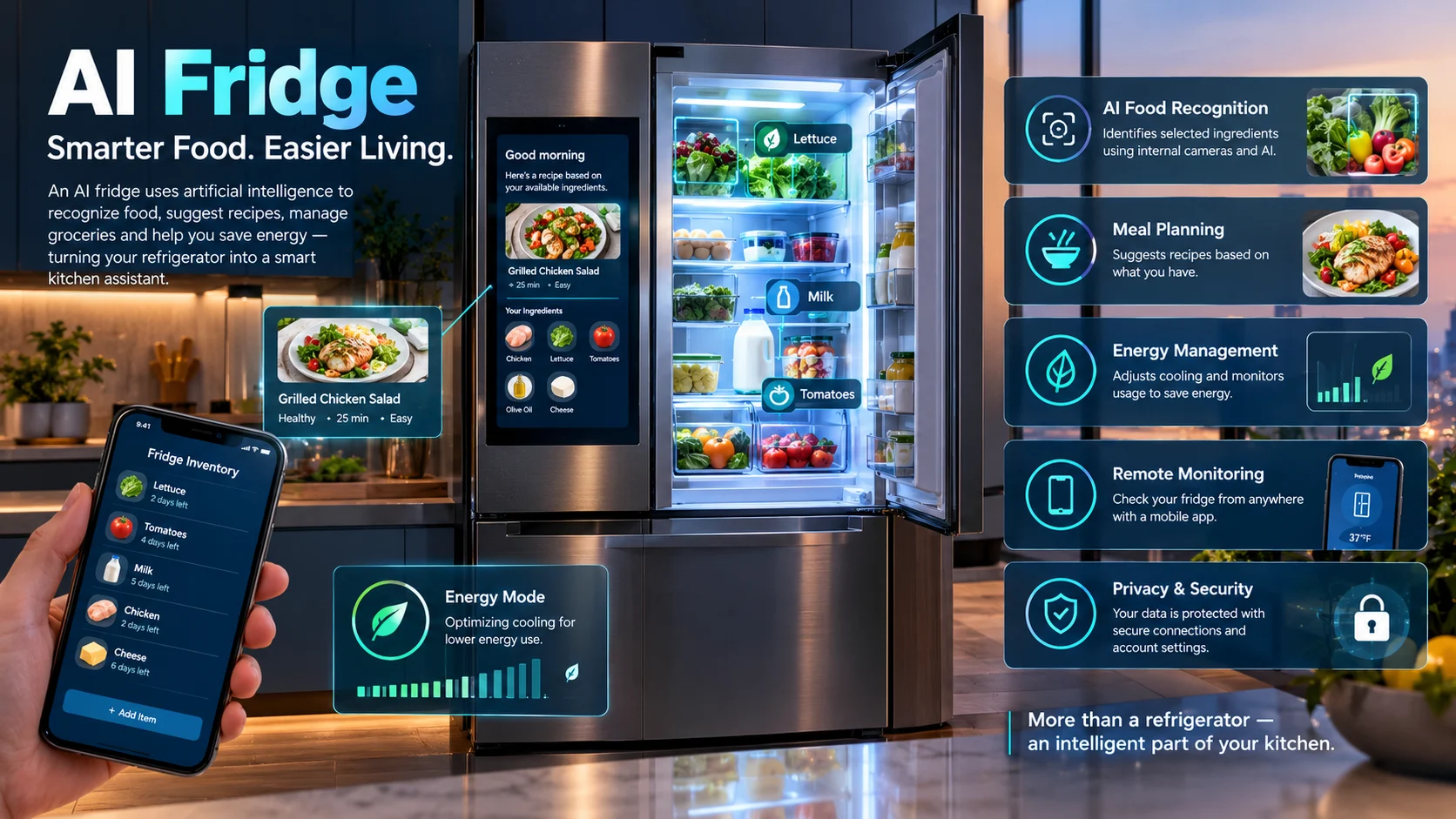
An AI fridge is a smart refrigerator that uses artificial intelligence to support tasks such as recognizing food, suggesting recipes, managing groceries, and optimizing certain cooling functions. Depending on the model, it may also connect to a mobile app, provide energy insights, and offer a touchscreen for meal planning and smart-home controls.
An AI fridge turns an everyday kitchen appliance into a more connected food-management system. Instead of only keeping ingredients cold, some models can help you track groceries, plan meals, monitor settings, and identify opportunities to manage energy use.
However, not every smart refrigerator includes the same AI capabilities. Some models focus on cooling performance and connected controls, while others add internal cameras, food recognition, voice assistants, and interactive displays.
The real question is whether these features solve problems you experience in your kitchen. Understanding the technology, limitations, running costs, and available models will help you make a better purchasing decision.
AI Fridge at a Glance
- Food recognition: Selected models can identify certain ingredients using internal cameras and AI software.
- Meal planning: Compatible systems can suggest recipes based on available ingredients and preferences.
- Smart connectivity: Mobile apps can provide temperature controls, notifications, and remote monitoring.
- Energy management: Some refrigerators analyze usage patterns or adjust cooling behavior through dedicated energy-saving modes.
- Variable pricing: Costs depend on capacity, design, cooling technology, displays, and connected features.
- Important limitation: AI-generated inventory lists and recipe suggestions can be incomplete or incorrect.
What Is an AI Fridge?
An AI fridge is a refrigerator that uses artificial intelligence to interpret information, recognize selected items, or adapt certain functions to user behavior. It combines traditional refrigeration hardware with software, sensors, connected services, and sometimes cameras or a built-in display.
The term covers a range of products. A refrigerator with app-based temperature monitoring is a smart fridge, but it does not necessarily have advanced AI. A model that recognizes food or uses AI to recommend recipes offers a more specific set of capabilities.
AI Fridge vs. Smart Fridge
These terms overlap, but they are not identical.
| Feature | Standard refrigerator | Smart refrigerator | AI-enabled refrigerator |
|---|---|---|---|
| Food cooling and freezing | Yes | Yes | Yes |
| Remote temperature monitoring | No, typically | Often | Model-dependent |
| Door-open notifications | No, typically | Often | Model-dependent |
| Internal camera and food recognition | Rare | Available on some models | Available on selected models |
| AI-based recipe recommendations | No | Available on some models | Available on selected models |
| Adaptive energy or cooling functions | Depends on hardware | Available on some models | Available on selected models |
| Touchscreen and voice interaction | No, typically | Available on some models | Available on selected models |
The distinction matters when shopping. A manufacturer’s use of the word “AI” does not mean every feature is intelligent, automated, or included in every model.
How Does an AI Fridge Work?
An AI fridge brings together several technologies. The exact combination depends on the refrigerator’s design and the features enabled by its manufacturer.
1. Cameras and Food Recognition
Some refrigerators use internal cameras to capture images of food. An AI vision system analyzes those images and attempts to identify supported ingredients.
Samsung’s AI Vision Inside is one example. Its capabilities vary by model and software version, and its published documentation makes clear that recognition does not cover every possible food item.
The system may then display a food list or use recognized ingredients to support meal planning. Items that are obscured, packaged in unfamiliar ways, or outside the supported categories may need to be entered manually.
2. Machine Learning and Usage Patterns
Machine learning allows software to identify patterns in data and use them to make predictions or adjustments.
In a refrigerator, those patterns might relate to door openings, temperature fluctuations, or household usage routines. Some models use this information to adjust cooling behavior or anticipate periods of heavier use.
However, the capabilities depend on the particular model. AI does not automatically mean that a refrigerator can learn every household habit or optimize every aspect of food storage.
3. Connected Apps and Cloud Services
Many smart refrigerators connect to a manufacturer’s mobile app. Users may be able to check temperatures, receive maintenance alerts, change supported settings, or review a food list while away from home.
Some AI features also rely on cloud services. That can enable additional capabilities, but it may require an internet connection, an account, compatible software, and a supported region.
For example, Samsung announced a 2026 software update for selected Family Hub refrigerators that expands AI food recognition and conversational Bixby controls. The company said availability would depend on the model and rollout schedule.
4. Smart Cooling and Energy Management
AI-related energy features can use operating data or usage patterns to adjust certain cooling functions. The purpose is to balance temperature control with electricity consumption.
Samsung’s AI Energy Mode is one example of a manufacturer-specific energy-management feature. Its actual savings depend on the refrigerator, selected settings, household behavior, and operating conditions.
It is important to distinguish an energy-saving mode from food recognition. A refrigerator may offer one without offering the other.
Key Features of an AI Refrigerator
The following features are useful in different ways, but availability varies across models.
AI Food Inventory
Food inventory tools attempt to show which ingredients are inside the refrigerator. This can help users remember groceries they already own and reduce unnecessary purchases.
The feature is most useful when the system recognizes the foods you regularly buy. If you frequently store leftovers in opaque containers or use ingredients the camera cannot identify, manual updates may still be necessary.
Recipe Recommendations and Meal Planning
Some connected refrigerators can recommend meals based on available ingredients or user preferences. Compatible food-management apps may also support shopping lists and weekly meal planning.
These recommendations can save time when deciding what to cook. However, a recipe suggestion is not a guarantee that every ingredient is available or that the suggested quantities match what you have.
Always check the recipe before cooking, especially when allergies, dietary restrictions, or food safety are involved.
Expiration and Freshness Tracking
Some systems allow users to record use-by dates and receive reminders. Others combine inventory information with suggested recipes to encourage users to use ingredients before they spoil.
Do not assume that every AI fridge automatically determines the true expiry date of every item. Dates may need to be entered manually, and visual recognition cannot reliably establish whether food is safe to eat.
Use the label on the package, proper storage guidance, and established food-safety practices rather than relying solely on an app notification.
Voice Assistants and Touchscreens
Selected models include a touchscreen or a voice assistant for managing settings, checking lists, viewing recipes, or accessing compatible smart-home functions.
These features may be convenient in a busy kitchen. Their value depends on whether you will use them regularly and whether the available apps support your preferred services.
A large display can also increase the purchase price without improving basic refrigeration performance. Consider whether you need a screen before paying extra for one.
Remote Monitoring and Alerts
App-connected refrigerators may notify users about temperature changes, an open door, or certain maintenance needs.
Such alerts can be useful if you are away from home or want to monitor a refrigerator in another location. They still depend on compatible hardware, connectivity, notification settings, and the manufacturer’s supported services.
An alert is not a substitute for checking food safety after a prolonged power outage.
Benefits of an AI Fridge
The strongest reasons to consider an AI refrigerator involve convenience and food management rather than artificial intelligence alone.
Less Time Spent Managing Groceries
A food list can help you check what is already available before shopping. This is particularly useful for households that buy many ingredients or struggle to keep track of food stored in different compartments.
The system works best when its inventory is maintained accurately. You may still need to add items that the camera misses or remove ingredients that have been used.
More Convenient Meal Planning
Recipe recommendations can help turn available ingredients into meal ideas. Instead of starting from an empty shopping list, you can begin with the food you already have.
This may reduce planning effort, although it does not eliminate the need to check ingredient quantities, preparation time, and nutritional requirements.
Potential Energy Savings
Some AI refrigerators include controls designed to reduce unnecessary energy consumption. Yet the presence of AI alone does not prove that a refrigerator is more efficient than a conventional model.
Energy performance depends on capacity, insulation, compressor design, door configuration, room temperature, and how frequently the doors open. ENERGY STAR recommends comparing certified efficiency and choosing a refrigerator that fits your actual needs.
Easier Smart-Home Management
A connected refrigerator may integrate with other compatible appliances or smart-home services. Depending on the ecosystem, users may manage settings, receive notifications, or access selected functions through one app.
The benefit depends on compatibility. Before buying, verify that the refrigerator supports the devices and services you already use.
Limitations and Hidden Costs
AI refrigerators can be useful, but buyers should understand the compromises before spending more on advanced features.
Food Recognition Is Not Perfect
A camera cannot always identify food accurately. Packaging, poor visibility, unusual ingredients, and changes in the arrangement of items can affect recognition.
For that reason, treat an automatically generated inventory as an assistant, not a definitive record. Check it against the actual contents of the refrigerator.
Premium Features Can Increase the Purchase Price
Models with large displays, multiple cameras, advanced cooling systems, or specialized door mechanisms may cost more than basic refrigerators.
The added cost makes sense only if the features provide enough practical value for your household. Compare equivalent capacities and cooling configurations before attributing a price difference to AI.
Internet and Account Dependencies
Some functions may stop working or become limited if the internet connection fails, an app changes, or the manufacturer retires a service.
Basic refrigeration should remain the priority. Before buying, confirm which essential functions work offline and which connected features require a manufacturer account.
Software Support and Long-Term Ownership
A refrigerator is a long-term purchase, so software support matters. Ask how long the manufacturer plans to provide updates and whether key features depend on third-party services.
Also check warranty coverage for the appliance, display, cameras, and other electronic components. Do not assume that software support and hardware warranty periods are identical.
Privacy and Security
Connected appliances may process account information, device data, voice commands, or images, depending on their features.
Review the manufacturer’s privacy policy and determine what data is collected, where processing occurs, and whether cloud services are required. Use a strong account password and install available security updates.
A camera inside the refrigerator does not automatically mean the device monitors your entire home, but the actual data practices should be verified rather than assumed.
AI Fridge Pricing: What Should You Budget For?
There is no universal price for an AI fridge. Prices vary by country, brand, capacity, finish, cooling system, and the number of connected features.
For a concrete example, Samsung’s US product listing for a 29-cubic-foot Bespoke AI four-door refrigerator has displayed different prices depending on the listing and promotion. Its product page has shown both a promotional price and a higher comparison price, illustrating why shoppers should verify current offers before purchasing.
Those US prices should not be treated as estimates for Pakistan or another market. Import duties, shipping, retailer margins, warranty availability, and local distribution can change the final cost substantially.
Costs to Check Before Buying
- Purchase price: Compare refrigerators with similar capacity and cooling configurations.
- Electricity: Estimate annual consumption using the model’s energy label and your local electricity tariff.
- Connectivity: Check whether specific functions require subscriptions or paid services.
- Maintenance: Confirm filter replacement requirements, repair costs, and warranty coverage.
- Internet requirements: Determine whether key features need continuous connectivity.
- Installation: Include delivery, kitchen modifications, and any required electrical work.
Avoid relying on a manufacturer’s maximum advertised energy savings as your expected result. Actual consumption depends on how the refrigerator is used and the conditions in which it operates.
Best AI Fridge Brands and Alternatives to Compare
Several manufacturers offer connected refrigerators, but feature availability differs by model and market. These examples provide a starting point for research, not a universal ranking.
| Brand or platform | Relevant technology | Potential strength | Important limitation |
|---|---|---|---|
| Samsung | Bespoke AI, Family Hub, AI Vision Inside, SmartThings | Food recognition, connected controls, meal-planning tools, and selected display-based features | AI features vary by model, region, and software version |
| LG | ThinQ, ThinQ Food, selected InstaView refrigerators | Connected appliance controls and, on selected models, camera-assisted food management | Capabilities differ across refrigerator ranges and markets |
| Haier | Connected and smart refrigerator ranges, depending on market | A brand worth comparing for capacity, cooling features, and local availability | Verify whether the specific model offers genuine AI functionality |
| Conventional energy-efficient refrigerator | Efficient compressor, insulation, temperature control | Straightforward cooling without paying for every connected feature | May lack inventory tracking, recipe suggestions, or remote app controls |
Samsung’s official documentation describes AI Vision Inside and Family Hub functions on selected refrigerators. LG’s official materials describe ThinQ-connected kitchen features and food-management capabilities on particular products. Neither brand offers identical features across every refrigerator it sells.
For current product information, visit the manufacturers’ official sites:
- Samsung refrigerators
- LG refrigerators
- ENERGY STAR refrigerator guidance
Which Option Makes the Most Sense?
Choose a camera-equipped model if you frequently forget what you have stored. Consider a refrigerator with app-based monitoring if remote alerts matter more than recipe suggestions.
If your priority is low running cost, compare energy consumption, capacity, and cooling performance first. A conventional efficient refrigerator may offer better value than a premium AI model whose extra features you rarely use.
How to Choose the Right AI Fridge
The most effective buying strategy is to start with your household’s needs and evaluate AI features afterward.
1. Choose the Right Capacity
Estimate how much fresh and frozen food your household stores. A larger refrigerator may offer more flexibility, but it can also use more electricity and require more kitchen space.
Measure the available width, height, depth, door clearance, and delivery route before ordering.
2. Check Local Availability and Service
Brand websites may advertise models that are unavailable in your country. Confirm local stock, authorized servicing, spare parts, and warranty coverage before paying.
For buyers in Pakistan, check the local energy label and the refrigerator’s stated annual electricity consumption. Imported models may have different specifications or service arrangements from locally distributed versions.
3. Compare Energy Consumption
Do not assume that an AI model automatically uses less electricity. Compare the rated consumption of models with similar capacities and configurations.
In Pakistan, your estimated annual electricity cost can be calculated as:
\[ \text{Annual cost}=\text{Annual kWh}\times\text{Cost per kWh} \]
For example, a refrigerator rated at 300 kWh per year would cost PKR 12,000 annually at an illustrative tariff of PKR 40 per kWh. Your actual tariff and consumption may differ.
4. Test the Features You Will Actually Use
Before purchasing, try the food-management app or inspect a demonstration model if possible. Determine whether inventory tracking, notifications, and recipe suggestions fit your normal routine.
A practical feature you use every day is more valuable than an impressive feature you rarely open.
Frequently Asked Questions
1. What is an AI fridge, and how is it different from a smart fridge?
An AI fridge uses artificial intelligence for tasks such as recognizing selected foods, suggesting recipes, or adapting certain functions. A smart fridge generally focuses on connectivity and app-based controls, although some smart refrigerators also include AI.
2. Can an AI fridge automatically recognize all the food inside it?
No. Food recognition depends on the model, supported food categories, camera visibility, and software capabilities. Some items may be missed or identified incorrectly, so users may need to update the inventory manually.
3. Does an AI fridge save electricity?
Some models include AI-based energy-management features, but savings are not guaranteed. Capacity, cooling design, usage habits, room temperature, and the refrigerator’s energy rating all affect electricity consumption.
4. Is an AI fridge worth buying?
An AI fridge may be worthwhile if you regularly use food tracking, meal planning, remote monitoring, or connected controls. If you mainly need reliable cooling and low running costs, a conventional energy-efficient refrigerator may provide better value.
5. Does an AI fridge need an internet connection?
Basic refrigeration does not normally require internet access, but certain connected features may depend on Wi-Fi, a manufacturer account, or cloud services. Check the specific model’s documentation to understand which functions work offline.
Conclusion
An AI fridge combines conventional refrigeration with software that can support food recognition, meal planning, connected controls, and selected energy-management functions. Its usefulness depends on the actual capabilities of the model, not simply its AI branding.
For households that value grocery organization and smart-home convenience, these features may justify a higher purchase price. For other buyers, capacity, cooling performance, electricity consumption, and reliable local servicing matter more.
Before buying, compare the energy label, warranty, software support, privacy terms, and local availability. The right refrigerator is the one that meets your everyday needs without adding unnecessary cost or complexity.